

Airwallex runs discovery and checkout
On your own storefront, Airwallex hosts the catalog, runs search, cart, and checkout inside the chat, and takes the payment.
To let a conversation on your site sell, with Airwallex running search, cart, checkout, and payment, complete the steps in this document.
Choose this path when a conversation already happens on your site, run by your own agent or by the chatbot provider you already use. Your chat app gains a set of commerce tools. Airwallex runs search, cart, and checkout behind them, and takes the payment.
What Airwallex renders is an iframe inside your chat window. Product cards, the cart, and the card form live in it. Your chat app never handles card data and never builds checkout screens. The look of the conversation stays yours.
Before you begin
- Agentic commerce enabled on your account. See Enable Airwallex Agentic Commerce Suite.
- A chat app on your site, or the Assistant SDK in its place.
- A URL where Airwallex can call your create checkout API, and a Webhook endpoint that can receive PaymentIntent events. See Payment webhooks.
Who does what
| Stage | You | Your chat app | Airwallex |
|---|---|---|---|
| Discovery | Keep your catalog current. | Calls the Airwallex catalog tools with a Bearer token you issued. | Searches your catalog and renders product cards in the chat window. |
| Checkout | Return availability, fulfillment options, and totals from your create checkout API. | Nothing. The iframe carries it. | Calls your API and renders the cart. |
| Payment | Nothing. | Nothing. The card form is Airwallex's. | Collects the card, creates the PaymentIntent, and confirms it. |
| Fulfillment | Fulfill on the Webhook. | Nothing. | Sends the Webhook with the shopper's choices. |
How the purchase runs
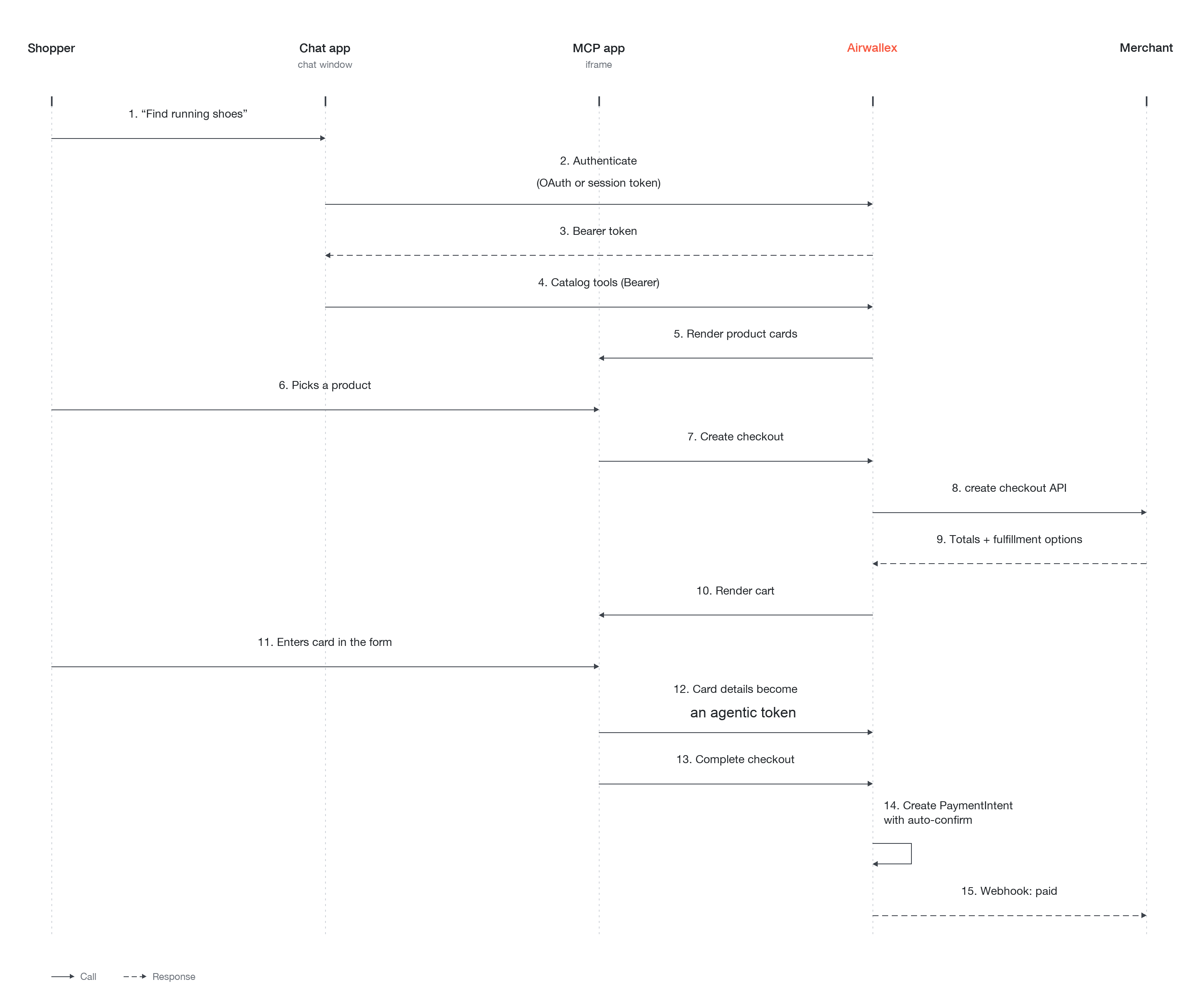
The steps below follow the sequence diagram. The MCP app in that diagram is the MCP WebUI: the iframe inside your chat window. Your chat app mounts it, and Airwallex renders what is inside it. The MCP server is the backend that powers the WebUI. Your chat app calls the MCP server with the Bearer token.
- The shopper asks your chat app for something you sell.
- Your chat app authenticates the shopper. On your own domain it calls your session token endpoint. If the assistant is hosted off your domain, it uses the OAuth server you expose.
- Your chat app receives a Bearer token and holds it for the conversation.
- Your chat app calls the Airwallex catalog tools with that token.
- Airwallex renders product cards in the iframe.
- The shopper picks a product in the iframe.
- The iframe asks Airwallex to create a checkout.
- Airwallex calls your create checkout API.
- You return availability, fulfillment options, and totals.
- Airwallex renders the cart in the iframe.
- The shopper enters a card in the form inside the iframe.
- Airwallex turns the card into a single-use agentic token. The card number never reaches your chat app or your systems.
- The iframe calls complete checkout, with that token.
- Airwallex creates the PaymentIntent and confirms it with the token.
- Airwallex sends you the PaymentIntent Webhook. It carries the payment result and the shopper's fulfillment choice. You fulfill the order. See Sample payload.
Supply your catalog
Send Airwallex a product feed and keep it current. Enable Airwallex Agentic Commerce Suite covers the formats, the required fields, and how ingestion works.
Nothing else on this path works until the catalog is loaded. The commerce tools your chat app calls read from it. Until there is a catalog, there is nothing to search, nothing to put in a basket, and nothing to price.
You are done when your Account Manager confirms the feed is ingested and your products are searchable.
Build your create checkout API
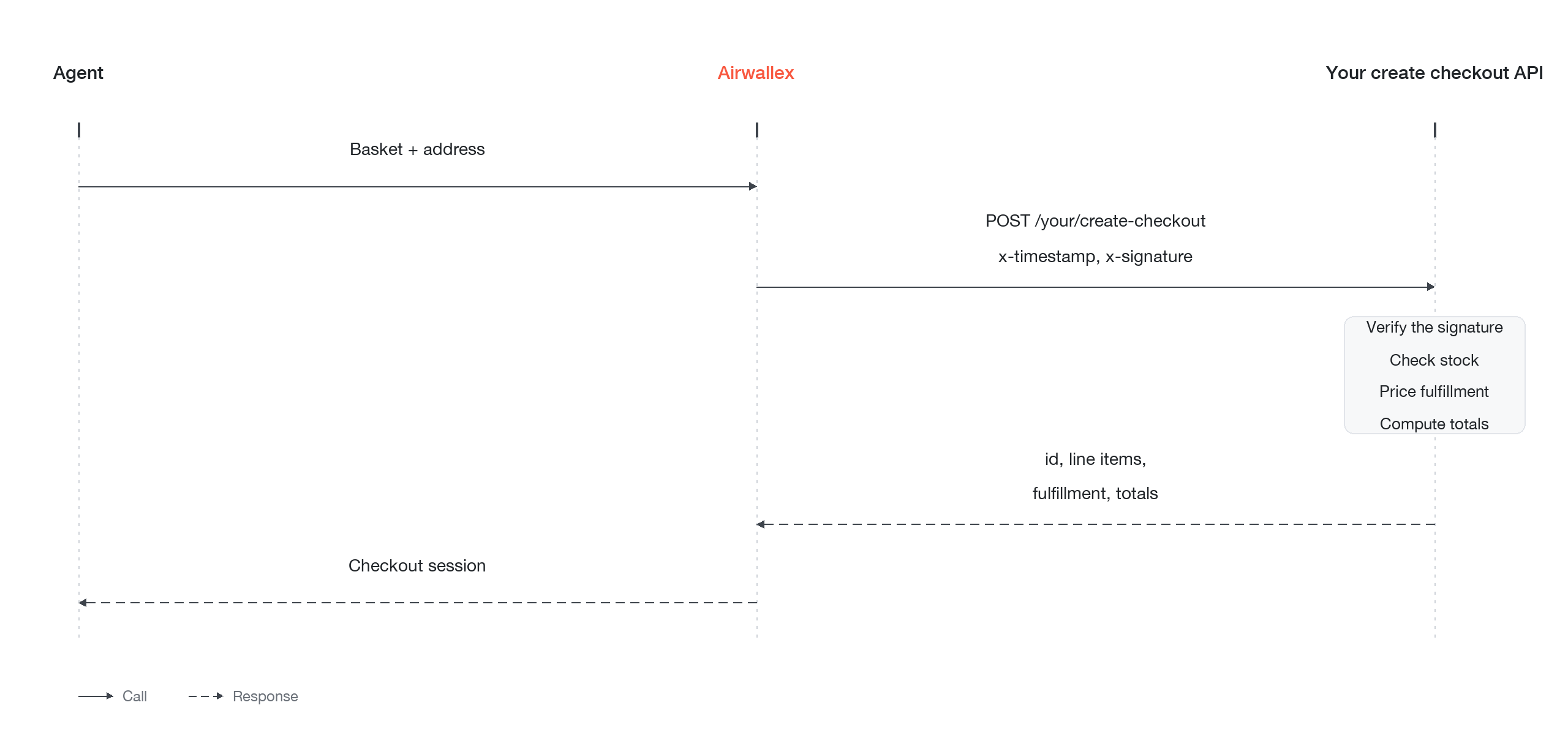
This is the one endpoint you build for this path: POST /create_checkout. It is where your commerce logic runs. You host it on your own systems and give Airwallex the URL. Airwallex records it in your merchant configuration as your create checkout endpoint. Whenever a shopper is ready to buy, Airwallex sends the basket to this endpoint and waits for your answer before showing the shopper anything.
Your answer settles three things, and each of them is final:
- You decide what is actually available. Airwallex sells only the quantities you confirm.
- You decide how the order can reach the shopper, by listing the fulfillment methods you offer and the priced options under each one.
- You decide what the order costs. The totals you return are the totals the shopper is charged.
Create checkout is not an order. The response only indicates that the shopper started checkout. Fulfill when the PaymentIntent Webhook arrives. See Sample payload.
Verify the signature
Check the signature before you act on the request. A mismatch means the request did not come from Airwallex. The signature does not identify the shopper.
1POST /your/create-checkout HTTP/1.12Content-Type: application/json3x-timestamp: 17316000000004x-signature: {{SIGNATURE}}
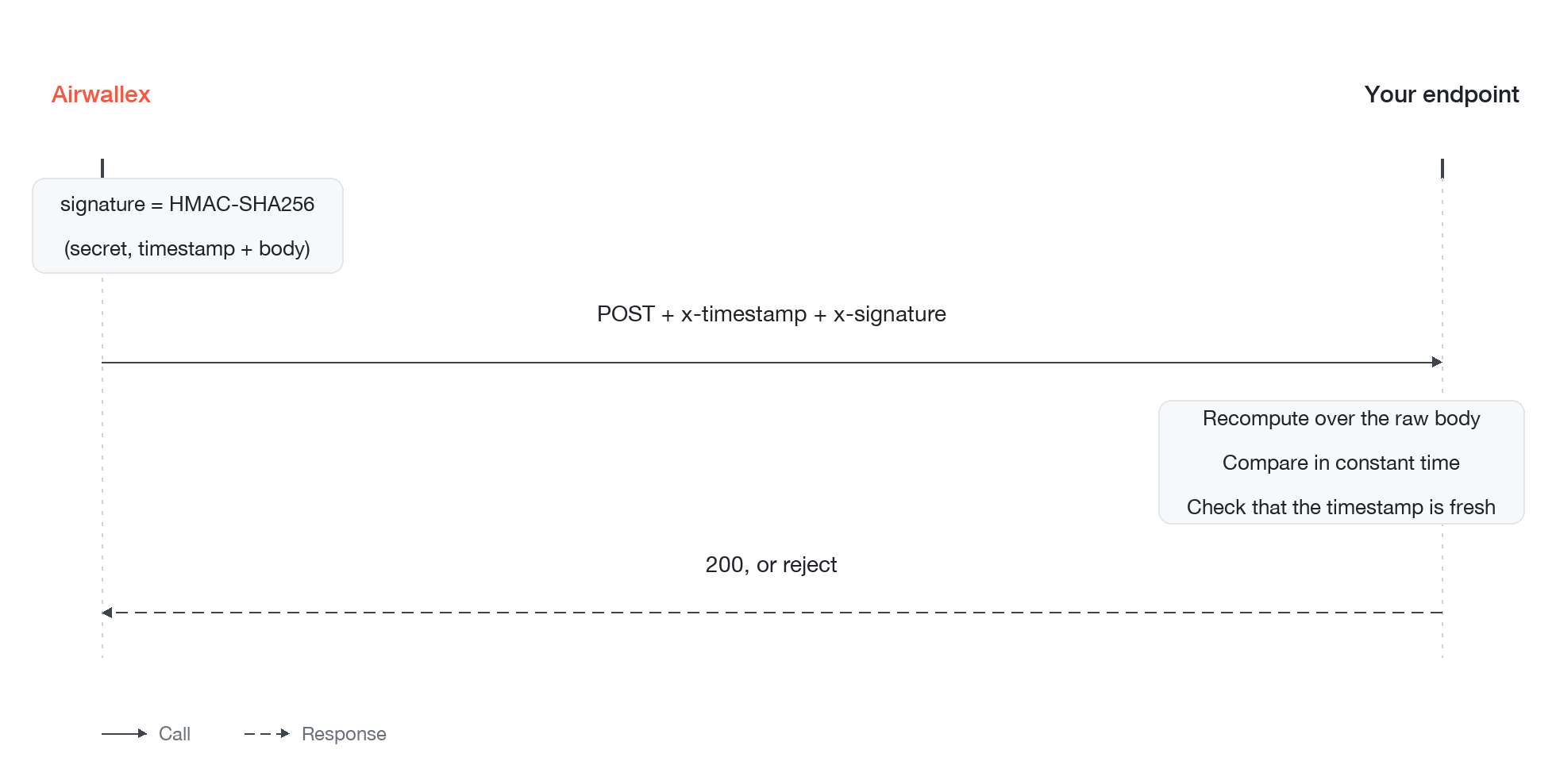
x-timestamp is epoch milliseconds, as a decimal string. x-signature is the hex HMAC-SHA256 of timestamp + the raw JSON body, keyed with the signing secret your Account Manager gives you after onboarding. Authorization: Bearer is present only on the Airwallex-hosted chat path.
1import { createHmac, timingSafeEqual } from 'node:crypto';23function signaturesMatch(secretKey, timestamp, rawBody, signature) {4 const expected = createHmac('sha256', secretKey).update(timestamp + rawBody).digest('hex');5 const a = Buffer.from(expected);6 const b = Buffer.from(signature);7 return a.length === b.length && timingSafeEqual(a, b);8}
Reject a timestamp more than five minutes from your clock. Airwallex rotates keys with an overlap, so you are never without a valid secret. Ask your Account Manager to arrange a rotation.
Example request
1{2 "line_items": [3 { "id": "line_item_001", "item_id": "dress_tropical_s", "requested_quantity": 1 },4 { "id": "line_item_002", "item_id": "dress_floral_s", "requested_quantity": 1 }5 ],6 "currency": "USD",7 "customer": {8 "id": "cus_hkpdxxxxxxxx",9 "email": "[email protected]",10 "first_name": "Jane",11 "last_name": "Merchant",12 "phone_number": "+1 415 555 0100"13 },14 "shipping_address": {15 "street": "123 Market Street",16 "city": "San Francisco",17 "state": "CA",18 "postcode": "94103",19 "country_code": "US"20 }21}
A call with no customer and no shipping_address is still a valid basket. Return pickup options, which do not depend on an address. On ACP you can also return DIGITAL. Price shipping on the later call that carries an address. Do not return DIGITAL or LOCAL_DELIVERY when the agent speaks UCP.
Example response
Return the same checkout id on retries for the same basket. Do not create an order or decrement stock here.
1{2 "id": "mch_co_01EXAMPLE",3 "line_items": [4 { "id": "line_item_001", "item_id": "dress_tropical_s", "requested_quantity": 1, "available_quantity": 1 },5 { "id": "line_item_002", "item_id": "dress_floral_s", "requested_quantity": 1, "available_quantity": 1 }6 ],7 "fulfillment": {8 "methods": [9 {10 "id": "ship",11 "type": "SHIPPING",12 "line_item_ids": ["line_item_001", "line_item_002"],13 "destinations": [14 {15 "id": "dest_home",16 "address": {17 "street": "123 Market Street",18 "city": "San Francisco",19 "state": "CA",20 "postcode": "94103",21 "country_code": "US"22 }23 }24 ],25 "options": [26 { "id": "std", "title": "Standard shipping (4-5 days)", "carrier": "USPS", "cost": 500 },27 { "id": "exp", "title": "Express shipping (1-2 days)", "carrier": "FedEx", "cost": 1500 }28 ]29 },30 {31 "id": "pickup",32 "type": "PICKUP",33 "line_item_ids": ["line_item_001", "line_item_002"],34 "destinations": [35 { "id": "loc_downtown", "name": "Downtown Store" },36 { "id": "loc_uptown", "name": "Uptown Store" }37 ],38 "options": [39 { "id": "pu_instore", "title": "In-store pickup", "cost": 0 },40 { "id": "pu_curbside", "title": "Curbside pickup", "cost": 0 }41 ]42 }43 ]44 },45 "totals": [46 { "type": "subtotal", "amount": 11798, "display_text": "Subtotal" },47 { "type": "tax", "amount": 950, "display_text": "Tax" },48 { "type": "total", "amount": 12748, "display_text": "Total" }49 ],50 "permalink_url": "https://merchant.example/checkout/mch_co_01EXAMPLE"51}
Signaling availability
Echo each line item with available_quantity next to requested_quantity. An equal quantity is available. A lower quantity is partially available. 0, or a line you omit, is unavailable. Drop that line from the method's line_item_ids as well.
Fulfillment and totals
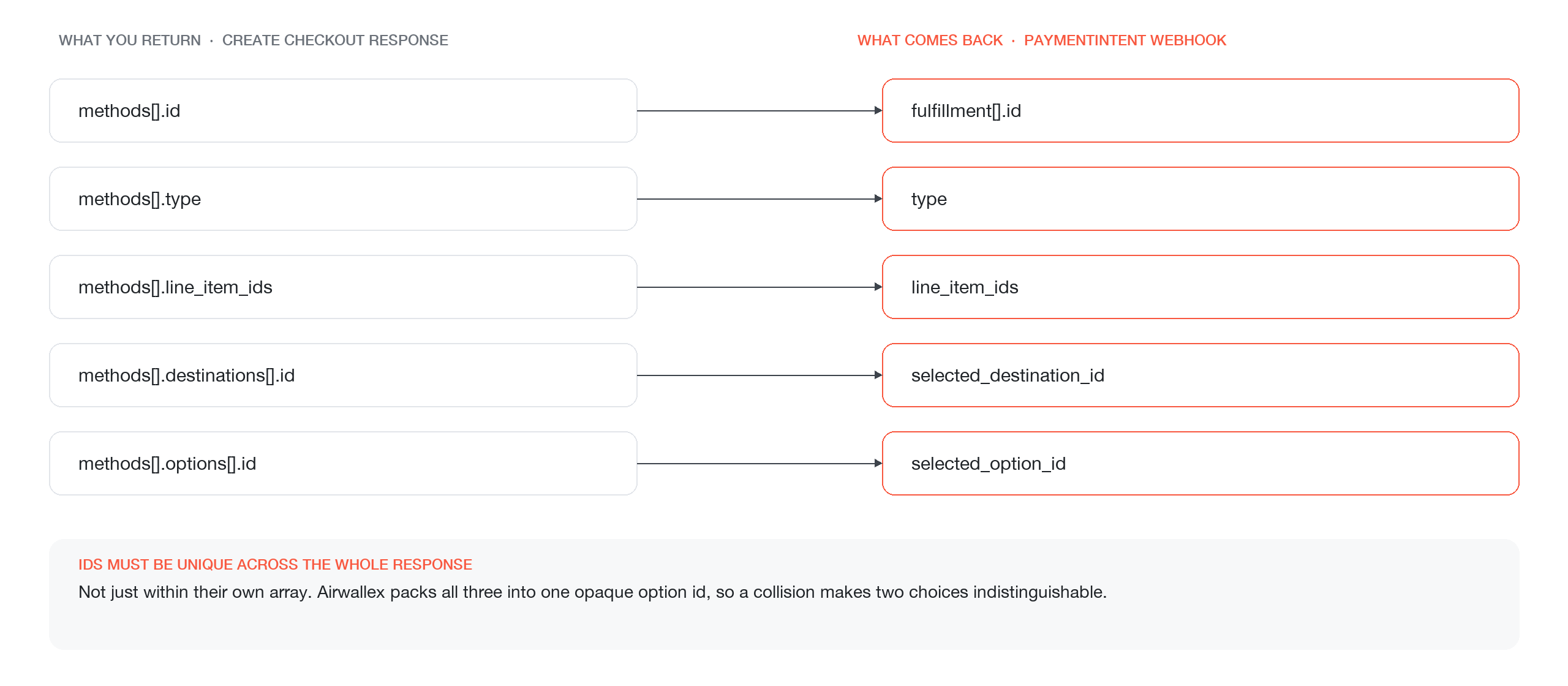
Return at most one method of each type. Shipping and pickup together is fine. Two shipping methods is not. Every method must list every line item you returned. Ids for methods, destinations, and options must be unique across the whole response, stable across retries, and meaningful in a log.
cost and each totals[].amount are integers in minor units. 500 is 5.00 in a two-decimal currency. Never send a fulfillment total. Airwallex adds that row from the option the shopper selects. Your total excludes fulfillment.
| Code | What triggered it |
|---|---|
multiple_fulfillment_methods_per_type | More than one method with the same type. |
fulfillment_does_not_cover_cart | A method's line_item_ids did not cover every line item you returned. |
duplicate_fulfillment_id | Two method, destination, or option ids collided. |
unsupported_fulfillment_method_type | A type outside SHIPPING, PICKUP, DIGITAL, and LOCAL_DELIVERY. |
Request and response fields are in the Merchant-hosted endpoints reference.
Handle the PaymentIntent Webhook
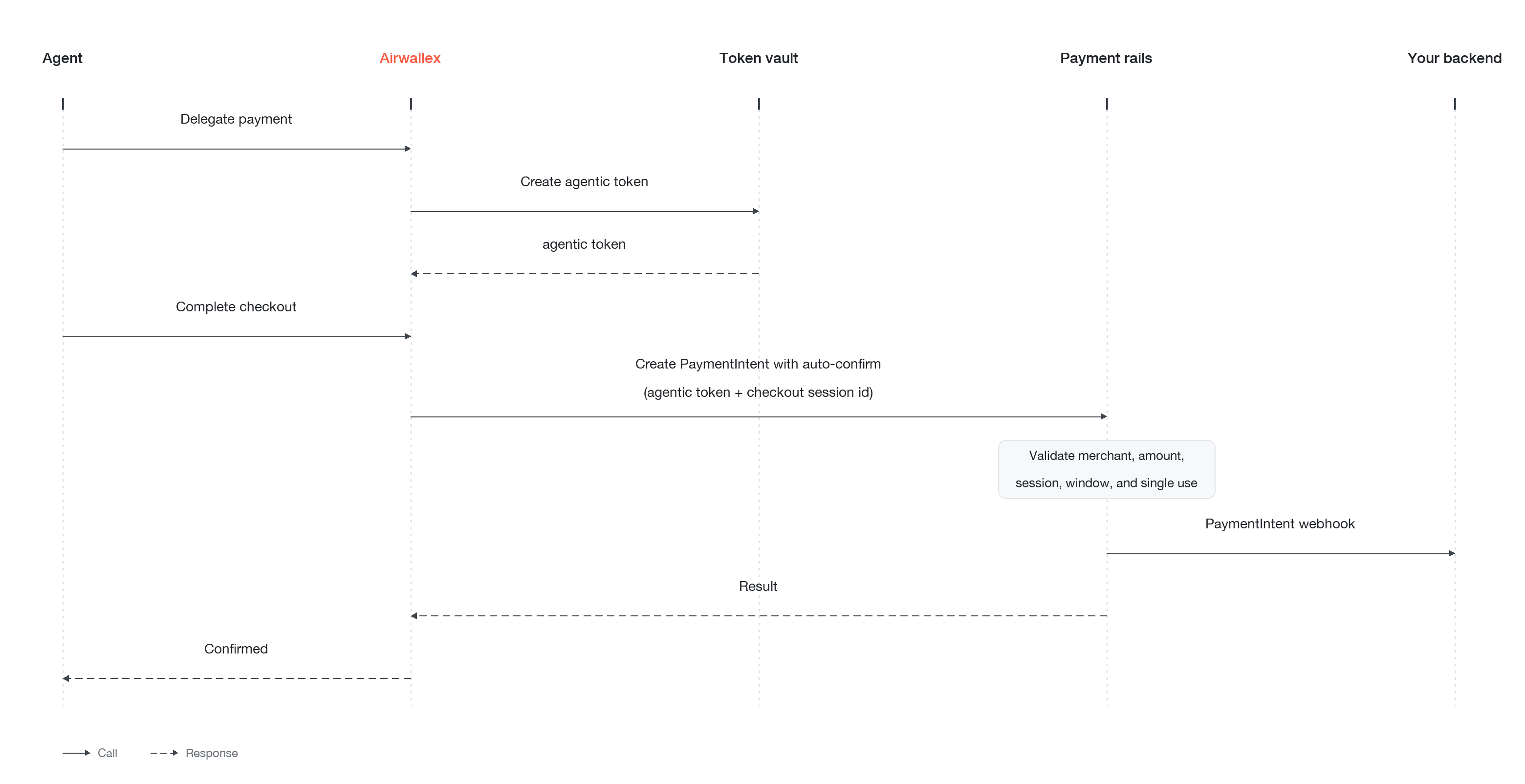
Airwallex creates and confirms the PaymentIntent for this flow. You do not need to create or confirm it yourself. Your integration must handle the Webhook that follows.
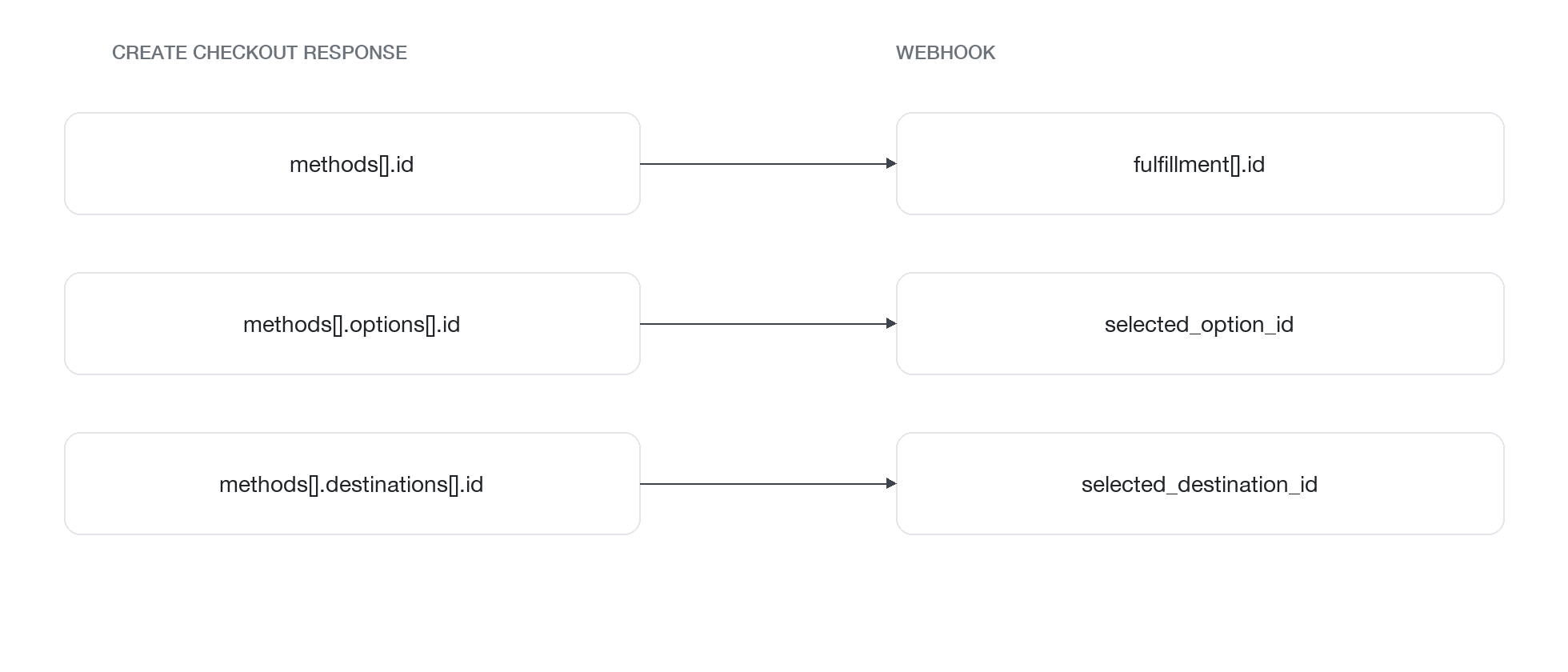
Use the Webhook to trigger fulfillment. The Create a checkout response only indicates that the shopper started checkout. The Webhook confirms that the payment was completed. It also includes the fulfillment option selected by the shopper, identified by the IDs you returned in the Create a checkout request. Use these IDs to associate the selected delivery method and option with the order.
Make your Webhook handler idempotent, because Airwallex may deliver the same Webhook more than once. Without idempotency, you could fulfill an order twice. Verify the Webhook as you would any Airwallex Webhook. See Check webhook signatures.
All IDs in the Webhook are IDs your integration generated. Match the type value case-insensitively: for example, you can send SHIPPING or PICKUP, and the Webhook returns shipping or pickup.
Sample payload
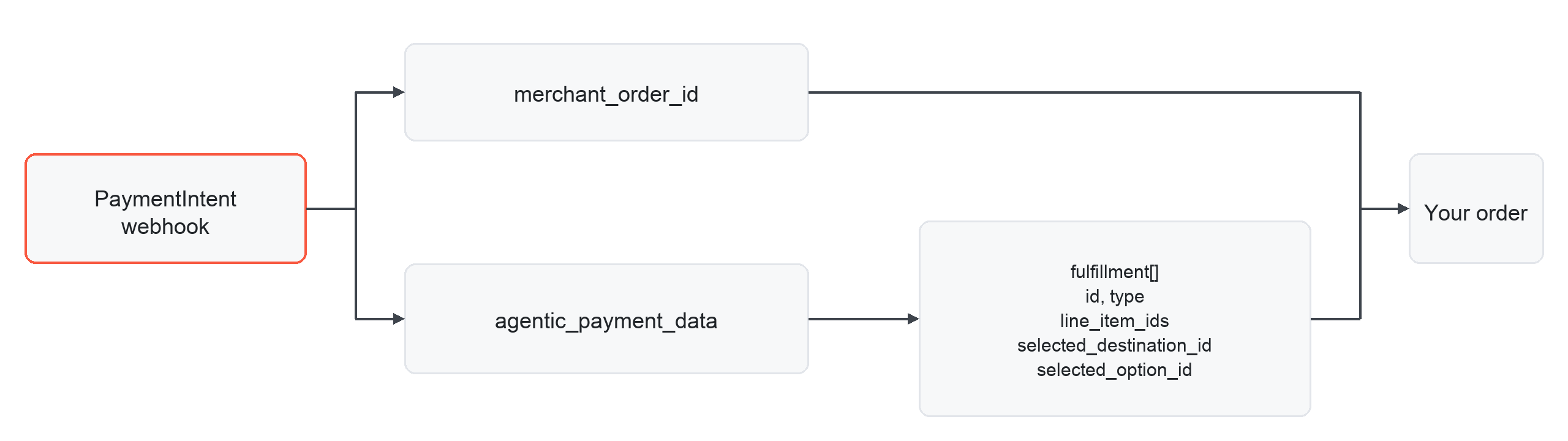
Fulfill on payment_intent.succeeded. The envelope matches the PaymentIntent payload example. data.object is the PaymentIntent. merchant_order_id is the checkout id you returned. agentic_payment_data carries the fulfillment choice.
1{2 "id": "evt_100_2019102201549020043_8321220011893766",3 "name": "payment_intent.succeeded",4 "accountId": "78814faa-1b30-4598-a9c8-f0583db8d09d",5 "data": {6 "object": {7 "request_id": "d6a92e2a-02e5-c37b-c977-13796ec7443a",8 "id": "int_aaaat9w2hgh8mzi1111",9 "merchant_order_id": "mch_co_01EXAMPLE",10 "amount": 16.66,11 "currency": "USD",12 "captured_amount": 16.66,13 "payment_method_options": {14 "card": {15 "risk_control": {16 "three_domain_secure_action": "FORCE_3DS",17 "three_ds_action": "FORCE_3DS"18 },19 "three_ds_action": "FORCE_3DS"20 }21 },22 "status": "SUCCEEDED",23 "created_at": "2023-01-13T07:32:05+0000",24 "updated_at": "2023-01-13T07:32:05+0000",25 "agentic_payment_data": {26 "fulfillment": [27 {28 "id": "pickup",29 "type": "pickup",30 "line_item_ids": ["line_item_001", "line_item_002"],31 "selected_destination_id": "loc_downtown",32 "selected_option_id": "pu_instore"33 }34 ]35 }36 }37 }38}
Read agentic_payment_data as in-store pickup at loc_downtown, covering line_item_001 and line_item_002. Those are the line item ids from the example response. merchant_order_id is the checkout session id you returned. The fulfillment array length is 1 in this release. Do not assume the length stays 1.
- Verify the Webhook signature.
- Look up the checkout by
merchant_order_id. That value is the checkout session id you returned from create checkout. - Read the fulfillment selection and attach it to the order.
- Fulfill the order.
- Return 2xx quickly, and do the work asynchronously.
- Reconcile payments you might have missed. Poll the list PaymentIntents APIAPI by
merchant_order_id, the checkout session id you returned.
The Webhook carries the same PaymentIntent object as the API. Agentic fields are in Confirm a PaymentIntentAPI. Standard PaymentIntent events are in Payment webhooks.
You are done when a test payment produces a Webhook you can resolve to an order, with the right fulfillment method and option attached.
Expose an authentication method
Before your chat app can call any commerce tool, it has to prove which shopper it is acting for. You decide how that proof is produced. Airwallex accepts either method below. Which one suits you depends on where the conversation runs.
| What you expose | Use it when | What your chat app presents |
|---|---|---|
POST /chat/generate_session_token on your own origin | The conversation runs on your own domain, inside your own session. | A short-lived session Bearer token that Airwallex validates. |
| An OAuth authorization server and a JWKS URL | Your chat provider hosts the assistant off your domain. | A Bearer token you issued, validated against the JWKS you publish. |
If you choose the session token, build the endpoint on your own origin. It returns a short-lived token that the chat app carries for the rest of the conversation. Omit Authorization for a guest.
1POST /chat/generate_session_token HTTP/1.12Host: your-backend.example.com
1{2 "access_token": "eyJhbGciOi…",3 "expires_in": 36004}
For a guest, call Obtain an access tokenAPI with the scoped API key from onboarding, and return that token as access_token. That key needs only Read access to the Payment Acceptance > Customs Declarations scope, and no wider access. Create it as a scoped key rather than an Admin key. See Manage API keys.
A shopper who is already signed in sends your website session on the same endpoint. Validate it, then call Generate a client secret for a CustomerAPI and return that client secret as access_token.
1POST /chat/generate_session_token HTTP/1.12Host: your-backend.example.com3Authorization: Bearer {{MERCHANT_WEBSITE_TOKEN}}
1{2 "access_token": "eyJhbGciOi…",3 "expires_in": 9004}
That shopper arrives at create checkout as customer.id. An absent customer.id is a guest checkout. The request can also carry a CAPTCHA payload. Confirm the field name with your Account Manager before you rely on it.
Request and response fields are in the Merchant-hosted endpoints reference.
What your chat app does
The rest of the integration happens on your chat provider's side, or with your own agent team.
| What your chat app does | Detail |
|---|---|
| Authenticate with you | Call the method you exposed and hold the Bearer token for the life of the conversation. |
| Connect to the Airwallex MCP server | The MCP server is the backend. It carries the catalog, checkout, and payment tools. The MCP app is the WebUI in the chat window, and this server powers it. On your own storefront the chat app calls https://mcp.airwallex.com/agentic_commerce_sdk/acp or https://mcp.airwallex.com/agentic_commerce_sdk/ucp, with the Bearer token from POST /chat/generate_session_token. |
| Mount the Airwallex iframe in the chat window | Product cards, the cart, and the card form are rendered by Airwallex. Your provider sizes and mounts the frame. They do not rebuild what is inside it. |
| Carry the result back into the conversation | The checkout result returns to the chat app so the assistant can confirm the order in its own voice. |
None of this touches card data, and none of it reimplements checkout. If your provider says they need to build a cart or a payment form for this integration, they have misread it.
Authentication on this path
| Shopper | Credential |
|---|---|
| Guest | Session token your backend mints. |
| Signed in to your site | Customer client secret, obtained through the website-auth bridge. |
Before you go live
- Your catalog is ingested and current.
- Your create checkout API is registered, verifies signatures, is idempotent, and responds quickly.
- Your Webhook handler is idempotent and resolves every id back to an order.
- A reconciliation job polls PaymentIntent status for any checkout session where no Webhook arrived in your expected window.
- Your authentication method is live and rate-limited. If it is the session token endpoint, it is also protected with CAPTCHA.
- A signed-in shopper reaches your create checkout API with
customer.idpopulated. - Your chat provider has completed their side and driven a test purchase end to end.