

Enable Airwallex Agentic Commerce Suite
Enable agentic commerce on your account, register your create checkout URL, and send Airwallex the product catalog agents read.
To sell through an AI agent on the end-to-end path, enable agentic commerce on your account and send Airwallex your product catalog. Agents read your feed, not your website. If the feed is poor, agents do not recommend your products.
This page covers the end-to-end path. If you chose payment only, you create the PaymentIntent yourself. You do not register a create checkout URL or send a PaymentIntent API key. Skip the catalog and continue with payment only on your storefront or payment only on an external surface.
Before you begin
- An Airwallex account.
- A decision on how you use the Suite.
- A product feed, if you are on the end-to-end path. Use unified JSONL when you are generating a feed for Airwallex. Use a Google Merchant Center TSV when you already have one.
Enable agentic commerce on your account
Agentic commerce is available to a limited set of merchants and is enabled per account.
- Ask your Account Manager to enable agentic commerce on your account.
- Send your Account Manager the URL of your create checkout endpoint. Implement that endpoint as specified in Create a checkout.
- Send your Account Manager a scoped API key and its Client ID. The key must be allowed to create a PaymentIntent. The Airwallex MCP server uses these credentials to create the PaymentIntent on your behalf. Do not send them when you create the PaymentIntent yourself.
- Receive your merchant configuration from your Account Manager. It includes your
merchant_open_idand the secret used to sign create checkout calls. The signing secret is not the API key from the previous step.
You can send a catalog after the account is enabled.
Send your catalog
Send Airwallex a feed file. Airwallex ingests it. This release has no upload API and no uploader in the web app. Agree a refresh schedule with your Account Manager when the feed is first loaded.
| Format | Use it when |
|---|---|
unified_jsonl | You are generating a feed for Airwallex. It is variant-native and can carry richer descriptions. |
gmc_tsv | You already run a Google Merchant Center feed. Export it and send it unchanged. |
Make the feed useful to an agent
| What to do | Why it matters |
|---|---|
| Write descriptions for a reader, not a search engine. | An agent reads your description and paraphrases it to the shopper. Keyword-stuffed copy produces poor recommendations. |
| Name the attributes shoppers ask about. | Size, material, fit, compatibility, and care. If it is not in the feed, the agent cannot answer and moves on. |
| Keep availability current. | A stale available flag becomes a basket your create checkout API has to reject. |
| Put one variant on each buyable thing. | Shoppers buy a size and a color, not a product family. |
Unified JSONL format
Send one JSON object per line. Each object is one product and its variants.
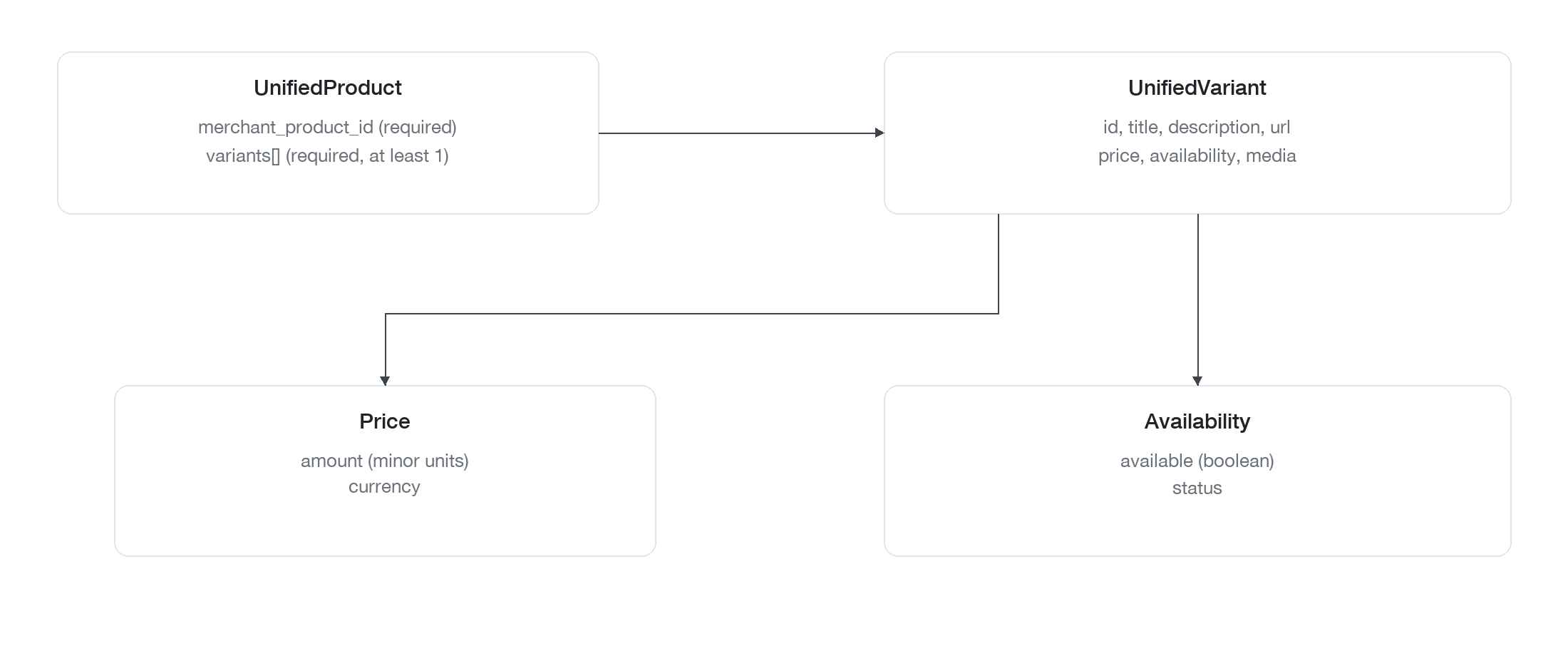
UnifiedProduct
| Field | Required | Notes |
|---|---|---|
merchant_product_id | Yes | Your stable product id. Keep it stable across refreshes. |
variants[] | Yes | At least one. A product with no variants is not ingestible. |
UnifiedVariant
| Field | Required | Notes |
|---|---|---|
id | Yes | The id agents send as item_id on create checkout. |
title | Yes | Shopper-facing. |
description | Yes | Shopper-facing. The agent reads it and paraphrases it. |
url | Yes | The product page. |
price | Yes | { amount, currency }. amount is an integer in minor units. |
availability | Yes | { available, status }. |
media | Yes | May be an empty array. The field must be present. |
Availability is yes or no, not a count. The feed carries no stock quantity. If an agent asks for 10 and you have 5, say so at checkout: return that line item with an available_quantity of 5. Airwallex reads that as partially available. See Signaling availability.
The sample is broken across lines so you can read each field. In the feed file, send this same object as one line.
1{2 "merchant_product_id": "COAT-ARDEN",3 "variants": [4 {5 "id": "COAT-ARDEN-NVY-M",6 "title": "Arden wool overcoat, navy, M",7 "description": "A mid-weight wool overcoat with a wide notch lapel and a single-breasted three-button front. Wool-cashmere blend, fully lined, two welt pockets.",8 "url": "https://example.com/products/arden-overcoat?v=nvy-m",9 "price": {10 "amount": 28900,11 "currency": "GBP"12 },13 "availability": {14 "available": true,15 "status": "in_stock"16 },17 "media": [18 {19 "url": "https://cdn.example.com/arden-nvy-1.jpg"20 }21 ]22 },23 {24 "id": "COAT-ARDEN-NVY-L",25 "title": "Arden wool overcoat, navy, L",26 "description": "A mid-weight wool overcoat with a wide notch lapel and a single-breasted three-button front. Wool-cashmere blend, fully lined, two welt pockets.",27 "url": "https://example.com/products/arden-overcoat?v=nvy-l",28 "price": {29 "amount": 28900,30 "currency": "GBP"31 },32 "availability": {33 "available": false,34 "status": "out_of_stock"35 },36 "media": []37 }38 ]39}
Whatever you put in a variant's id arrives as item_id on create checkout. If your feed ids differ from the ids in your order system, map them before you publish the feed.
price.amount is an integer in minor units. 28900 with currency GBP is 289.00 GBP. These units are not the same as PaymentIntent amount, which uses major units. See PaymentIntents.
Google Merchant Center TSV
If you maintain a Google Merchant Center product feed, export it and send it unchanged. There is nothing to remap, and no second feed to keep in sync.
- In Google Merchant Center, export your product feed as TSV.
- Send the file to your Account Manager and tell them the format is
gmc_tsv. - Airwallex maps Google Merchant Center fields onto the unified model and ingests the feed.
Start with gmc_tsv if you already have the feed. Move to unified_jsonl when you want control over what agents read: richer descriptions, and attributes Google Merchant Center has no field for.