

Surcharge and Discount
Configure variable surcharge or discount rates based on payment method, card brand, card type, and transaction classification to recover processing costs transparently.
Surcharging lets you add a percentage-based fee to a transaction so you can pass processing costs to the shopper. Surcharge and Discount extends this by letting you set variable rates for different payment methods, card brands, card types (credit or debit), domestic or international transactions, and shopper billing states. You can also set a negative rate to apply a discount instead, steering shoppers toward lower-cost payment methods.
Surcharge and discount amounts are transparently displayed to shoppers at checkout before they confirm payment, and are included in the total amount charged.
Supported payment methods and channels
Surcharge and Discount supports the following payment methods:
| Payment method | Surcharge supported |
|---|---|
| Card (Visa, Mastercard, UnionPay, Amex, Discover, JCB, Diners Club) | Yes |
| Apple Pay | Yes |
| Google Pay | Yes |
| Alipay CN | Yes |
| Alipay HK | Yes |
| FPS (Faster Payment System) | Yes |
| Klarna | Yes |
| Bank transfer | Yes |
For card payments, you can further configure surcharge rates based on:
- Card brand — Visa, Mastercard, UnionPay, Amex, Discover, JCB, or Diners Club.
- Card type — Credit or debit.
- Domestic or international — Whether the card-issuing country matches the merchant's country.
- Billing state — Set different rates for specific US states, based on the shopper's billing state.
Surcharge and Discount is available across these checkout flows:
| Checkout flow | Supported |
|---|---|
| Hosted Payment Page | Yes |
| Drop-in Element | Yes |
| Payment Links | Yes |
| Xero invoice payments | Yes |
| Airwallex Billing (invoicing, subscriptions, and usage-based billing) | No |
Payment Links versus Airwallex Billing invoices
Surcharge and Discount is a Payments feature that applies to Airwallex Payment Links and to Xero invoices, which your customers pay through an Airwallex Payment Link. It is not yet supported for Airwallex Billing — including one-off invoice payments, subscriptions, and usage-based billing. Airwallex Billing invoices are not the same as Payment Links: they are paid through a digital invoice link or Billing Checkout, not a Payment Link, and do not support surcharge. For a comparison of these payment collection methods, see Choose your billing solution.
Before you begin
- You have an active Airwallex account.
- You are collecting payments through a supported checkout flow.
- You have reviewed the compliance requirements.
How surcharge is applied at checkout
When a shopper selects a payment method at checkout, the applicable surcharge rate is calculated and displayed before the shopper confirms payment. The surcharge amount is included in the total charged amount.
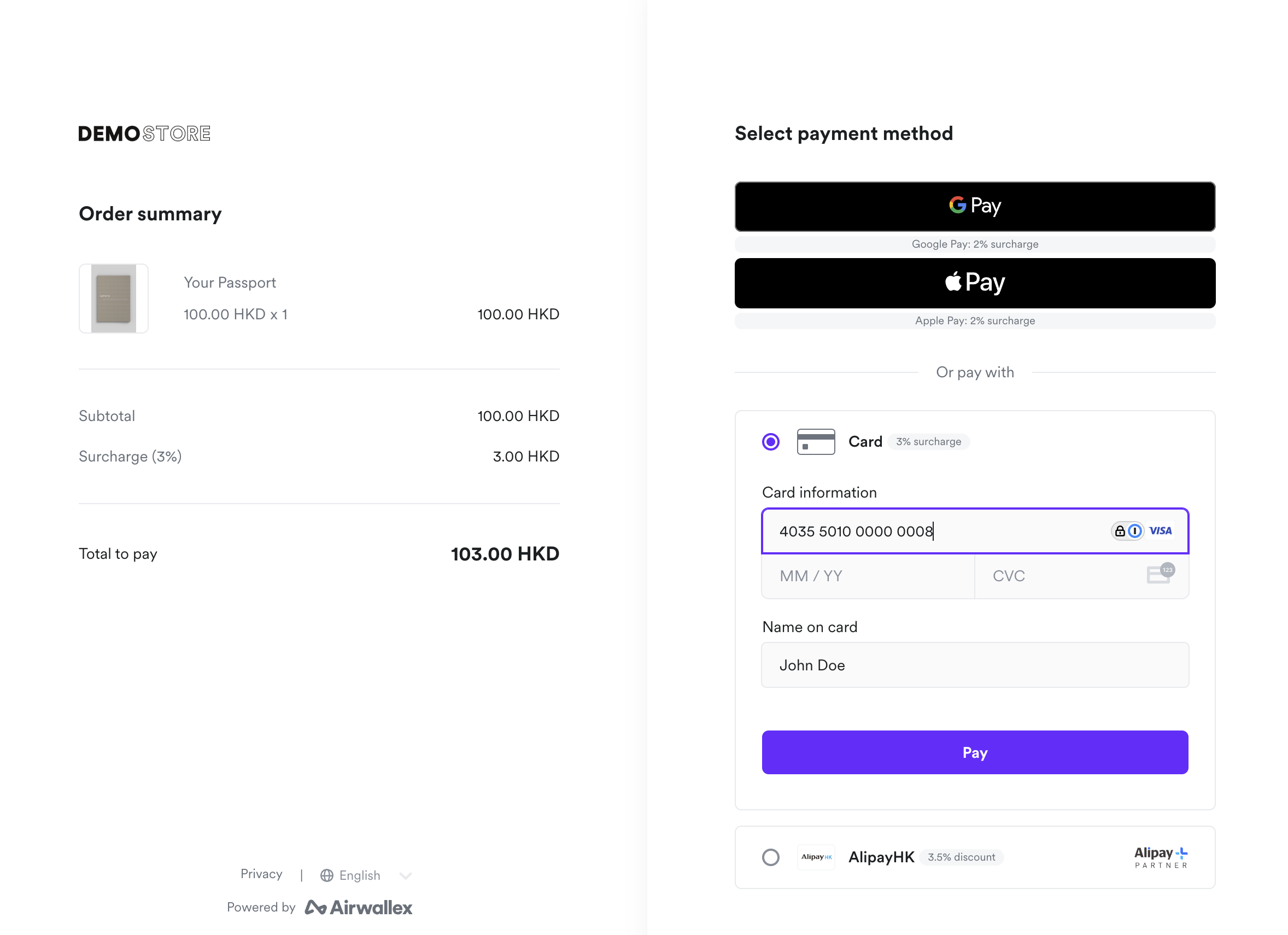
For card payments, the surcharge rate may update as additional card details are provided (for example, when the card brand or type becomes known from the card number).
Payment intent response
After a payment is confirmed, the surcharge details are included in the PaymentIntentAPI response under order.surcharge:
1{2 "order": {3 "surcharge": {4 "amount": 1.50,5 "percentage": 1.56 }7 }8}
The order.surcharge object contains:
amount— The surcharge amount.percentage— The surcharge rate applied.
Webhooks
Surcharge details are also included in the payment_intent.succeeded webhook event. Use webhooks to reconcile surcharge amounts in your system. For more information, see Listen for webhook events.
Compliance
Surcharging must comply with legal, regulatory, and card scheme requirements in each region where you operate. You are responsible for ensuring your surcharge configuration meets all applicable laws and regulations, including any requirements to disclose surcharge amounts to shoppers before payment.
Airwallex enforces the restrictions described below automatically. Some restrictions prevent you from configuring surcharge rules based on where your business is registered. Others block or cap the surcharge at the time of payment based on the shopper's billing address. Consult your legal advisor for guidance on surcharging requirements that may apply in your region.
Supported markets
Surcharging is only supported in the following markets:
- United States
- Canada (except Quebec)
- New Zealand
- Singapore
- Hong Kong
- Malaysia
Some of these markets have additional restrictions, as described below. Surcharging is not available in any market not listed here.
Airwallex enforces the following restrictions:
United States restrictions
Surcharging is not supported in Connecticut (CT), Maine (ME), Massachusetts (MA), Puerto Rico (PR) and is capped at 2% in Colorado (CO).
You can configure different surcharge rates for different US states based on the shopper's billing state, except in the states where surcharging is not supported.
Card scheme caps:
| Card brand | Maximum surcharge rate |
|---|---|
| Visa | 3% |
| Mastercard | 4% |
Debit cards: Surcharging debit cards is not supported.
Canada restrictions
If your business is registered in Canada (outside Quebec, where surcharging is not available), the following restrictions apply:
- Surcharge rate is capped at 2.4% across all card networks.
- Surcharging debit and prepaid cards is not supported.
- The surcharge amount must appear on receipts, and you must post clear signage informing shoppers about the surcharge.
- You must register with Mastercard before surcharging Mastercard payments.
New Zealand restrictions
If your business is registered in New Zealand, surcharges must not exceed your cost of accepting the payment method, within the following caps:
| Card type | Maximum surcharge rate |
|---|---|
| Contactless debit | 0.7% |
| Credit | 1.5% |
You must also clearly disclose the surcharge and offer shoppers at least one payment method that does not incur a surcharge.
Hong Kong restrictions
For B2C transactions, surcharges must be clearly disclosed to comply with the Hong Kong Trade Descriptions Ordinance.
Configure surcharge rules
You can configure surcharge rules in the Airwallex web app under Payments > Surcharge, or by contacting your account manager.
Each surcharge configuration consists of one or more rules. Each rule specifies:
- Payment method — The payment method the rule applies to. If the payment method is
Card, the rule must also include at least one card-specific condition (card brand, card type, domestic or international, or billing state). - Surcharge rate — A percentage between -5% and 5%, subject to any applicable regulatory and card scheme or network requirements. Lower caps may apply in certain regions. See Compliance for details.
- Priority — When multiple rules match a transaction, rules are evaluated in ascending priority order, and the first matching rule is applied.
Example configuration
A merchant that wants to recover different processing costs for different card types might configure:
| Priority | Payment method | Card brand | Card type | Domestic | Surcharge rate |
|---|---|---|---|---|---|
| 1 | Card | Visa, Mastercard | Credit | Yes | 1.5% |
| 2 | Card | Visa, Mastercard | Credit | No | 2.5% |
| 3 | Card | Amex | Credit | — | 3.0% |
| 4 | Apple Pay | — | — | — | 1.0% |
In this example:
- A domestic Visa credit card payment has a 1.5% surcharge.
- An international Mastercard credit card payment has a 2.5% surcharge.
- Any Amex credit card payment has a 3.0% surcharge, regardless of domestic or international status.
- An Apple Pay payment has a 1.0% surcharge.
Negative rates (discounts)
When you set a negative surcharge rate, the amount is subtracted from the transaction total as a discount. At checkout, the UI displays "Discount" instead of "Surcharge" so the shopper sees the reduction clearly.
Payment type declaration
When configuring surcharge rules, you declare whether the associated accounts process B2B payments, B2C payments, or both. Card brand-specific surcharge rates (setting different rates for different card brands) are only available for B2B payments. This is due to card scheme requirements that restrict surcharging by card brand to B2B transactions.
Suggested rates
To help you set rates, Airwallex can auto-fill suggested surcharge rates based on your transaction history and the cost of accepting each payment method. You can accept a suggested rate as-is or adjust it before activating the rule.
These auto-filled rates are suggestions only, based on your transaction history and our interpretation of applicable laws. They are provided to assist you and are not legal advice or a guarantee of compliance. You are solely responsible for ensuring the surcharge rates you set comply with all applicable laws, regulations and card scheme/network rules.
Refunds
When a surcharged payment is refunded, the surcharge amount is included in the refund. The refunded amount reflects the original total including the surcharge.
Settlement and reporting
The surcharge is included in the payment amount, so settlement and reporting reflect the total charged to the shopper, including the surcharge. The surcharge is not reported as a separate line item.
Airwallex processing fees are calculated on the total amount after the surcharge is added, not on the original transaction amount. Factor this into the surcharge rates you configure when recovering processing costs.
To reconcile surcharged payments, you can use the settlement report or the settlements APIAPI.