

Listen for webhook events
Create a webhook subscription, configure your endpoint to respond and verify signatures, and whitelist Airwallex IPs so you receive webhook notifications. For an overview of how webhooks work, delivery behavior, and security, refer to Webhooks overview.
Before you begin
You need access to the Airwallex web app with Developer, Admin, or Owner role.
Create a webhook subscription
You subscribe by registering a notification URL and choosing which events to receive. When one of those events occurs in your account, Airwallex sends a JSON payload to your URL via HTTP POST.
To create a webhook subscription:
- Log in to the Airwallex web app and select Developer > Webhooks.
- Click New webhook to configure the notification URL and the events you want to listen for.
- In the Create webhook page, provide the following information.
- Name: The name for your webhook subscription.
- Notification URL: The URL the webhook notifications should be sent to.
- API version: The API version for your webhooks, which determines the structure of the notifications you receive, including event names and payload fields. By default, it is set to the API version configured for your account, but you can choose a different API version.

- Select the events the webhook will listen for. You can listen to events across multiple accounts using the Account dropdown.
- Click Submit to create a webhook subscription.
You can preview sample payloads by selecting individual webhook events.
Delivery headers
HTTP POST payloads delivered to your webhook's notification URL contain several special headers:
| Header | Description |
|---|---|
| x-timestamp | A Unix timestamp in milliseconds, for example, 1357872222592. |
| x-signature | The HMAC hex digest of the concatenated timestamp and request body. This header is sent if the webhook is configured with a secret. The HMAC hex digest is generated using the SHA-256 hash function and the secret as the HMAC key. |
Webhook payload
The webhook payload is sent as JSON in the POST request body. The full event details are included and can be used directly after parsing the JSON into an Event object. The id field corresponds to Event ID in the web app.
The Event object contains the following fields:
| Field | Description |
|---|---|
id | A unique identifier of the event. |
name | The type of event, for example, payment_attempt.authorized. |
account_id | A unique identifier of the account this event belongs to. Only applicable to account-level events; can be empty. |
org_id | A unique identifier of the organization this event belongs to. Only applicable to organization-level events; can be empty. |
data | Contains the business information for the event, which varies for each event type. The resource that triggered the event is nested under data.object. Refer to the event type pages for payload samples. |
created_at | The time the event was created. |
version | The API version for the webhook subscription, which determines the content within the data object. |
1{2 "id": "evt_100_2019102201540902013102020043_8321220011893766",3 "name": "payment_attempt.authorized",4 "account_id": "19621303213",5 "data": {6 "object": {...}7 },8 "created_at": "2019-10-22T01:54:09+0000",9 "version": "2024-02-22"10}
Within data, the object field contains the resource that triggered the event. It follows the same schema as the response body returned by that resource's Retrieve API. For example, for payment_intent.* events, data.object matches the response from Retrieve a PaymentIntentAPI. Refer to the event type pages for the Retrieve API that corresponds to each event, along with full payload samples.
Respond to webhook events
Your endpoint must acknowledge all notifications by returning a 200 OK HTTP status code. If Airwallex does not receive a 200 OK response (due to a timeout or any other status code), it considers the delivery a failure and retries. To prevent timeouts, send the 200 OK response immediately.
Check webhook signatures
Airwallex signs the webhook events it sends to your notification URLs by including a signature in each request's header. This allows you to verify that the events were sent by Airwallex.
Before you can verify signatures, you need to retrieve your notification URL's secret key from your web app. Each secret is unique to the URL to which it corresponds. After this setup, Airwallex starts to sign each webhook it sends to the URL.
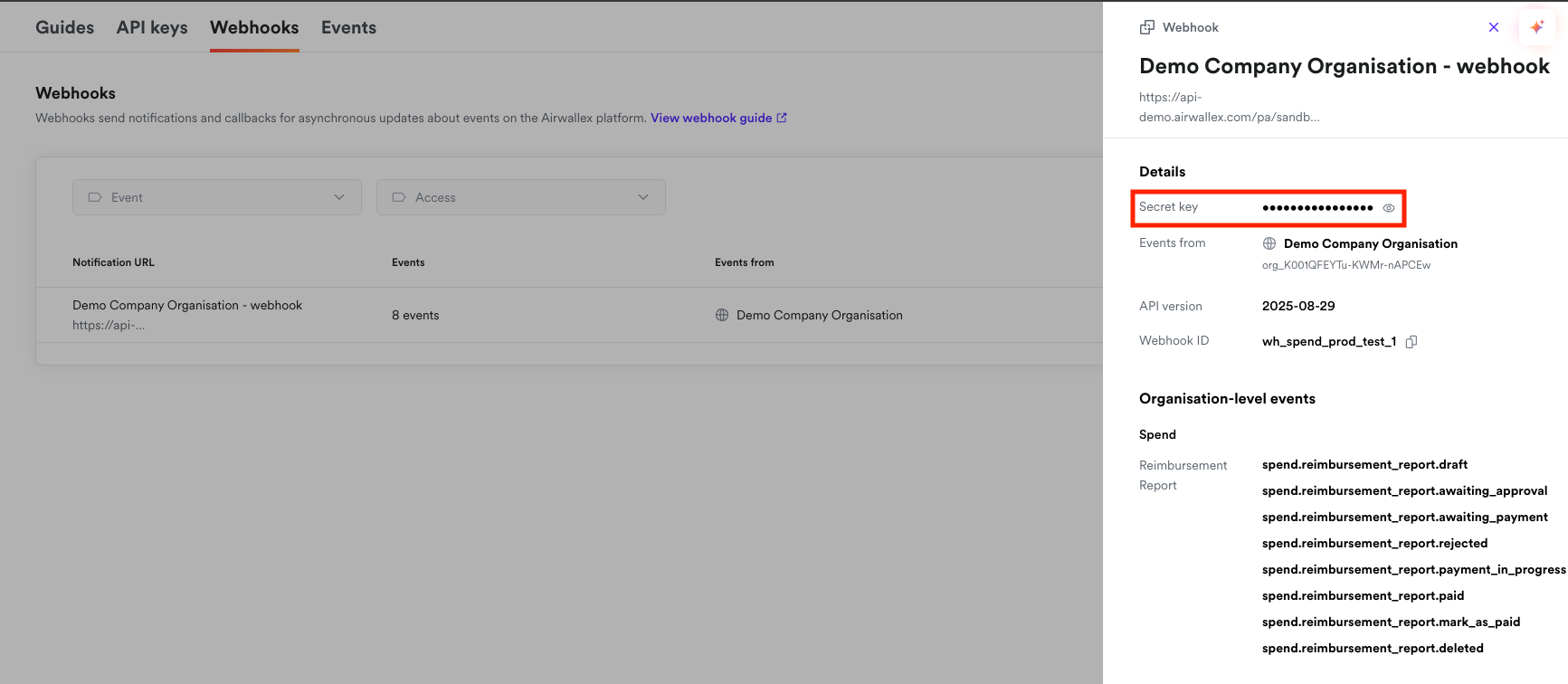
Webhook signatures for test events are generated using the secret key provided in the client-secret-key header of the test event payload.
You can verify signatures by following these steps.
- Extract the
x-timestampandx-signaturefrom the header. - Prepare the
value_to_digeststring by concatenating thex-timestamp(as a string) and the actual JSON payload (the request's body, as a string). - Compute an HMAC with the SHA-256 hash function. Use the notification URL's secret key as the key and the
value_to_digeststring as the message. - Compare the
x-signaturein the header to the expected signature. If a signature matches, compute the difference between the current timestamp and the received timestamp, then decide if the difference is within your tolerance.
If your signature verification fails, check the following common causes:
- Use the raw JSON payload: Always use the original, unmodified request body when computing the signature. Do not use a parsed and re-serialized JSON object, as this may change the formatting (whitespace, key ordering, etc.) and result in a different signature.
- Check before parsing: Many JSON parsing libraries automatically format or normalize the JSON payload. Verify the signature before parsing or transforming the payload in any way.
- Verify timestamp format: Ensure you're using the
x-timestampvalue exactly as received in the header, without any conversion or formatting. - Use the correct secret key: Confirm you're using the secret key that corresponds to the specific notification URL receiving the webhook. Each webhook subscription has its own unique secret key.
- Check the concatenation order: The
value_to_digeststring must be constructed by concatenating thex-timestamp(as a string) followed by the raw JSON payload body, in that exact order.
Code examples
The following examples show how to verify the signature and return 200 for success or 400 if verification fails, in Java, PHP, and Node.js.
1import org.apache.commons.codec.digest.HmacAlgorithms;2import org.apache.commons.codec.digest.HmacUtils;3import org.springframework.stereotype.Controller;4import org.springframework.web.bind.annotation.PostMapping;5import org.springframework.web.bind.annotation.RequestBody;6import org.springframework.web.bind.annotation.ResponseBody;78import javax.servlet.http.HttpServletRequest;9import javax.servlet.http.HttpServletResponse;1011@Controller12public class WebhookExampleController {1314 @PostMapping("/webhook/example")15 @ResponseBody16 public String receive(HttpServletRequest request, @RequestBody String payload, HttpServletResponse response) {17 String responseBody = "";1819 StringBuilder valueToDigest = new StringBuilder();20 String timestamp = request.getHeader("x-timestamp");21 valueToDigest.append(timestamp);22 valueToDigest.append(payload);2324 String signature = request.getHeader("x-signature");25 String secret = getSecret();2627 HmacUtils hmacUtils = new HmacUtils(HmacAlgorithms.HMAC_SHA_256, secret);28 if (hmacUtils.hmacHex(valueToDigest.toString()).equals(signature)) {29 // Do something with event30 response.setStatus(HttpServletResponse.SC_OK);31 } else {32 response.setStatus(HttpServletResponse.SC_BAD_REQUEST);33 responseBody = "failed to verify the signature";34 }3536 return responseBody;37 }38}
Whitelist IP addresses
Airwallex emits webhook calls using one of the following IPs. To receive webhook calls successfully, these IPs must be whitelisted:
For production environment
- 35.240.218.67
- 35.185.179.53
- 34.87.64.173
- 35.220.213.251
- 34.92.128.176
- 34.91.47.254
- 34.91.75.229
- 35.230.185.215
- 34.86.42.60
- 34.177.101.131
- 34.143.140.106
- 34.158.57.211
- 34.124.183.136
- 34.126.131.52
- 34.21.185.174
- 34.142.140.136
- 35.236.197.105
- 34.11.6.7
- 34.145.133.253
- 34.182.195.122
- 35.186.175.150
- 34.85.218.163
- 136.107.34.62
- 35.186.166.138
- 34.21.104.184
For Sandbox environment
- 35.240.211.132
- 35.187.239.216
- 34.87.139.23
- 136.110.35.143
- 34.142.189.194
- 35.197.128.86
For guidance on HTTPS, retries, acknowledging events immediately, handling duplicate events, and event ordering, refer to Webhooks overview.
Next steps
Now that you can receive and verify webhooks, you can:
- View and re-trigger webhook events to inspect events and re-deliver them in the web app.
- Review event types and payload examples by product.