

You run discovery, Airwallex takes the payment
Keep discovery and checkout in your own assistant. Airwallex collects the card inside the conversation and takes the payment.
To take payment inside a conversation your own assistant already runs, create a PaymentIntent for the amount your systems calculate, hand the id and client secret to the assistant, and fulfill when the PaymentIntent Webhook arrives.
Choose this path when you already run an assistant or chatbot on your own site and it already knows your catalog, your stock, and your prices. You keep discovery and checkout where they are. Airwallex collects the card inside the conversation and takes the payment.
Before you begin
- Agentic commerce enabled on your account. See Enable Airwallex Agentic Commerce Suite. You do not need a product feed or a create checkout API.
- A server that can create a PaymentIntent.
- A Webhook endpoint for PaymentIntent events. See Payment webhooks.
Who does what
| Player | What they do |
|---|---|
| You | Create the PaymentIntent with the amount from your systems, hand its id and client secret to the assistant, and fulfill on the Webhook. If you confirm from your server, you also send the confirm call. |
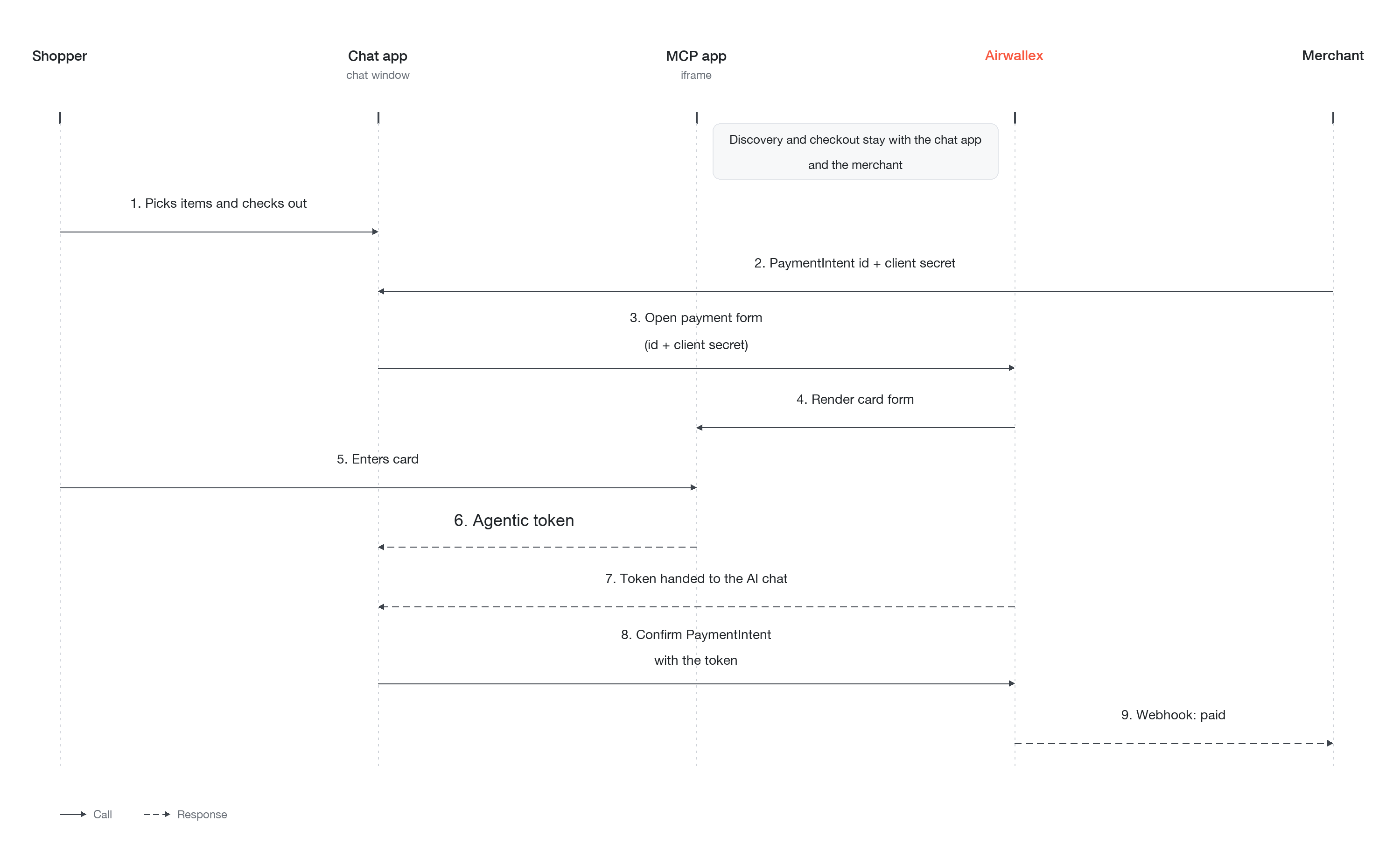
| Your assistant | Runs discovery and checkout as it does today, opens the Airwallex payment form, and receives the agentic token. Either confirms the PaymentIntent, or sends the token to your server so you can confirm it. |
| Airwallex | Renders the card form inside the chat, turns the card into a single-use agentic token, and processes the payment. |
How the purchase runs
These steps are the same whichever way you confirm.
- The shopper builds a basket inside your own assistant, against your own systems.
- You create a PaymentIntent for that order, with the amount taken from your systems, and set
merchant_order_idto your order id. - You hand your assistant the PaymentIntent ID and its client secret. The client secret works only for this PaymentIntent, so it can go to the browser or the assistant. Never send your API key.
- Your assistant opens the Airwallex payment form inside the chat, and the shopper enters a card.
- Airwallex turns that card into a single-use agentic token and returns it to the assistant. The card number never reaches your assistant.
- Confirm the PaymentIntent. Use Confirm from the assistant or Confirm from your server.
- Your Webhook fires. Fulfill the order on it. See Sample payload.
Create the PaymentIntent
Create a PaymentIntent for the order, and take the amount from your own systems rather than from whatever your assistant worked out in the conversation.
This holds even though the assistant is yours. The model driving it is not a system of record. It can misread a promotion, drop a line from the basket, or be talked into a different number. Price the basket in the systems that already own your pricing, create the intent for that amount, and nothing said in the conversation can change what is charged.
Set amount in the units the PaymentIntents API expects (major units). Do not copy minor-unit amounts from a product feed into this field.
1curl -X POST https://api.sandbox.airwallex.com/api/v1/pa/payment_intents/create \2 -H 'Authorization: Bearer {{ACCESS_TOKEN}}' \3 -H 'Content-Type: application/json' \4 -d '{5 "request_id": "b01737e5-c5ab-4765-8834-cbd92dfeaf81",6 "amount": 100,7 "currency": "USD",8 "merchant_order_id": "order_1001"9 }'
The response includes the id and client_secret you hand to the assistant. See Create a PaymentIntentAPI for the request and response fields.
Hand over the id and client secret
Pass the PaymentIntent ID and its client_secret from your backend to the assistant. The client secret works only for this PaymentIntent, so it can go to the browser or the assistant that opens the payment form. Never send your API key.
There is no session token to mint and no OAuth flow to run on this path. Those mechanisms exist to establish who a shopper is before anything has been created. Here the PaymentIntent already exists and already carries the amount.
Let Airwallex collect the card
You build nothing in this step. Airwallex renders the card form inside the chat, and the shopper types their card into the Airwallex form. Airwallex tokenizes it inside its own compliance boundary and returns a single-use agentic token. Card data never touches your systems, so taking payments this way does not widen your PCI scope.
Confirm the PaymentIntent
Confirm in one of the two ways below. The token only works against the intent it was created for. If the merchant, the amount, the session, or the validity window does not match, the confirmation fails and nothing is charged. It never falls back to an ordinary charge. A token that has been replayed, or pointed at a different order, does not work. It is single-use.
The order id is the PaymentIntent's merchant_order_id, which you set when you created the PaymentIntent. In the create sample that value is order_1001. Set agentic_payment_data.checkout_session_id to that same id. checkout_session_id is required whenever an agentic token is used.
Confirm from the assistant
The assistant confirms the PaymentIntent with the client secret and the agentic token. You do not call confirm. Fulfill when the PaymentIntent Webhook arrives.
The body the assistant sends:
1{2 "payment_method": {3 "type": "card",4 "card": {5 "agentic_token": "{{AGENTIC_TOKEN}}"6 }7 },8 "agentic_payment_data": {9 "checkout_session_id": "order_1001"10 }11}
Send the token as payment_method.card.agentic_tokenAPI. Set checkout_session_id to the PaymentIntent's merchant_order_id.
Confirm from your server
The assistant sends the agentic token and the PaymentIntent ID to an endpoint you host. You define that endpoint. Your server checks that the order still matches the PaymentIntent, then confirms with your API key. The API key stays on your server. Return the result to the assistant so it can tell the shopper. Fulfill on the Webhook, not on the confirm response.
1curl -X POST https://api.sandbox.airwallex.com/api/v1/pa/payment_intents/{{PAYMENT_INTENT_ID}}/confirm \2 -H 'Authorization: Bearer {{ACCESS_TOKEN}}' \3 -H 'Content-Type: application/json' \4 -d '{5 "request_id": "d917ad44-6ae4-447e-a534-cce4ceebfd2e",6 "payment_method": {7 "type": "card",8 "card": {9 "agentic_token": "tok_agentic_abc123"10 }11 },12 "agentic_payment_data": {13 "checkout_session_id": "order_1001"14 }15 }'
Send the token as payment_method.card.agentic_tokenAPI. Set checkout_session_id to the PaymentIntent's merchant_order_id. The response returns latest_payment_attempt.agentic_payment_dataAPI.
Handle the PaymentIntent Webhook
This is the same Webhook as every other path, and it is the only place where Airwallex tells you that money moved. Treat its arrival as the instruction to fulfill, rather than acting on what the assistant displayed.
Make the handler idempotent. A Webhook can be delivered more than once, and you do not want to ship the same order twice. Run a job that checks PaymentIntent status for any payment where you expected a Webhook and did not receive one, so an outage on your side does not leave a paid order unfulfilled.
This path does not call create checkout, so there is no checkout id to join. The event you listen for is the same. See Sample payload. Verify the Webhook as with any Airwallex Webhook. See Check webhook signatures and Payment webhooks.
Authentication on this path
The client secret is the credential, and it is scoped to a single PaymentIntent. There is no session token and no OAuth, because the PaymentIntent exists before anything is called. Your own login still decides who the shopper is. Airwallex is not asked that question on this path.
What you do not build
In the payment-only integration, you do not need to provide a product feed or integrate the Create a checkout API. Your assistant, product search, cart, and checkout logic remain unchanged.
Before you go live
- Your PaymentIntent amounts come from your systems, never from the model.
merchant_order_idis the order id you set when you created the PaymentIntent.- The client secret reaches the assistant that opens the payment form. Your API key stays on your server.
- Your Webhook handler is idempotent.
- A reconciliation job covers payments where no Webhook arrived.
If the assistant confirms:
checkout_session_idis the PaymentIntent'smerchant_order_id.- You do not call confirm.
- Your assistant handles a failed confirmation without stranding the shopper.
If your server confirms:
checkout_session_idis the PaymentIntent'smerchant_order_id.- The assistant sends the agentic token to an endpoint you host.
- Your server confirms with your API key.
- You fulfill on the Webhook, not on the confirm response.
- Your assistant handles a failed confirmation without stranding the shopper.