

Add a chat app with the Assistant SDK
Put an Airwallex shopping assistant on your product pages when you do not already have a chat provider.
SDK package
The AI shopping assistant is an element of @airwallex/components-sdk. It is not in the latest stable release. Install a prerelease that includes aiShoppingAssistant. This page uses 1.36.0-alpha.4.
To run Airwallex runs discovery and checkout without procuring a chat provider first, install the Assistant SDK on your product pages.
The SDK stands in for the chat app and nothing else. The catalog, the create checkout API, and the Webhook are the same work either way. Listen for the same sample payload. You can replace the SDK later with a provider of your own without touching them.
Before you begin
- The integration in Airwallex runs discovery and checkout, including the session token endpoint from that page.
- A page element where the assistant can mount.
Install the SDK
-
Install the package:
Shell1npm install @airwallex/[email protected] -
Initialize the element and mount it:
JavaScript1import { init, createElement } from '@airwallex/components-sdk';23await init({4 env: 'demo',5 enabledElements: ['aiShoppingAssistant'],6});78const assistant = await createElement('aiShoppingAssistant', {9 environment: 'sandbox',10 backendUrl: 'https://your-backend.example.com',11 merchantId: 'your_merchant_id',12 appearance: { mode: 'light' },13 uiOptions: { title: 'your-chat-title', displayMode: 'panel', side: 'right' },14});1516assistant.mount('#assistant-chat');
This example targets sandbox. init takes env: 'demo'. The element takes environment: 'sandbox'. Those are separate options.
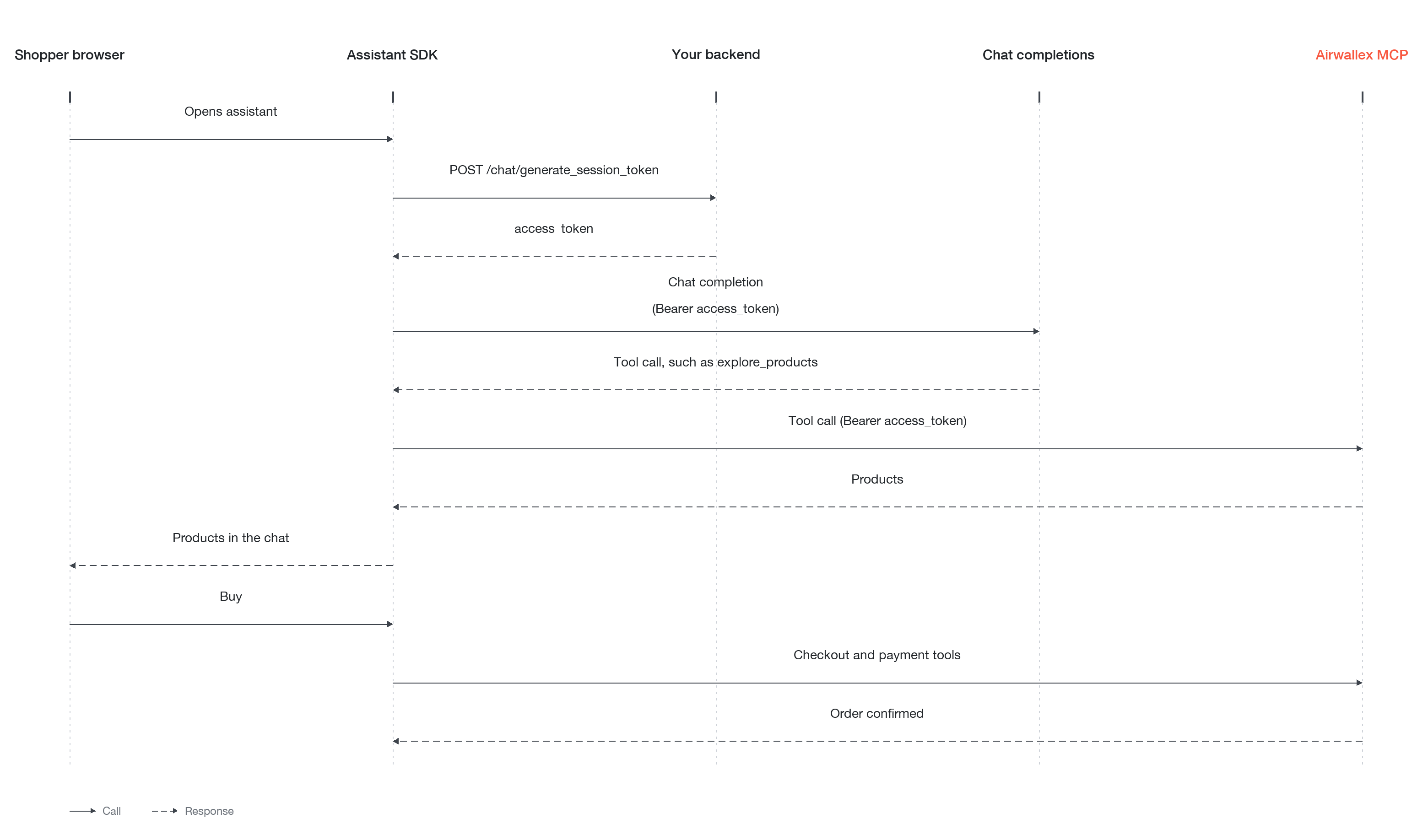
The SDK obtains a short-lived Bearer token from the session token endpoint you built and uses that same token for chat and for the Airwallex commerce tools. No long-lived keys reach the browser.
The SDK builds the full endpoint URL from backendUrl: it calls {backendUrl}/chat/generate_session_token. Pass the origin that serves your endpoint, such as https://your-backend.example.com, not the endpoint path itself. A trailing slash is ignored.
The element lifecycle is init, createElement, mount, on(event), then destroy. You can also call open, close, toggle, update, and unmount. Events are ready, open, close, error with { instanceId, code, message }, checkoutResult with a status of succeeded, failed, or cancelled and an optional referenceId, and event with { instanceId, name, data }.
| Property | Type | Required | Description |
|---|---|---|---|
backendUrl | string | Yes | Base URL of the backend that serves your session token endpoint. The SDK appends /chat/generate_session_token to it. |
merchantId | string | No | Merchant id. |
openAICompatibleUrl | string | No | Your OpenAI-compatible chat completions URL. |
llmToken | string | No | Token for your own chat completions endpoint. |
model | string | No | Model name for your own endpoint. The Airwallex-hosted endpoint ignores it. |
environment | 'production', 'sandbox', or 'staging' | No | Assistant environment. This is separate from env on init. |
appearance.mode | 'light' or 'dark' | No | Color mode. Required when you set appearance. |
appearance.variables.colorBackground | string | No | Background color. |
appearance.variables.colorBorder | string | No | Border color. |
appearance.variables.colorText | string | No | Text color. |
appearance.variables.colorPrimary | string | No | Primary color. |
appearance.variables.colorPrimaryText | string | No | Text on the primary color. |
appearance.variables.fontFamily | string | No | Font family. |
appearance.variables.borderRadius | string | No | Corner radius. |
uiOptions.logoUrl | string | No | Logo image URL. |
uiOptions.logoAlt | string | No | Logo alt text. |
uiOptions.title | string | No | Header title. |
uiOptions.welcomeHeading | string | No | Welcome heading. |
uiOptions.composerPlaceholder | string | No | Input placeholder. |
uiOptions.suggestions | { label: string, prompt: string }[] | No | Suggested prompts. label is shown. prompt is sent. |
uiOptions.displayMode | 'panel' or 'popup' | No | Docked panel or floating popup. |
uiOptions.panelWidth | string | No | Panel width. |
uiOptions.panelHeight | string | No | Panel height. |
uiOptions.zIndex | number | No | Stacking order. |
uiOptions.side | 'left' or 'right' | No | Anchored screen edge. |
uiOptions.offset.x | number | No | Horizontal offset. |
uiOptions.offset.y | number | No | Vertical offset. |
Decide who runs the model
The assistant needs a chat completions endpoint. Both options use the same OpenAI-compatible request format.
| Host it yourself | Use Airwallex's | |
|---|---|---|
| Model choice | Yours | Airwallex's |
| System prompt and tone | Yours | Airwallex's |
| Conversation data | Stays with you | Passes through Airwallex |
| Effort | You run inference and wire up the tools | Point the SDK at Airwallex |
Start with the Airwallex endpoint. Move to your own when you want control over the model or the prompt, or when conversations have to stay in your infrastructure. Your catalog, checkout, and payment integration does not change either way. Bring your own model is not available on the Airwallex-hosted path. If you need a specific model, host the endpoint yourself.
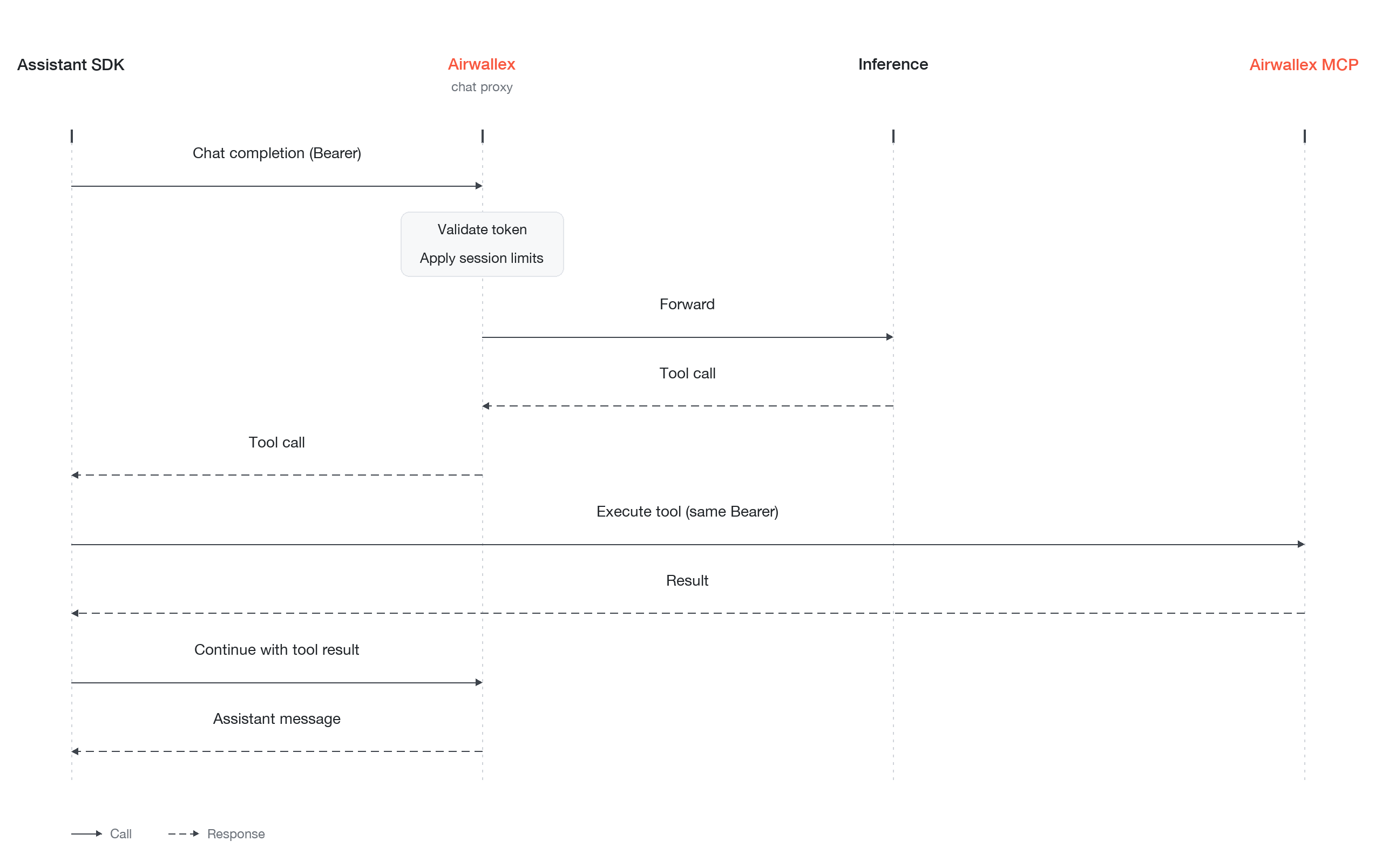
When you use Airwallex's agent, the SDK calls https://copilot.airwallex.com/v1/chat/completions. When you run your own agent, set openAICompatibleUrl to your chat completions URL.
1POST /v1/chat/completions HTTP/1.12Host: copilot.airwallex.com3Authorization: Bearer {{ACCESS_TOKEN}}4Content-Type: application/json56{7 "stream": true,8 "messages": [9 { "role": "user", "content": "Show me running shoes under $150" }10 ]11}
The session token is the access_token from Expose an authentication method.
Create chat completion is the only supported operation. Models, embeddings, files, and the assistants surface are not proxied. Rate limits are applied per session by the proxy. Ask your Account Manager for the limits on your account.
You are done when the assistant mounts on a product page, answers a product question, and completes a purchase.