

Airwallex runs discovery and checkout
Let external agents find your products, price a basket against your systems, and complete a purchase through ACP or UCP.
To let agents you do not control find your products, price a basket against your systems, and complete a purchase, complete the steps in this document.
The work matches Airwallex runs discovery and checkout on your own storefront until the conversation leaves your domain. That is where this path differs: the agent speaks ACP or UCP, guests are common, and signed-in shoppers use OAuth.
Before you begin
- Agentic commerce enabled on your account, and a catalog Airwallex has ingested. See Enable Airwallex Agentic Commerce Suite.
- A create checkout API. If you already built it for your own storefront, you do not build it again.
- A PaymentIntent Webhook handler. See Payment webhooks.
- Confirmation from your Account Manager of which surfaces are open for your account.
Who does what
| Stage | You | Airwallex |
|---|---|---|
| Discovery | Keep your catalog current. | Publishes it on the agent endpoints when the surface requires that configuration, and answers the agent. |
| Checkout | Return availability, fulfillment options, and totals from your create checkout API. | Calls your API and speaks ACP or UCP to the agent. |
| Payment | Issue OAuth tokens for your signed-in shoppers. | Collects the card, creates the PaymentIntent, and confirms it. |
| Fulfillment | Fulfill on the Webhook. | Sends the Webhook with the shopper's choices. |
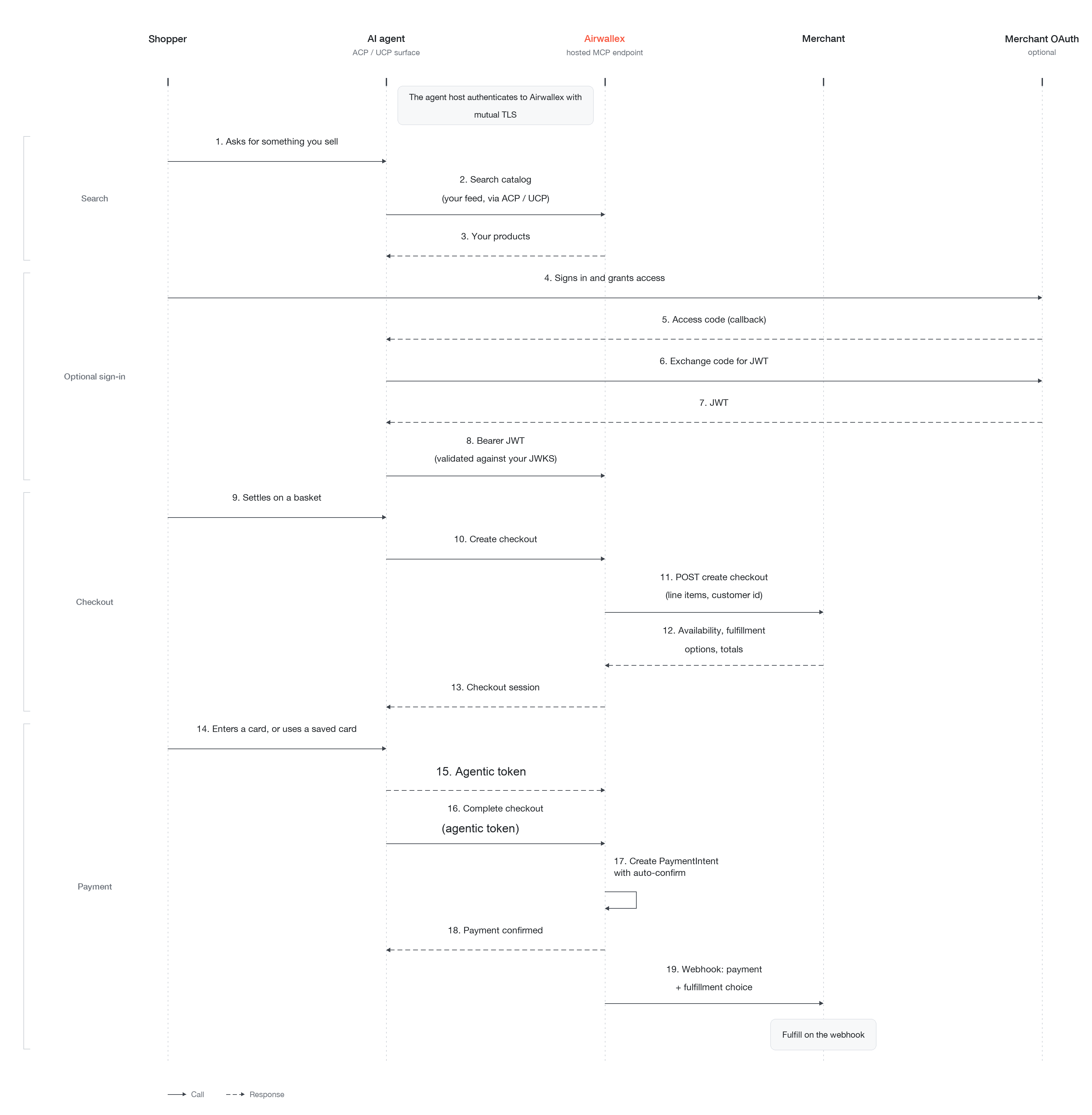
How the purchase runs
Discovery
- A shopper asks an external AI agent, for example ChatGPT, Claude, or Gemini, for something you sell.
- The agent host authenticates to Airwallex with mutual TLS.
- When the surface requires an agent endpoint, the agent searches your catalog there, over ACP or UCP.
- Airwallex returns matching products from the feed you supplied.
Signed-in shopper
These steps are optional. Purchases can complete without them. A guest types a card. A signed-in shopper can pay with a card already saved with you.
- The shopper signs in on your login page and grants the agent access.
- Your OAuth server sends the agent an access code through a callback.
- The agent exchanges the access code for a token at your token endpoint.
- Your OAuth server returns the JWT.
- The agent presents the JWT to Airwallex, which validates it against your JWKS URL.
Checkout
- The shopper settles on a basket.
- The agent asks Airwallex to create a checkout.
- Airwallex calls your create checkout API with the line items. A signed-in shopper also arrives as
customer.id. - Your API returns availability, fulfillment options, and totals. These are final, and the shopper is charged your totals.
- Airwallex returns the checkout session to the agent.
Payment and outcome
- The shopper enters a card, or uses one saved with you.
- Airwallex returns an agentic token to the agent. The agent never sees the card number.
- The agent calls Complete checkout on the Airwallex MCP server, referencing the agentic token.
- Airwallex creates the PaymentIntent with auto-confirm, using the token. The token works only for the merchant, amount, session, and window it was issued for.
- Airwallex tells the agent the payment is confirmed.
- Airwallex sends you the PaymentIntent Webhook, carrying the payment result and the shopper's fulfillment choice. You fulfill the order on this Webhook. See Sample payload.
Supply your catalog
Send Airwallex a product feed and keep it current, as described in Enable Airwallex Agentic Commerce Suite. There is no separate catalog for external surfaces. The feed that makes your products findable on your own site is the same feed that makes them findable here. If you already did this for your storefront, this step is done.
Build your create checkout API
This is the same endpoint, the same contract, and the same signature check as on your own storefront. See Build your create checkout API.
What changes is the kind of request it receives. On these surfaces the shopper is often a stranger to you, so expect calls that carry no customer and no shipping address. Handle those calls. Do not reject them. Return pickup options, which do not depend on knowing where the shopper is. On ACP you can also return DIGITAL. Price shipping later, on the call that carries an address. Do not return DIGITAL or LOCAL_DELIVERY when the agent speaks UCP.
1{2 "line_items": [3 { "id": "line_item_001", "item_id": "dress_tropical_s", "requested_quantity": 1 }4 ],5 "currency": "USD"6}
The signed request, the full response, and the error codes are in Build your create checkout API. Signature headers are in Verify the signature.
Handle the PaymentIntent Webhook
This is the same Webhook as every other path. If you already built the handler for your own storefront, there is nothing new to write. An order that began on an external surface arrives with the same payload and the same ids.
The payload is in Sample payload. Airwallex confirms the PaymentIntent on this path. You do not call confirm.
Confirm your agent endpoints
Confirm the agent endpoints when the external AI surface requires that configuration. Your Account Manager tells you which surfaces need it. You do not build these endpoints. Airwallex hosts them. Once your merchant configuration and your catalog are in place, your products are reachable on the shared Airwallex agent endpoints. Confirm that they resolve.
Your merchant_open_id is issued with your merchant configuration and forms part of the path:
1https://mcp.airwallex.com/agentic_commerce/{merchant_open_id}/acp2https://mcp.airwallex.com/agentic_commerce/{merchant_open_id}/ucp
The two protocols are not identical. A small number of capabilities exist in ACP that UCP does not yet carry. Where that happens, return something sensible rather than letting the checkout fail.
| Capability | ACP | UCP |
|---|---|---|
DIGITAL fulfillment | Supported | Not supported |
LOCAL_DELIVERY fulfillment | Supported | Not supported |
| Agentic token tool | Supported | Not supported |
Everything else is identical across the two protocols. Your feed, your create checkout API, and your Webhook handling do not change depending on which protocol an agent speaks.
Stand up your OAuth server
Build this when you want shoppers on these surfaces to be recognized as your existing customers and to pay with a card they have already saved with you. Purchases can still happen without it. Without it, every purchase ends with a shopper typing a full card number into a chat window, which is where people most often abandon the purchase.
OAuth is the mechanism here, rather than the session token you might use on your own site, because there is no session on your domain to draw on. The shopper is inside someone else's product and has never touched your login. OAuth is how that shopper tells you, and can later revoke, that this agent may act for them against a credential you hold.
| What you stand up | What it does |
|---|---|
| Register endpoint | Lets an external AI surface register itself as a client on your OAuth server. |
| Authorize endpoint | Returns your login page so the shopper can authenticate. On success the surface receives a callback carrying the access code. |
| Token endpoint | Exchanges the access code for a JWT. |
| JWKS URL | You supply it to Airwallex during setup so Airwallex can validate the JWT you issue. |
| Identity mapping | The authorized shopper resolves to your customer record and reaches your create checkout API as customer.id. |
Letting a shopper pay with a saved card does not loosen the protections on the payment. The token minted against that saved card is still bound to one merchant, one amount, one session, and one validity window, and it is still single-use.
The signed-in token your OAuth server issues must carry your customer id and an audience equal to the external MCP URL the agent is calling. Airwallex validates it against the JWKS URL you supply.
Authentication on this path
| Shopper | Credential |
|---|---|
| Guest | No shopper credential. The host authenticates to Airwallex with mutual TLS. |
| Signed in with you | OAuth Bearer token you issue, validated against the JWKS you publish. |
Treat an absent customer.id as a guest checkout. A guest has no shopper credential. The host authenticates to Airwallex with mutual TLS:
1https://mcp.airwallex.com/agentic_commerce/{merchant_open_id}/acp2https://mcp.airwallex.com/agentic_commerce/{merchant_open_id}/ucp
Before you go live
- Your catalog is ingested and current.
- Your create checkout API handles a basket with no customer and no address.
- Your Webhook handler is idempotent and resolves every id back to an order.
- A reconciliation job polls PaymentIntent status for any checkout session where no Webhook arrived in your expected window.
- Your OAuth endpoints and JWKS URL are registered with Airwallex, if you want signed-in shoppers.
- Your Account Manager has confirmed which surfaces are open to you, and whether each one requires an agent endpoint.
- Your agent endpoints resolve, when the surface requires that configuration.