


Gain access to shoppers on Affirm
As a leading buy now, pay later (BNPL) provider in the U.S., Affirm helps merchants drive higher conversion, increase average order value, and attract new customers by offering consumers a transparent, flexible way to pay over time with no late or hidden fees. Affirm gives your customers a way to split purchases over a series of payments. Pay in 4 interest-free installments or in monthly installments.
Payment method properties
| Features | Affirm |
|---|---|
| Payment type | Buy Now Pay Later |
| Available for businesses registered in | HK, AU, SG, UK, EU, US, MY, NZ, JP |
| Shopper regions (typically used by payers from) | US |
| Presentment currencies | USD |
| Settlement currencies | USD Or in your default settlement currency |
| Settlement schedule | T + 3 business days Subject to reserve settlement |
| Minimum transaction amount | 35 USD |
| Maximum transaction amount | 30,000 USD |
| Checkout session timeout | 12 hours |
| Recurring payments | |
| Refunds | Full and partial refunds |
| Disputes (chargebacks) | |
| Placing a hold (delayed/manual capture) | up to 7 days after the transaction date |
| Descriptor (what the payer will see in their transaction history) | Your registered business name |
Choose the integration method that best suits your needs
Airwallex has built a range of client-side integration methods that allow you to manage your UI, minimize your implementation effort, and allow you to get to market quickly.
| Online payments via your own website/app | Online payments via ecommerce plugins | Payment links & Invoice Integrations |
|---|---|---|
| Hosted Payment Page Drop-in Element Mobile SDK Native API Subscription APIs | Shopify WooCommerce SHOPLINE Shoplazza Magento BigCommerce Salesforce Commerce Cloud PrestaShop | Payment Links Xero Invoice |
Shopper experience
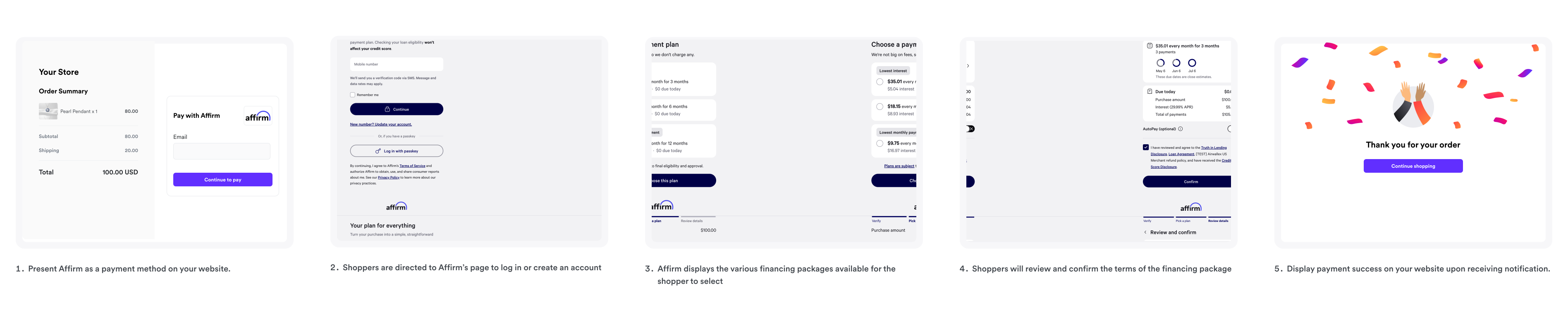
- On desktop, mobile browser, or a mobile app, after shoppers select Affirm as their payment method at checkout, they are redirected to Affirm's page to log in or create an account.
- Affirm evaluates the shopper's eligibility and presents available payment plan options.
- The shopper selects their preferred payment plan to complete the payment and is redirected back to your website.
Set up Affirm promotional messaging
Show shoppers flexible payment options before they reach checkout, which can help improve conversion by surfacing Affirm's financing packages earlier in the checkout journey.
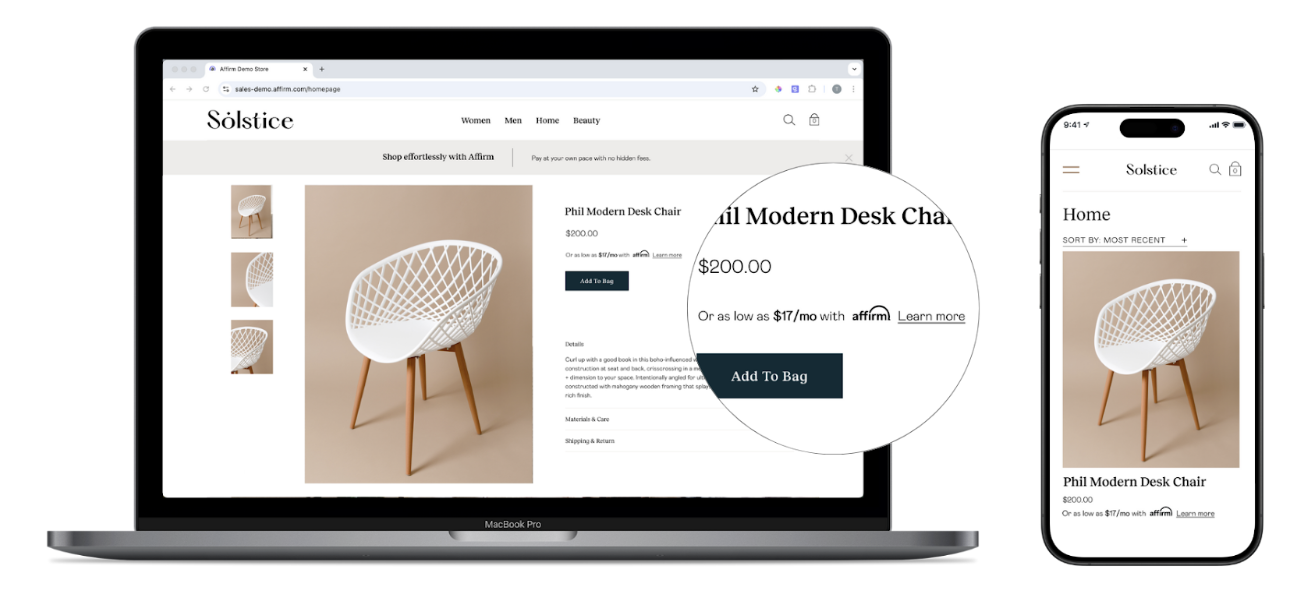
Affirm offers two ways to add promotional messaging to your storefront:
- Promos SDK: A client-side JavaScript library that renders promotional messaging components, such as "as low as" monthly pricing, directly on your pages. See Set up promotional messaging.
- Promos API: A server-side option that returns promotional messaging content programmatically. See the Promos API integration overview.
Both options require your Affirm public API key.
Get your Affirm public API key
You can retrieve your public API key from a live checkout redirect:
- Start a checkout on your store that redirects the shopper to Affirm.
- In your browser's address bar, find the
public_api_keyquery parameter in the Affirm URL. - Copy the
public_api_keyvalue and use it when you initialize the Promos SDK.
The redirect URL follows this format, with your key in the public_api_key parameter:
1https://www.affirm.com/products/checkout?public_api_key=<YOUR_PUBLIC_API_KEY>&checkout_ari=...
Manage Affirm disputes
A customer can raise a dispute within 120 days of the original transaction. The best way to resolve the dispute is to communicate directly with your customer to try and solve the issue together. If you can't reach a solution, then Affirm would step in to help solve the dispute. See Affirm's dispute flow for more details and instructions on handling Affirm disputes.