

MB WayEarly access
MB Way is available for early access
Expect limited functionality as we continue development and build the product in partnership with early users. Reach out to your Airwallex account manager or [email protected] if you would like to use this feature. Learn more about early access.

Gain access to shoppers on MB Way
MB Way is Portugal's leading mobile wallet, with a 45% share of e-commerce transactions. Developed from SIBS Multibanco, it has a consumer base of over 3.5 million individuals who make 9 million purchases each month. The MB Way wallet is supported by 28 banks, providing 95% market coverage, and consumers can store up to eight bank cards in their wallet.
Payment method properties
| Features | MB Way |
|---|---|
| Payment type | E-Wallet |
| Available for businesses registered in | AU, EU, HK, UK, US |
| Activation time for onboarding | 1 - 3 business days |
| Shopper regions (typically used by payers from) | PT |
| Processing currencies | EUR |
| Settlement currencies | EUR Or in your default settlement currency |
| Settlement schedule | T+3 business days |
| Minimum transaction amount | 0.01 EUR |
| Maximum transaction amount | 10,000.00 EUR |
| Checkout session timeout | 4 minutes |
| Recurring Payments | |
| Refunds | within 120 days |
| Partial Refunds | within 120 days |
| Multiple Partial Refunds | within 120 days |
| Disputes (chargebacks) | |
| Placing a hold (delayed/manual capture) | |
| Descriptor (what the payer will see in their transaction history) | Registered business name |
Choose the integration method that best suits your needs
Airwallex has built a range of client-side integration methods that allow you to manage your UI, minimize your implementation effort, and allow you to get to market quickly.
| Online payments via your own website/app | Online payments via ecommerce plugins | Payment links & Invoice Integrations |
|---|---|---|
| Hosted Payment Page Drop-in Element Mobile SDK Native API Subscription APIs | Shopify WooCommerce SHOPLINE Shoplazza Magento | Payment Links Xero Invoice |
Shopper experience
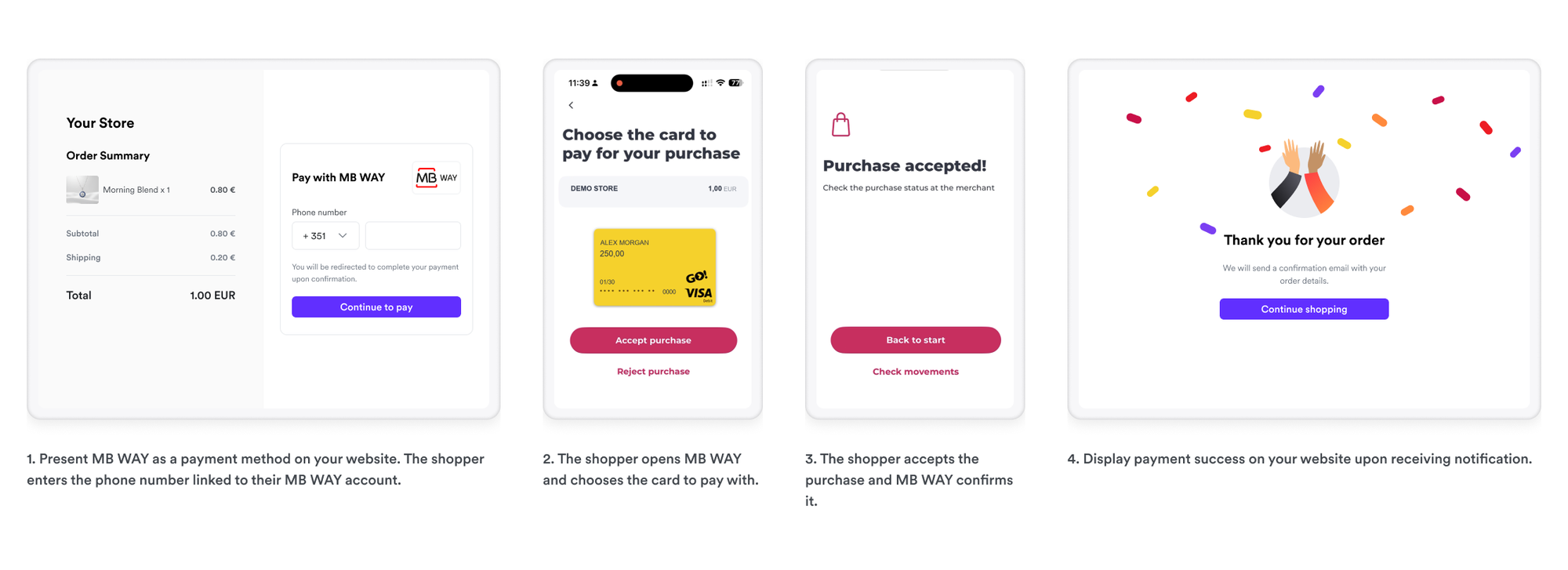
Accept MB Way payments on your website. The shopper enters their phone number at checkout and receives a push notification in the MB Way app to authorize the payment. See the checkout process below:
- The shopper selects to pay with MB Way on the merchant's checkout page
- The shopper enters their phone number associated with their MB Way account
- The shopper receives a push notification in the MB Way app to authorize the payment
- After the shopper authorizes the payment, they are redirected back to the merchant's confirmation page
Was this page helpful?