UPIEarly access

Gain access to shoppers on UPI
UPI (Unified Payments Interface) is India's most popular payment method, used by more than 350 million customers. Built by the National Payments Corporation of India (NPCI), this real-time, bank-to-bank payment method is supported by all major banks and mobile payment apps. Payments are instant and secure, and shoppers can pay online, in-app, or by scanning a QR code with their preferred UPI app for a fast, seamless checkout experience.
Payment method properties
| Features | UPI |
|---|---|
| Payment type | Online banking redirect |
| Available for businesses registered in | AU, EU, HK, SG, UK, US, JP, MY, NZ |
| Activation time for onboarding | 5 - 10 business days |
| Shopper regions (typically used by payers from) | IN |
| Processing currencies | INR |
| Settlement currencies | USD Or in your default settlement currency |
| Settlement schedule | T+3 business days |
| Minimum transaction amount | 1 INR |
| Maximum transaction amount | 100,000 INR |
| Session timeout | 12 minutes |
| Refunds* | within 180 days Full and partial refunds supported |
| Disputes (chargebacks) | |
| Placing a hold (delayed/manual capture) | |
| Descriptor (what the payer will see in their transaction history) | Registered business name |
*Refunds are credited to the shopper 2 - 7 business days after they are initiated.
Submitting invoices for transactions
Merchants accepting UPI must submit invoice details for every transaction, covering both physical and digital goods:
- Pass an invoice number (
order.invoice.number) when you create the Payment Intent. Without it, the payment cannot succeed. - Upload an invoice for the transaction. The invoice number on the uploaded invoice must be the same as the invoice number you pass when you create the Payment Intent. If an invoice is not uploaded for the transaction, Airwallex may withhold settlement of the transaction until it is. For details, see Invoices for UPI transactions.
Reusing invoice numbers
- An invoice number cannot be reused once a payment succeeds, or once a refund on that payment succeeds.
- If a payment fails, you can reuse its invoice number for a new payment.
Choose the integration method that best suits your needs
Airwallex has built a range of client-side integration methods that allow you to manage your UI, minimize your implementation effort, and allow you to get to market quickly.
| Online payments via your own website/app | Online payments via ecommerce plugins | Payment links & Invoice Integrations |
|---|---|---|
| Hosted Payment Page Drop-in Element Mobile SDK Native API | Shopify WooCommerce SHOPLINE Shoplazza Magento | Payment Links Xero Invoice |
Shopper experience
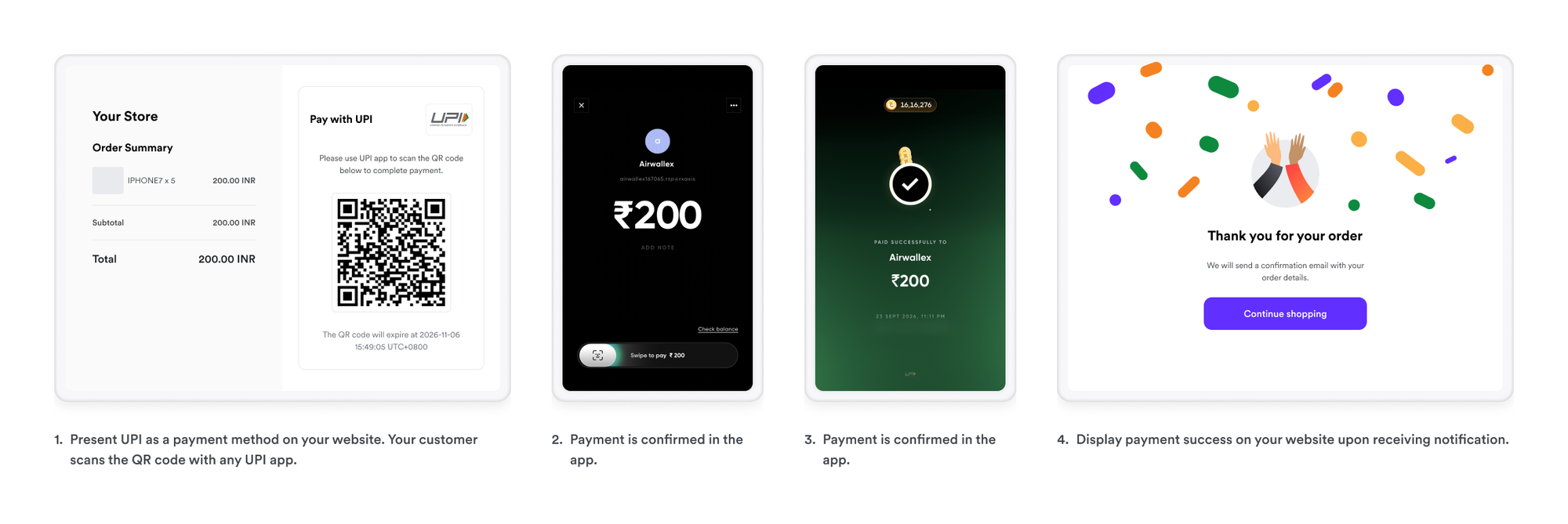
On desktop, present UPI at checkout and display a QR code for the shopper to scan with any UPI app.
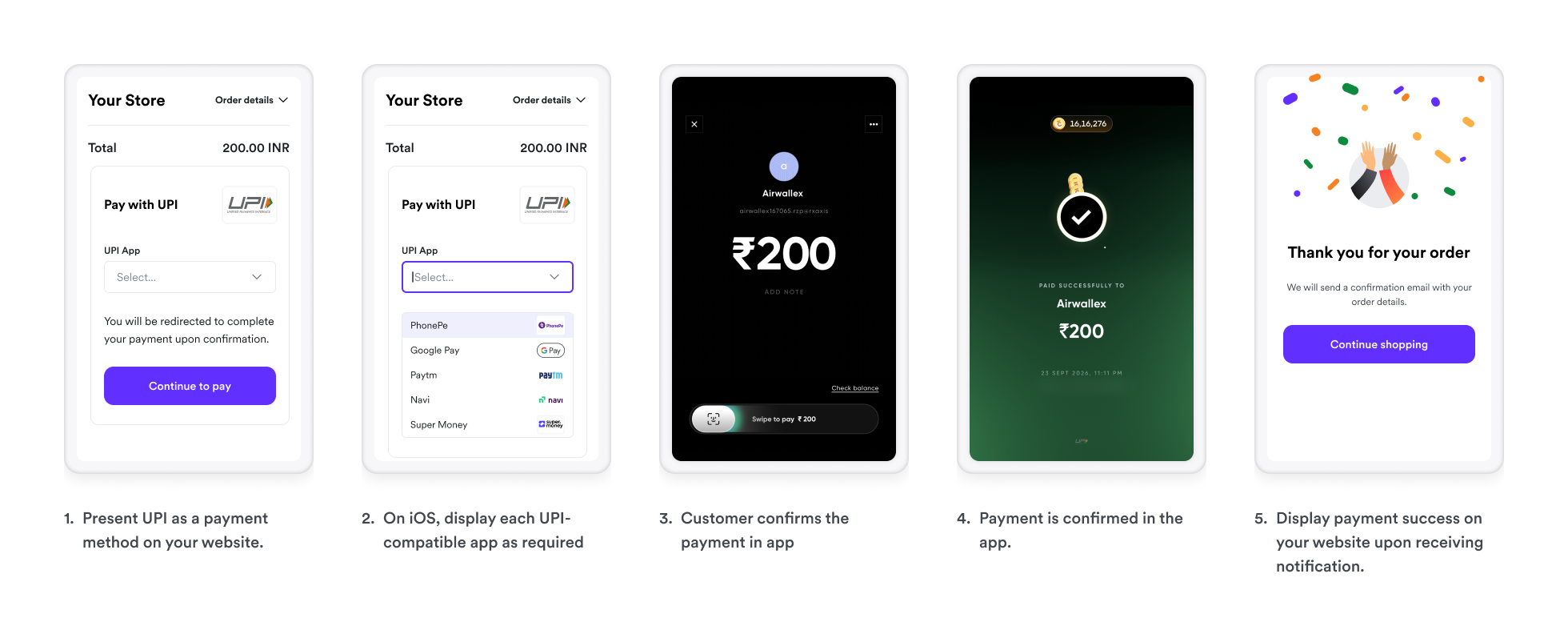
On iOS, present each UPI-compatible app at checkout so the shopper can choose one, then redirect them to that app to approve the payment. See Step 2. Confirm the Payment Intent for how to build the redirect.
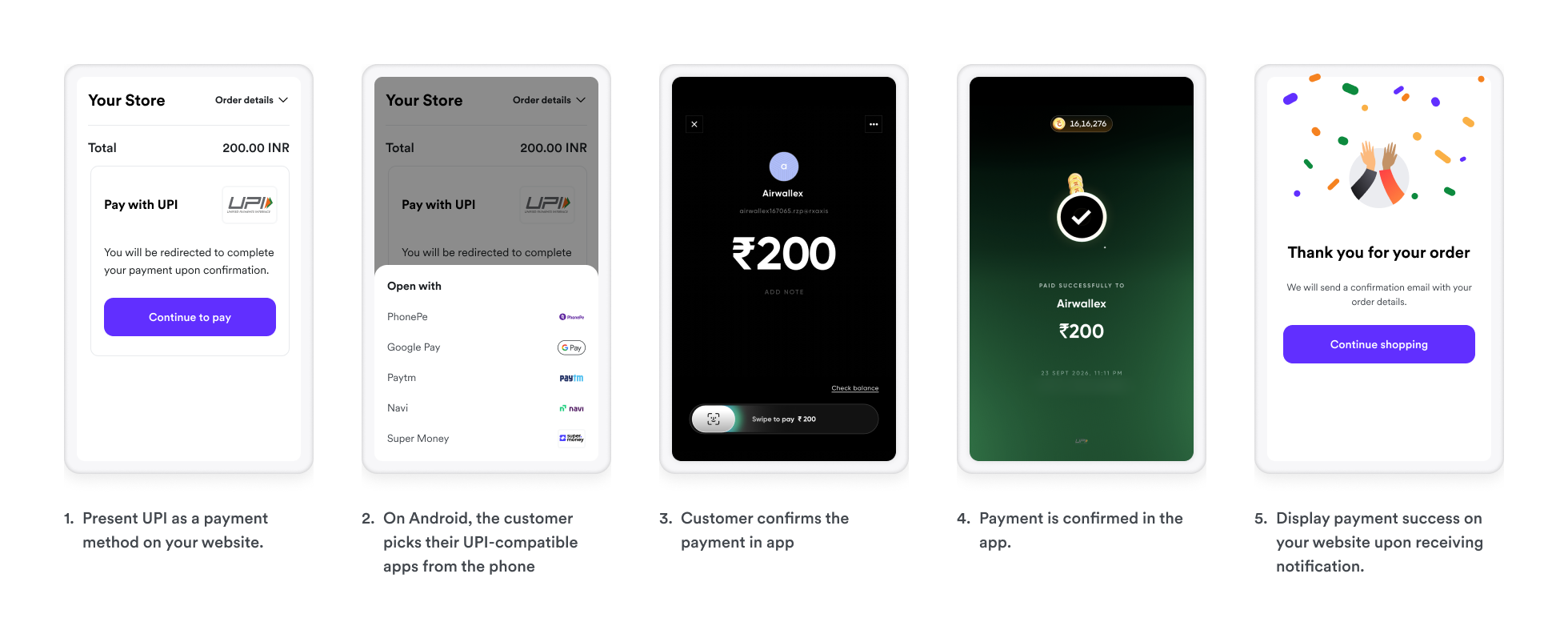
On Android, the shopper chooses from the UPI-compatible apps installed on their phone, then approves the payment in the app they select. See Step 2. Confirm the Payment Intent for how to build the redirect.