

Enable Apple Pay
You can enable Apple Pay using either the Airwallex web app or the API. Choose the option that best suits your needs.
Airwallex web app
Airwallex handles Apple Pay registration with Apple in the backend, and manages Apple Pay validation and payment processing for you. You do not need to create and maintain your own Apple Merchant ID and certificates for web integrations.
Airwallex uses its own certificates to handle validation and decryption of payment tokens for web integrations. This setup is not supported for native mobile integrations.
Follow these steps:
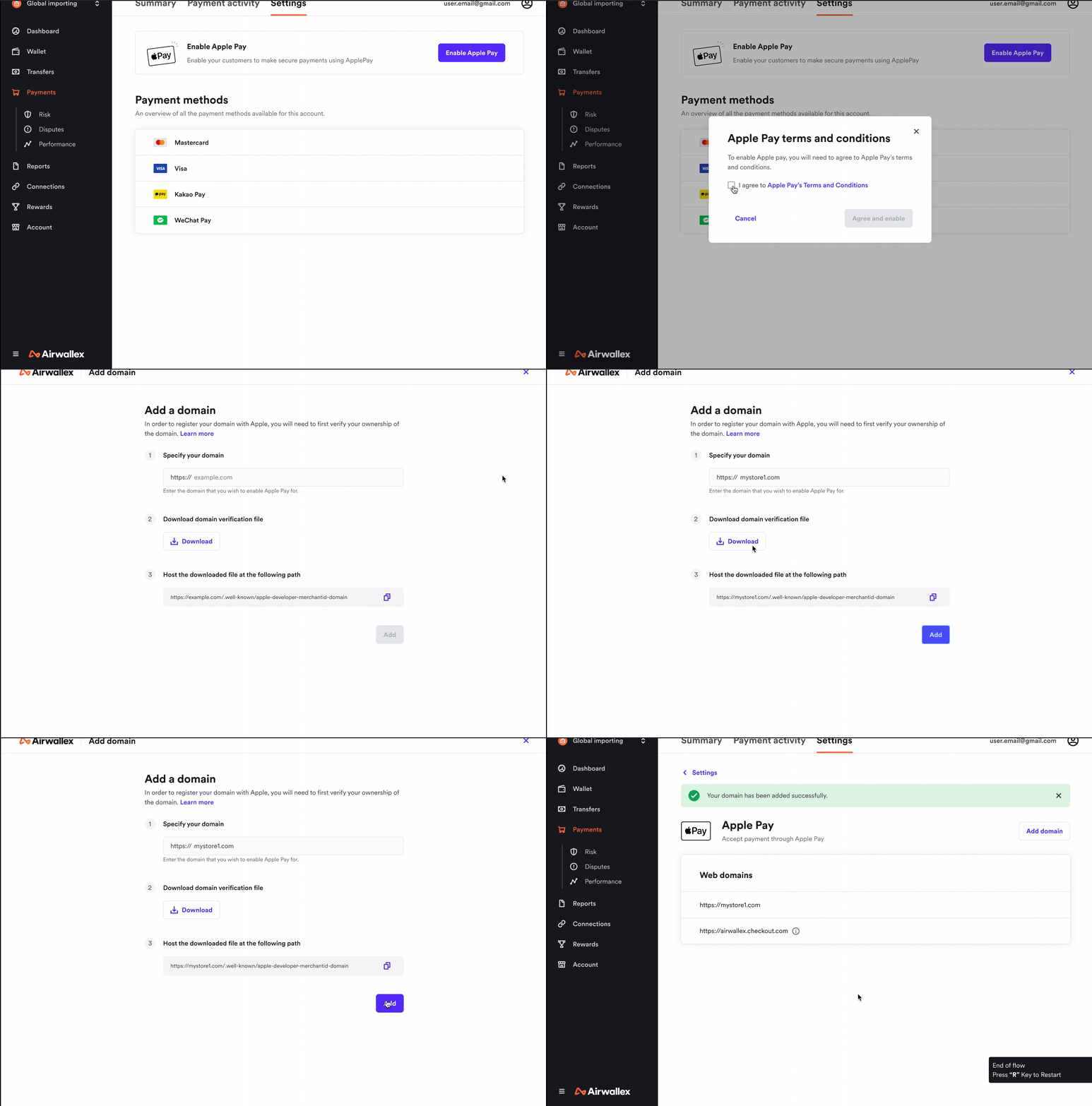
- Enable Apple Pay: In the Airwallex web app, go to Payments > Settings and enable Apple Pay. Your account must already be enabled for online payments.
- Accept Apple Pay terms and conditions: Review and accept Apple's acceptable use guidelines for websites.
- Add your domain (if required): You can skip this if you use Hosted Payment Page, Payment Links, or Shopify. For other integration methods, your domain must be verified by Apple before you can process Apple Pay payments. See Apple's merchant verification process. Then register and verify your domain:
- Specify your domain name.
- Download the Apple domain verification file.
- Host the file at
<<DOMAIN_NAME>>/.well-known/apple-developer-merchantid-domain-associationwithcontent-type: application/octet-stream. Your domain must be a valid domain name.
For iOS, in addition to the steps in the Airwallex web app, you must also complete setup in the Apple Developer portal.
Follow these steps:
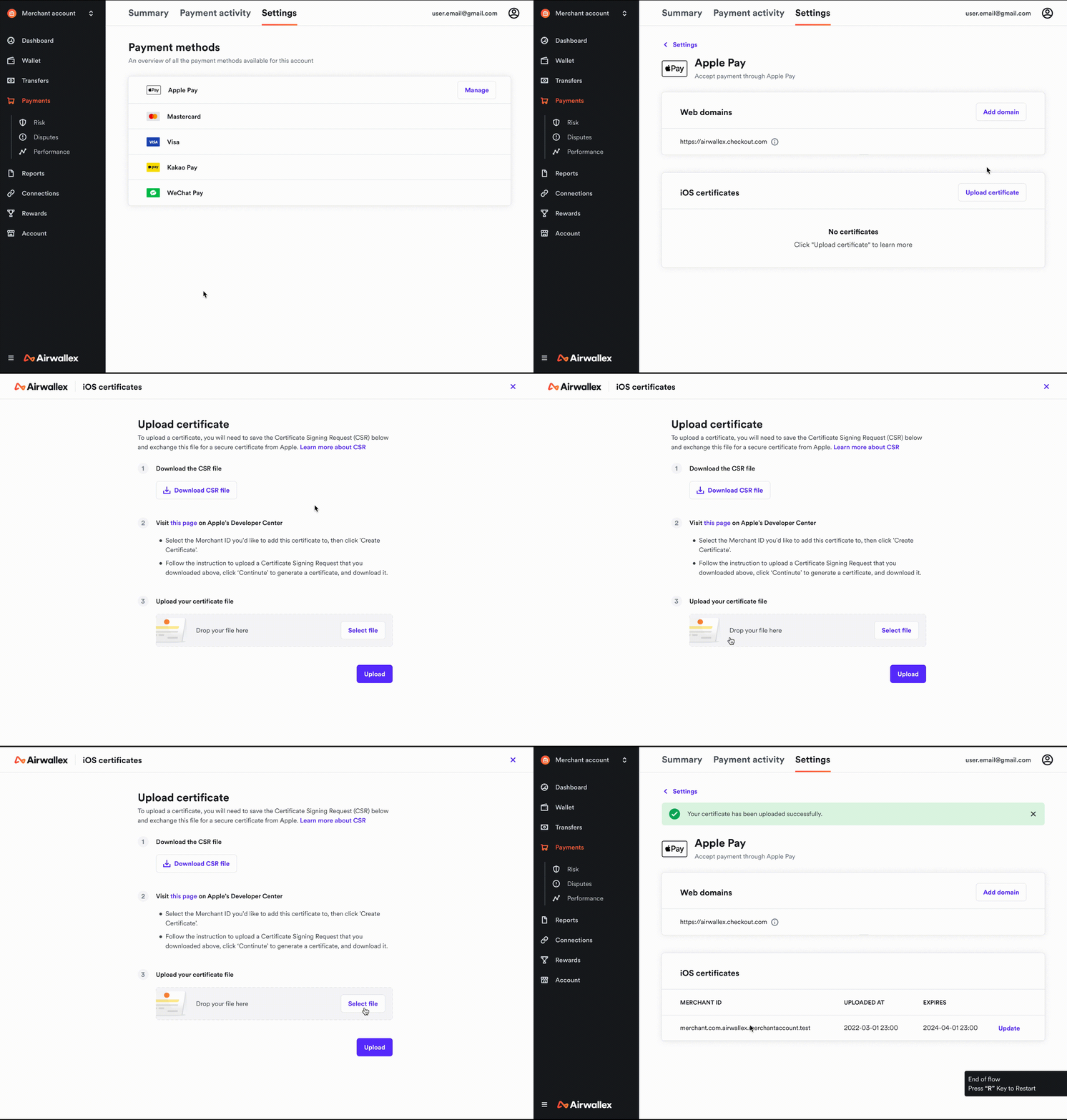
- Get CSR file from Airwallex web app: Go to Payments > Settings and click Upload certificate in the iOS certificates section. Download the CSR (Certificate Signing Request).
- Create a merchant identifier: Create a merchant identifier in Apple Developer. This merchant identifier never expires and can be used across multiple websites and iOS apps.
- Create a payment processing certificate: Create a payment processing certificate using that merchant identifier. Apple Pay servers use the certificate public key to encrypt payment data, and the certificate private key is used to decrypt data for payment processing.
- Upload certificate in Airwallex web app: Upload the certificate from the previous step in the workflow you started in step 1, then click Upload to complete registration. Airwallex can then decrypt Apple Pay payment token information for you.
API
Airwallex supports enabling and activating Apple Pay as a payment method via API. You can request Apple Pay together with other card payment methods, or separately after at least one card payment method is active on your merchant account.
Enabling Apple Pay
Start by enabling Apple Pay as a payment method on your merchant account using Enable a CapabilityAPI.
1curl -X POST https://api.sandbox.airwallex.com/api/v1/account_capabilities/payments_applepay/enable \2 -H 'Authorization: Bearer {{ACCESS_TOKEN}}' \3 -H 'x-on-behalf-of: {{CONNECTED_ACCOUNT_ID}}'
x-on-behalf-of (header): If you are a platform using Payments for Platforms and are enabling connected accounts for a new payment method, include this header with the connected account identifier.Ensure ENABLE_ACCOUNT_CAPABILITY permission is configured for new connected accounts.
Activating Apple Pay
To activate Apple Pay, complete this step if you use your own domain and are not using Airwallex hosted checkout for payment collection.
Before you activateHost Apple's domain verification file on your domain:
- Download the domain verification file.
- Host the file at
<<DOMAIN_NAME>>/.well-known/apple-developer-merchantid-domain-associationwithcontent-type: application/octet-stream.
Call the Config APIAPI with domains in the request body (up to 99 domains per request):
1curl -X POST https://api.sandbox.airwallex.com/api/v1/pa/config/applepay/registered_domains/add_items \2 -H 'Content-Type: application/json' \3 -H 'Authorization: Bearer {{ACCESS_TOKEN}}' \4 -d '{5 "items": [6 "dev.airwallex.com",7 "payno.travel.com"8 ]9 }'
Managing Apple Pay domains
You can add, list, or remove registered Apple Pay domains via Config APIs.
Add new domains
Follow the same steps in Activating Apple Pay.
Delete existing domains
Apple Pay allows up to 99 domains linked to a merchant account. Delete domains that are no longer in use. If you are unsure which domains are currently registered, list them first:
Get list of domains
1curl -G https://api.sandbox.airwallex.com/api/v1/pa/config/applepay/registered_domains \2 -H 'Authorization: Bearer {{ACCESS_TOKEN}}'
Example response:
1{2 "items": [3 "dev.airwallex.com",4 "payno.travel.com"5 ]6}
Delete domains
1curl -X POST https://api.sandbox.airwallex.com/api/v1/pa/config/applepay/registered_domains/remove_items \2 -H 'Content-Type: application/json' \3 -H 'Authorization: Bearer {{ACCESS_TOKEN}}' \4 -d '{5 "items": [6 "dev.airwallex.com",7 "payno.travel.com"8 ],9 "reason": "not being used anymore"10 }'
Payments for platforms
If you are a partner using Payments for Platforms, you can manage Apple Pay activation on behalf of connected accounts. Use your own API key and include the connected account identifier in the request headers when that connected account is the merchant of record.
The steps above also apply to platforms.
If connected accounts share the same domain(s), you do not need to register domains separately for every connected account:
- Register domain(s) with platform details (without
x-on-behalf-of), as shown in Enabling Apple Pay. - Still enable Apple Pay capability for each connected account separately.
FAQs
How do I register my payment processing certificate for iOS if I use API for Apple Pay setup?
Uploading payment processing certificates is not currently supported via API. Use the Airwallex web app for this step.
Are there any additional charges for using these APIs?
No, there are no additional charges for using these APIs.
Do I need domain activation for every connected account if all accounts share one domain?
No. You can register domains once with platform details, but you still need to enable Apple Pay capability for each connected account.