

3D Secure authentication
3-Domain Secure™ (3D Secure or 3DS) authentication provides an additional layer of security by protecting you against fraud when you accept card payments online. It requires shoppers to complete a verification step with the card issuer when paying, thereby shifting the liability for fraudulent card payments from you to the issuer in case of disputes. Airwallex supports 3DS for all card schemes that you can use to accept payments, namely Mastercard (Mastercard Identity Check), Visa (Visa Secure), and UnionPay.
To provide an optimal 3DS experience to your shopper regardless of the interface (mobile app or website), Airwallex offers a fully integrated 3DS solution supporting both 3DS 1 and 3DS 2.
-
3DS 1 is the original 3DS version that redirects shoppers to the card issuer’s site for authentication, for example, by entering a password or a code sent to their phone.
-
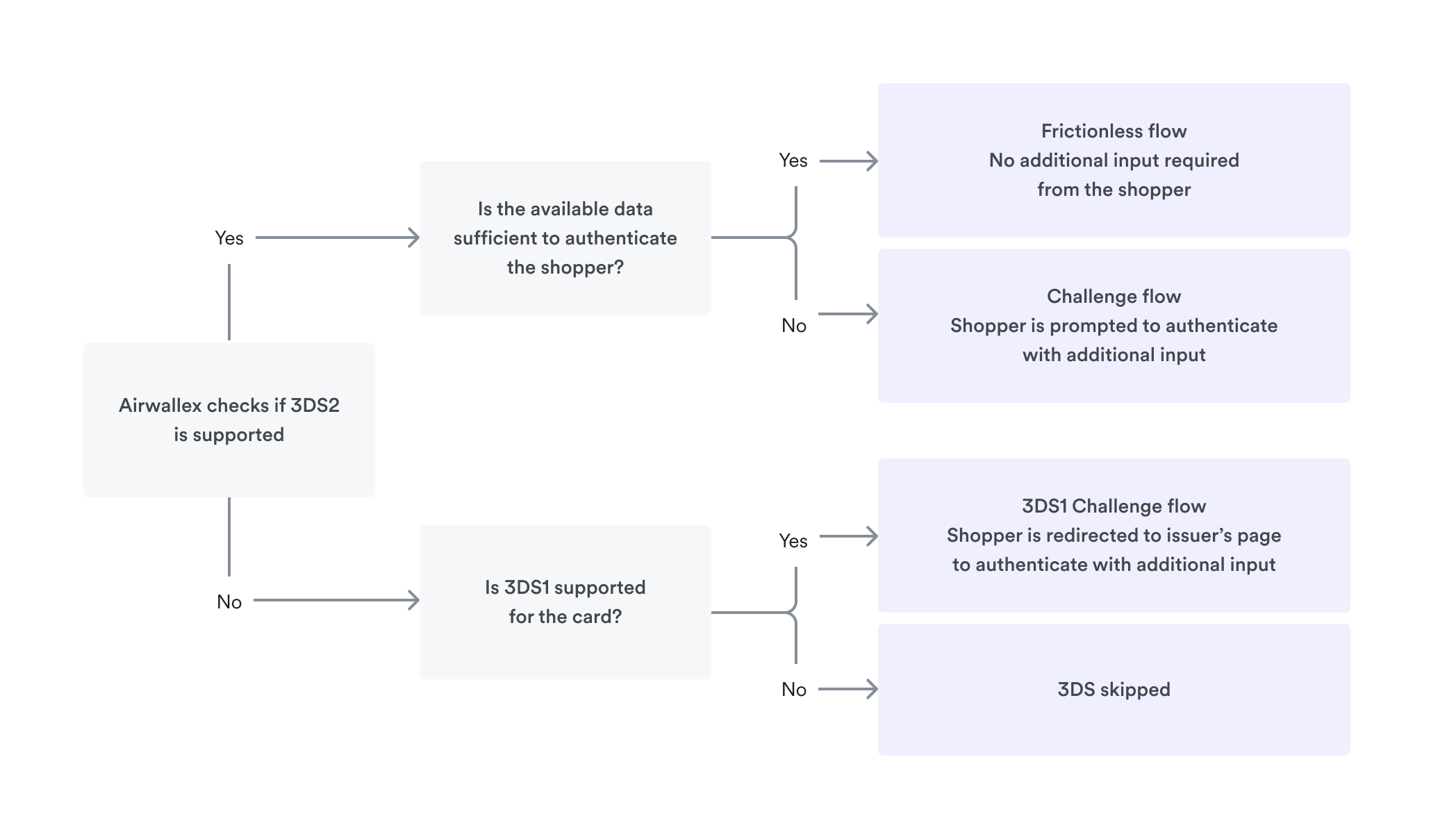
3DS 2 is the new version designed to enhance security in online purchases while providing frictionless checkouts to shoppers who are considered low risk by the card issuer. The issuer determines the risk based on the shopper information available during verification. When additional information is required to verify the shopper, the issuer presents a challenge to the shopper, for example, entering a code sent to their phone. The frictionless flow is attractive to shoppers and provides increased checkout conversion rates.
Airwallex always attempts 3DS 2 (if supported by the issuer and the card) and falls back to 3DS 1 only when 3DS 2 is not available. Rest assured that your shopper will be offered the most suitable 3DS experience (frictionless or challenge) based on the card issuer by always keeping the shopper’s checkout conversion in mind.
Account settings
By default, 3DS authentication is enabled on every payment using Airwallex's 3DS provider.
You can configure risk score ranges in the Airwallex web app so 3DS runs only when the issuer requires it.
You can override the account default on a single payment with payment_method_options.card.three_ds_action:
| Value | Description |
|---|---|
FORCE_3DS | Enforce 3DS on this payment using Airwallex's 3DS provider. |
EXTERNAL_3DS | Use your own 3DS provider. See Native API. |
SKIP_3DS | Skip 3DS regardless of the risk score. Requires approval. |
null | Use the account default. |
EXTERNAL_3DS and SKIP_3DS are accepted only after Airwallex has configured them on your merchant account. If you send a value that is not allowed, the payment request is rejected.
There is no self-serve page that lists the current account-level 3DS flags. Confirm as follows:
- Default Airwallex 3DS: no extra flag is required. A payment with
three_ds_actionomitted uses the account default. - Risk-based 3DS: the ranges you set in the web app.
EXTERNAL_3DSorSKIP_3DS: a payment that uses that value succeeds only if the flag is on. A rejection means it is not enabled.
To request EXTERNAL_3DS or SKIP_3DS, contact your Airwallex Account Manager. Include the setting you need (EXTERNAL_3DS or SKIP_3DS) and why (your own 3DS provider, or skip 3DS for your risk profile).
Integration options
3DS support is available with all our integration options: Pay by Link, Hosted Payment Page, Drop-in Element, Embedded Elements, Mobile SDK, and Native API.
- For existing Hosted Payment Page, Drop-in Element, and Embedded Elements integrations using airwallex-payment-elements JS client library, Airwallex automatically handles 3DS for your shopper – offering either frictionless or challenge flow depending on the card issuer’s requirements. The same applies to Pay by Link and Mobile SDK integrations.
Airwallex recommends that you use airwallex-payment-elements JS SDK to maximize 3DS frictionless flow for your shoppers.
- For Native API integrations, see 3DS authentication with Native API.