

How Airwallex payments work
Airwallex Payments lets you accept money from your shoppers and settle it into your Airwallex Wallet balance, while Airwallex handles connections to card schemes, local payment methods, and banks.
Regardless of which payment solution you use to get paid, the fundamental concepts of how payments acceptance with Airwallex works remain the same. We recommend you familiarize yourself with these concepts before you start processing payments.
At a high level, every payment goes through the same lifecycle:
- You create a payment when a shopper initiates checkout.
- The shopper pays using a card, local payment method, or bank transfer.
- Airwallex authorizes and captures the funds to complete the purchase.
- Funds settle into your Airwallex Wallet balance in one or more currencies.
- You can later refund the payment or handle disputes (chargebacks).
All payment activity is available in the Airwallex web app, reports, and APIs for reconciliation and analysis.
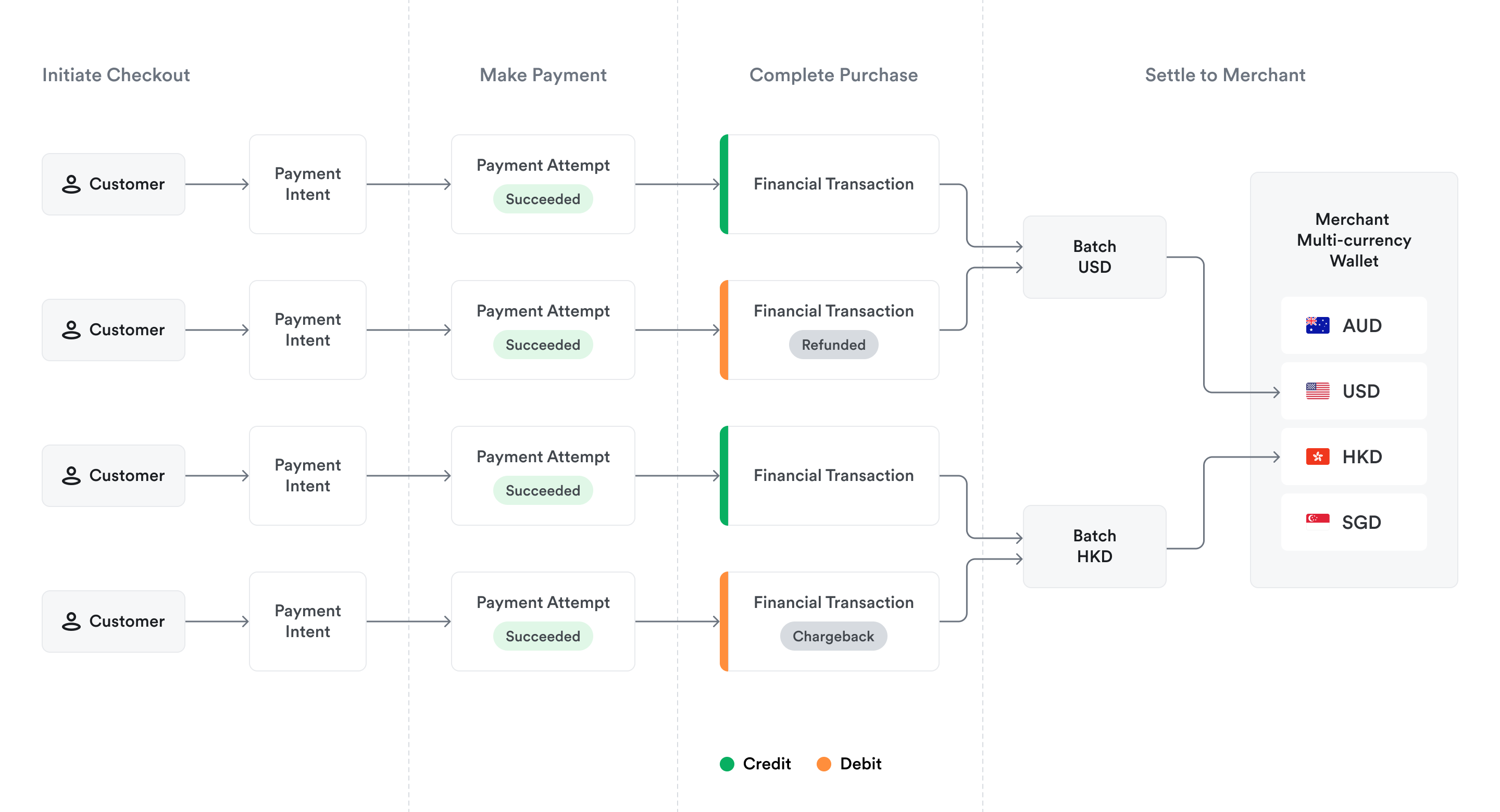
PaymentIntents
The payment journey begins when a shopper enters the checkout flow. In your system, this is associated with an order, for example, when the shopper clicks Checkout in the shopping basket. In Airwallex, this action creates a PaymentIntent object.
The PaymentIntent represents the shopper's intent to make a purchase. It becomes the single record of truth for that specific order, tracking the entire lifecycle of the order—including all attempts to pay, eventual refunds, and any disputes.
You can find all PaymentIntents in the Airwallex web app under Payments > Payment activity, or query them via PaymentIntentsAPI.
PaymentAttempts
When the shopper enters their payment details, for example, Visa card or WeChat Pay, and clicks Pay, Airwallex generates a PaymentAttempt object linked to the PaymentIntent.
The PaymentAttempt represents the shopper's attempt to fulfill their payment intent using a specific payment method. If a payment attempt fails, for example, insufficient funds, incorrect CVV, then the associated PaymentIntent remains open. This allows you to prompt the shopper to retry with a different payment method, creating a new attempt under the same intent, rather than abandoning the order entirely.
You can find all PaymentAttempts in the Airwallex web app under Payments > Payment activity, or query them via PaymentAttemptsAPI. Payment attempts for an intent are available within the payment details page in the web app.
Authorization and capture
Once a PaymentAttempt is submitted, Airwallex routes the transaction through the relevant payment network. Airwallex authorizes the payment with the shopper's bank or local payment provider and captures the funds. Note that funds may be captured immediately or later, depending on your configuration. See Place a hold on a payment method.
At this stage, you can track the status of the PaymentIntent and decide whether to fulfill the order. See Payment statuses.
Funds settlement
It is critical to understand the difference between payments and settlements.
While payments represent shopper transactions tied to your order, settlements represent the proceeds of those payments credited to your Airwallex Wallet. Successful capture of funds does not necessarily mean funds will settle in your Airwallex Wallet immediately. The settlement time is determined by the following key factors:
- Settlement schedule of the payment method, for example, T+2 days
- Reserve plan of your Airwallex account
There are additional factors that may delay settlements. For full details on how settlements work in Airwallex, see Settlements.
Financial transactions
When money actually moves, Airwallex creates one or more financial transactions, for example, principal amount, fees, refunds, or chargebacks. These financial transactions are grouped into batches for each currency, with a net sum of positive amounts for successful payments and negative amounts for refunds, disputes, or fees. Batches will be settled daily, typically at 23:00 in the local time zone where your Airwallex legal entity is registered. Once the settlement is credited to the available balance in your Airwallex Wallet, you will be able to use funds for payouts, conversions, or card spending.
You can track settlement batches in the Airwallex web app under Wallet > Wallet activity or query them via Settlement RecordsAPI.
Post-payment operations
Even after funds have settled, the payment lifecycle continues. You may need to issue a partial or full refund, or respond to a shopper dispute (chargeback).
Because the original PaymentIntent acts as the single record of truth, all post-payment operations are tied directly back to it. When you process a refund or lose a dispute, Airwallex automatically creates a negative financial transaction, which is then deducted from your next daily settlement batch.