

Settlements
Your multi‑currency Wallet in Airwallex records all funds credited and debited to your account, including settlements from payments after fees, FX, refunds, disputes, and reserves. You can withdraw, convert, or reuse funds across other Airwallex products when the funds in your Airwallex Wallet become usable.
Settling directly into your Airwallex Wallet unlocks the speed and flexibility of the Airwallex financial infrastructure:
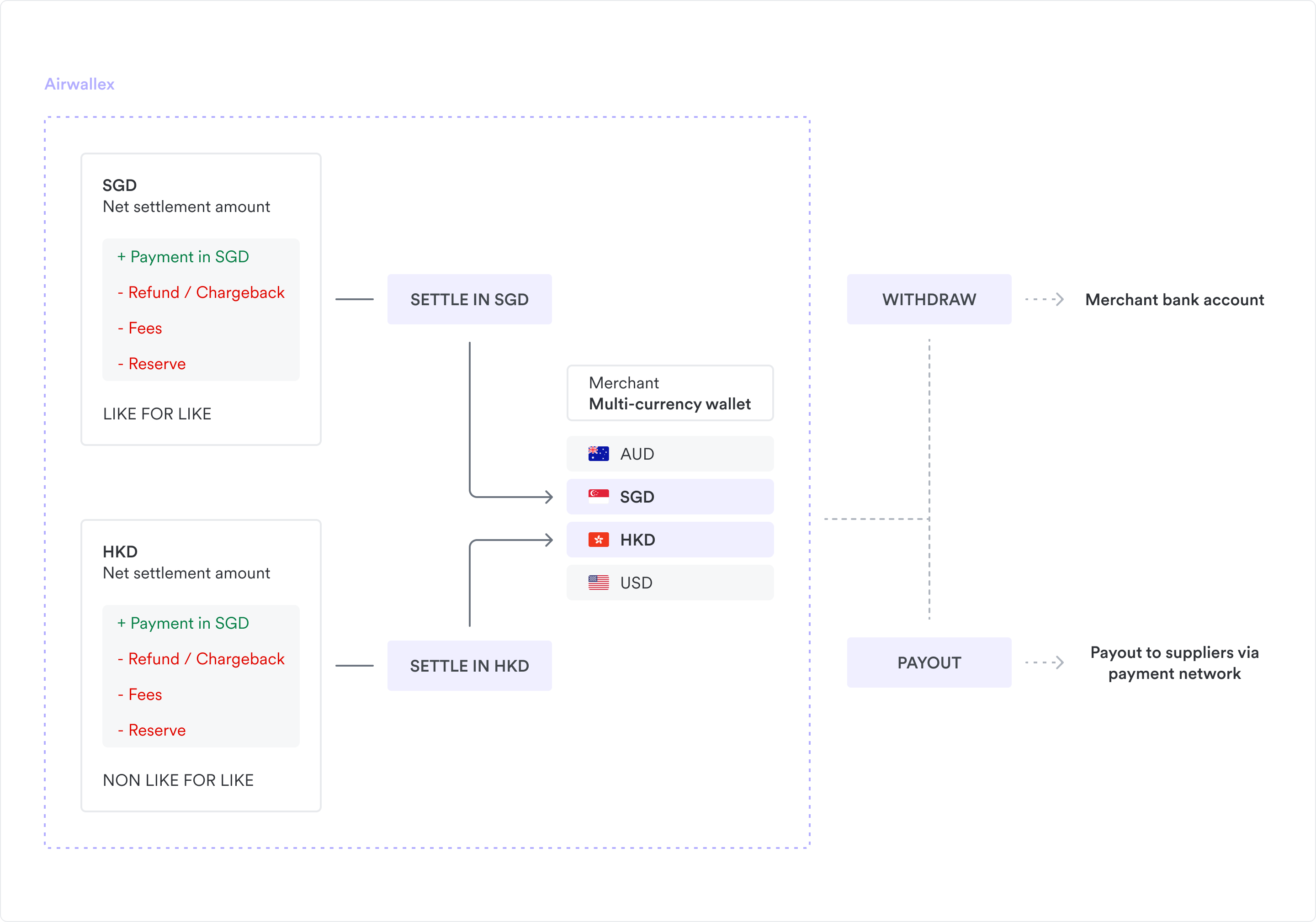
- Eliminates FX fees with like-for-like settlement: Unlike traditional gateways that settle global payments into your home currency, Airwallex Wallet is natively multi-currency. When a shopper pays in USD, the funds are routed directly to your USD balance. You can hold those funds and use them later to pay USD suppliers, avoiding double conversion and unnecessary FX fees. If you receive a payment in a currency you do not hold, Airwallex automatically converts it to your designated fallback currency balance.
- Provides faster access to funds: Funds are available for use the moment they settle into your available balance. You don't need to wait an extra 1–3 days for a payout to clear into an external bank account.
- Unifies operations: Your settlement balance is the same balance used to fund cards and payouts. This creates a closed-loop system where incoming revenue instantly funds outgoing expenses.
Understanding when funds appear in your Wallet, what affects their settlement, and how to reconcile settlements and fees is critical for your cash flow projections.
Key terms and definitions
| Term | Definition |
|---|---|
| Account balance | Your total Wallet balance, including both available balance and reserved balance. |
| Available balance | The portion of your Wallet balance that is immediately usable for payouts, card spend, or other transfers. |
| Capture date (transaction capture date) | The date when you capture a payment in Airwallex. Referred to as "T" when we describe settlement schedules, for example, T+1, T+2, and so on. |
| Fallback currency | A fallback settlement currency is the default currency Airwallex uses to settle any payment currencies that don't have like‑for‑like settlement configured in your principal settlement currencies. Those transactions are converted into the fallback currency (with FX applied) before being credited to your Airwallex Wallet. |
| Payout | A transfer from your Airwallex Wallet to your external bank account. |
| Principal settlement currencies | Currencies you configure with Airwallex to receive settlements directly (like‑for‑like) from your payments, so that transactions processed in those currencies can be credited to matching currency balances without FX conversion. |
| Reserve plan | Your configured reserve rules, for example, a 7‑day rolling reserve for card payments. These rules control how long funds stay in reserved balance before being released into available balance. For more information, see Reserve plans. |
| Reserved balance | Funds that have been settled into your Wallet but are temporarily held due to your reserve plan (for example, rolling reserves for cards and direct debits). These funds are not yet usable until they are released. |
| Settlement | When funds from a shopper's payment method, for example, card, bank transfer, local payment method, or direct debit, are moved into your Airwallex Wallet, and once released from any reserves, appear in your available balance. |
| Settlement schedule (T+N) | The number of days between the capture date (T) and when funds settle into your Wallet. For example, T+1 means funds are typically settled one day after capture. |
| Settlement time | The configured time of day (in your account's time zone) when Airwallex runs your daily settlement batch. |
| Wallet | Your Airwallex account that holds settled funds in different currencies. From your Wallet, you can make payouts, card spend, or other transfers. |
How settlement works
As a first step, you must define your principal settlement currencies and a fallback settlement currency during onboarding.
Log in to the Airwallex web app, go to Wallet > Balances tab and ensure all the desired settlement currencies are enabled and visible in your multi-currency Wallet to avoid unexpected FX conversions.
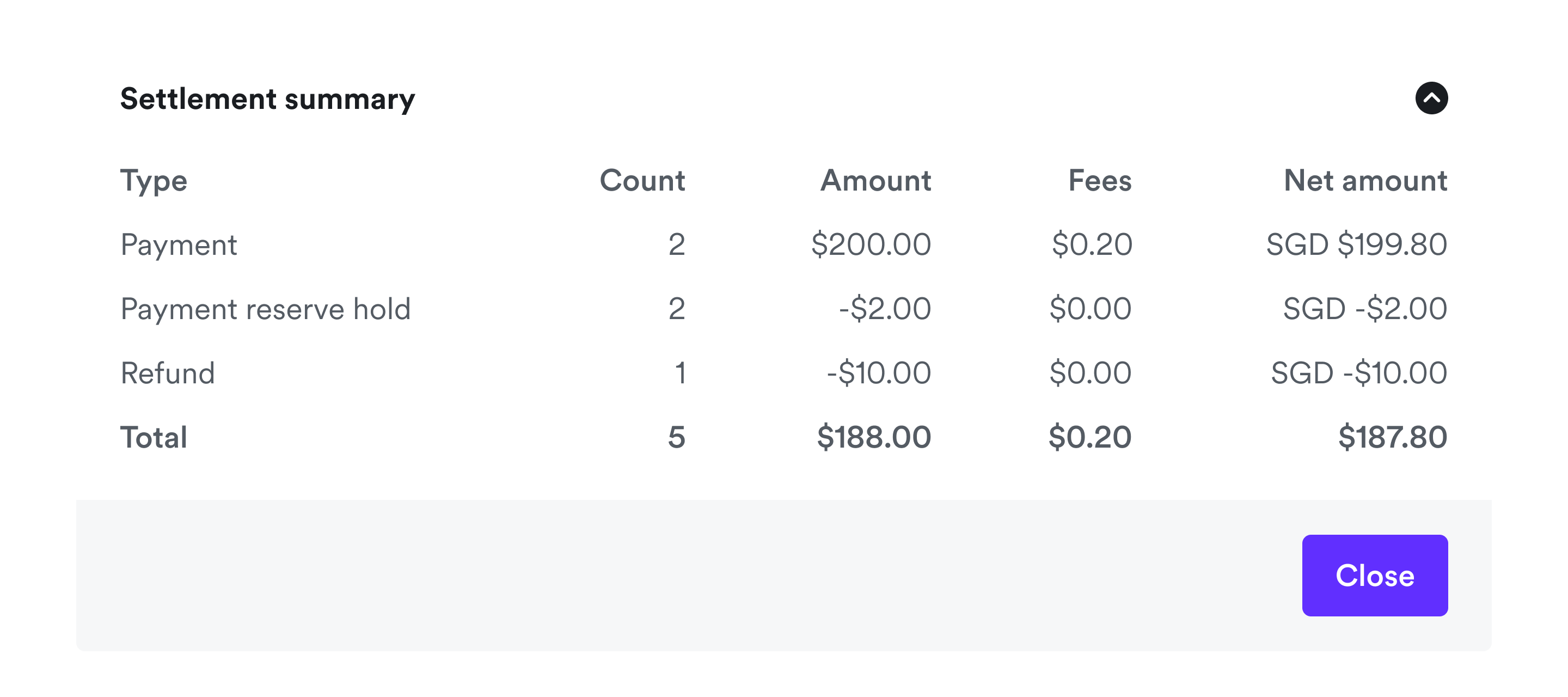
Airwallex periodically clears its position with you in batches and settles the net amounts to your account balance, in each currency where positions are cleared. For example, if you process 200 SGD in transactions, issue 10 SGD in refunds, have no chargebacks, and a 5% rolling reserve applies, Airwallex will settle a single net amount of 187.80 SGD (with fees also netted) to your SGD balance. The same process applies to each currency in your principal settlement currencies list.
For transactions processed in currencies that are not included in your principal settlement currencies, an FX conversion will be applied to your fallback settlement currency. See FX in payments. Once all fees and costs are netted, these amounts are settled to your fallback currency balance.
After a payment is captured, the following factors determine when funds become available in your Airwallex Wallet.
Settlement schedule for the payment method
Each payment method has its own processing time between capture (T) and when funds settle into Airwallex. Until this clearing process is complete, Airwallex cannot settle the funds into your Wallet. To find the settlement schedule for a payment method, click on the payment method in the overview page, and navigate to the individual payment method page, for example, Airwallex Pay.
Reserve plan for your account
If your account has a reserve plan (for example, a 7-day rolling reserve on cards or direct debits, or a fixed reserve amount), Airwallex will only move funds into your available balance after the payment method's settlement period or your reserve period—whichever is longer. This means your reserve plan may extend the time it takes for funds to become available.
You can check your reserve plan and settlement timings by logging into the Airwallex web app and navigating to Payments > Settings tab. Under Reserve plan, you can see the agreed settlement timing, for example, T+N for rolling reserve. T+0 means funds are typically settled into your Wallet on the same day, often within minutes, but not necessarily instantly for every individual payment. Actual timing depends on intraday batch runs, reserve plans, and any required risk review.
For more information on reserve plan types, see Reserve plan.
Availability timing
Funds in your available balance become immediately usable for payouts, card spend, or other transfers. The exact timing when funds become usable in your balance depend on the following factors, in addition to the settlement schedule and reserve plan.
Business days vs. calendar days
Most card and direct debit settlements count business days only.
- Business days: If a T+1 payment is cleared on a Friday, it will settle on Monday.
- Calendar days: Methods like PayNow count every day. A T+1 payment on Friday settles on Saturday.
Daily cut-off times
By default, Airwallex processes your main settlement batch once per day at a configured settlement time. For most merchants, this is 23:00 in the time zone of the Airwallex entity your account belongs to (not your own local time zone). For example:
Airwallex US (AWX US): America/New_York (US Eastern time)Airwallex Hong Kong (AWX HK): Asia/Hong_Kong (Hong Kong time)Airwallex UK (AWX UK): Europe/London (UK time)Airwallex Netherlands (AWX NL): Europe/Amsterdam (Central European time)Airwallex Australia (AWX AU): Australia/Melbourne (Australian Eastern time)Airwallex Singapore (AWX SG): Asia/Singapore (Singapore time)
When Airwallex calculates T in your settlement schedule (T+N):
- Payments captured before your daily settlement time are treated as captured on that calendar day (T).
- Payments captured at or after your daily settlement time are treated as captured on the next calendar day (T starts on the following calendar day).
For fast settlement configurations (for example, when your settlement time is set to 00:00), Airwallex runs intraday batches roughly every 20 minutes. Some fees or adjustments may still be applied in a separate end‑of‑day batch.
The settlement modes for fees include:
- Net settlement (default): In net settlement, Airwallex automatically deducts your processing fees (and any applicable reserves) before funds settle into your Wallet. What you see arriving in your available balance is already net of fees.
- Gross settlement: In gross settlement, funds are settled into your Wallet without deducting fees first. Fees are charged separately (for example, via your monthly invoice), so the amounts settling into your Wallet are closer to the original transaction totals.
Reporting and reconciliation for settlements
Once funds are settled, the following reports are available to help you reconcile with your bank account:
- Settlement report: Provides a summary of daily batch totals, net settlement amounts, fee summaries, and the available and reserved balances for each batch.
- Balance activity report: Tracks the running available balance and account balance following each settled transaction. Use this to confirm the settlement batches match the balance in your Wallet.
- Fee report: Details specific line items, such as a payment reserve hold or payment reserve release.
- Payment activity export: Allows you to match transaction IDs to their corresponding settlement batches.
To reconcile your Wallet balance with settlement batches, use the Settlement report to get the batch totals, and then use the Balance activity report to trace how these settled amounts contribute to your available balance.
For full details about these reports, see Reporting.