

Airwallex AgentOS
A production-grade toolkit for AI agents to operate on your Airwallex account
Airwallex AgentOS is a toolkit for AI agents that need to act on your production Airwallex account — reading balances, creating beneficiaries, issuing cards, building cashflow reports, and running multi-step financial workflows on your behalf.
AgentOS bundles three things:
- Connectors — the Airwallex CLI, which works against both sandbox and production, and the Airwallex AgentOS MCP server, which connects agents to your production Airwallex account.
- Skills — pre-built workflows for common tasks like contract-to-billing, beneficiary creation, card provisioning, and cashflow management.
- Plugins — one-step installation of the connectors and skills into Claude Code, Claude Cowork, and Cursor.
Building and testing an integration rather than operating on your account? See Developer connectors for the sandbox Developer MCP, the documentation-only Docs MCP, and the airwallex-dev integration skills.
Install AgentOS
The fastest way to get AgentOS is to let your agent set it up for you. Paste the prompt below into any AI assistant — it will fetch this guide and handle the installation, so you don't have to run a series of commands yourself.
1Set up Airwallex AgentOS for me. Fetch https://www.airwallex.com/docs/developer-tools/ai/agentos.md and follow the setup guide.
Prefer to run the steps yourself? Each tab below is self-contained — copy the commands into your agent and it will install the connectors and skills for you.
From inside your terminal, run:
1claude plugin install airwallex-agentos@claude-plugins-official
If you prefer to use the CLI for your agentic workflows, you can also install and authenticate the Airwallex CLI:
1curl -fsSL https://static.airwallex.com/developer-tools/airwallex-cli/install.sh | sh2airwallex auth login --prod
Restart Claude Code (or start a new session). The connectors and skills are now available to the agent.
Option A — Prompt-based (quickest)
Ask Claude to install and connect it for you. In a Claude Cowork chat, send:
Install the official Airwallex AgentOS plugin from the Claude marketplace.
Then ask Claude to connect the airwallex-agentos connector (Airwallex AgentOS MCP) so it can act on your production account.
If Claude surfaces an OAuth link in the chat, you'll need to paste the URL you receive after authenticating back into the chat to complete the connection.
Option B — Manual
-
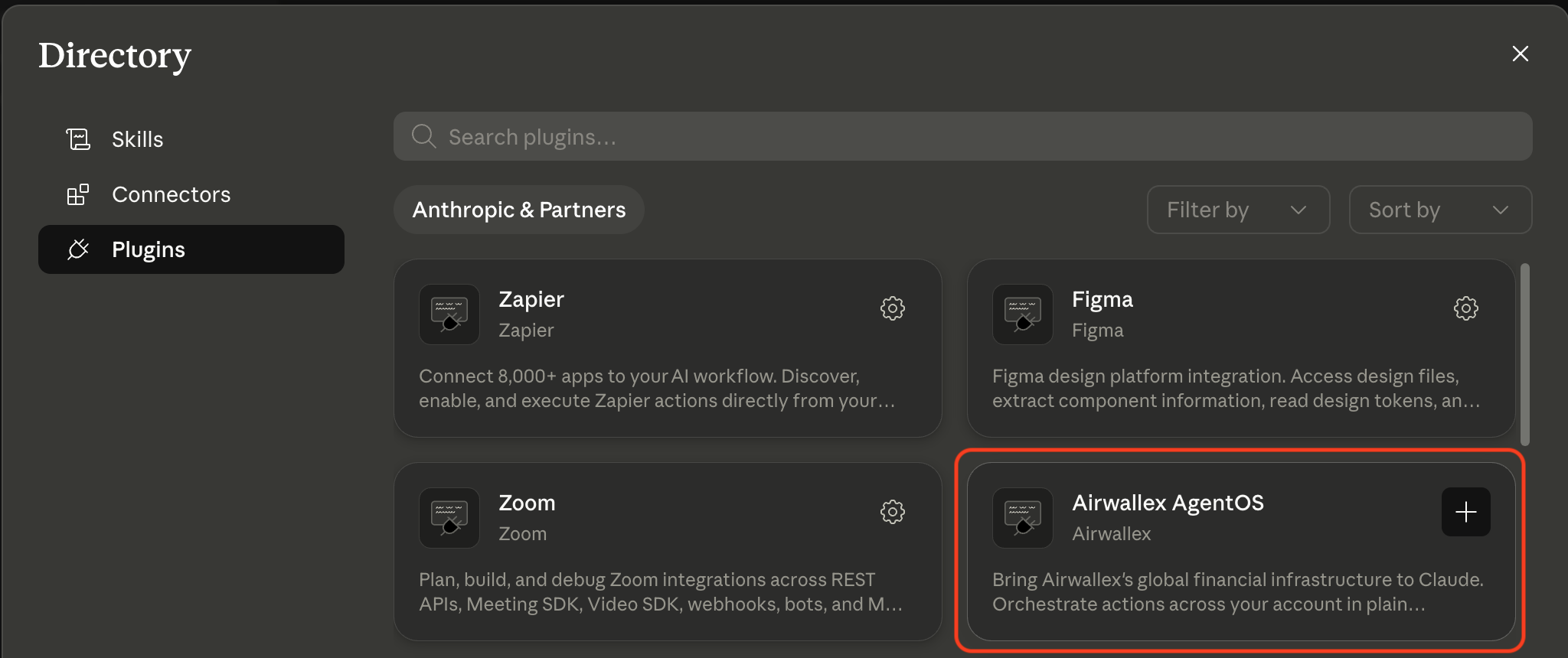
In Claude Cowork, open Settings > Extensions and install the Airwallex AgentOS plugin.
-
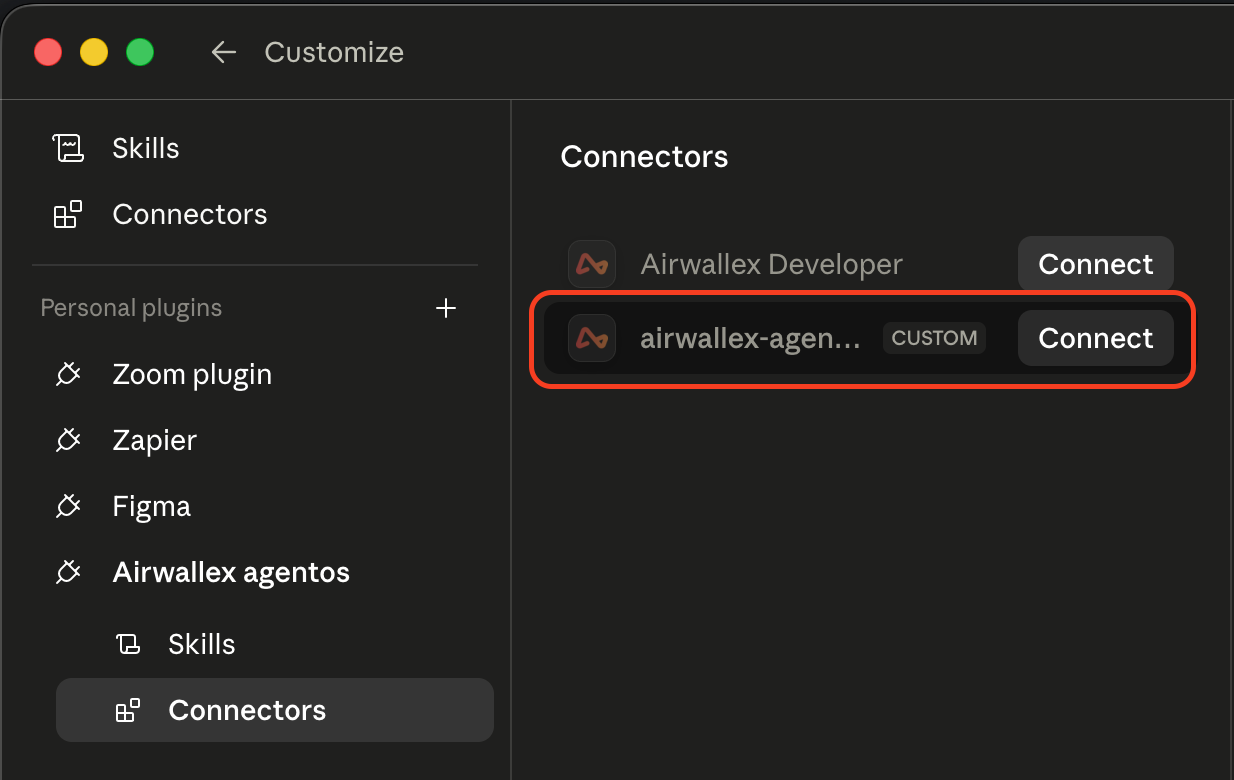
Connect the AgentOS MCP. Open Settings > Connectors and complete the OAuth flow to connect the official airwallex-agentos connector (Airwallex AgentOS MCP) so it can act on your production account.
-
Restart Claude Cowork. The connectors and skills are now available to the agent.
In Cursor, go to Settings > Plugins > Marketplace and search for airwallex. Click Get on the Airwallex agent skills for Cursor result to install the AgentOS skills.
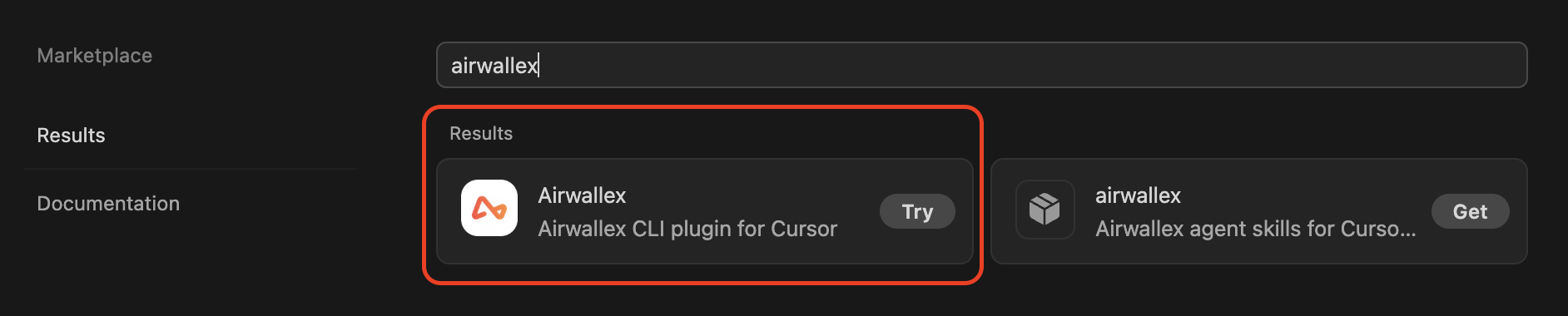
If you prefer to use the CLI for your agentic workflows, you can also install the Airwallex CLI plugin for Cursor (the Try result above), then install and authenticate the Airwallex CLI:
1curl -fsSL https://static.airwallex.com/developer-tools/airwallex-cli/install.sh | sh2airwallex auth login --prod
The connectors and skills are now available to the agent in your Cursor projects.
From inside a Codex session, run:
1codex plugin marketplace add https://github.com/airwallex/airwallex-marketplace2codex plugin add airwallex-agentos@airwallex-marketplace
If you prefer to use the CLI for your agentic workflows, you can also install and authenticate the Airwallex CLI:
1curl -fsSL https://static.airwallex.com/developer-tools/airwallex-cli/install.sh | sh2airwallex auth login --prod
Restart Codex (or start a new session). The connectors and skills are now available to the agent.
For any other agent that supports plugins, add the Airwallex marketplace and install the AgentOS plugin from it. The marketplace and all available plugins and skills live at github.com/airwallex/airwallex-marketplace — point your agent's plugin tooling at that repository.
For MCP-based agents, connect to the production endpoint https://mcp.airwallex.com/mcp and complete the OAuth flow (see Other agents under Airwallex AgentOS MCP).
For terminal-based or scripted workflows, install and authenticate the Airwallex CLI:
1curl -fsSL https://static.airwallex.com/developer-tools/airwallex-cli/install.sh | sh2airwallex auth login --prod
The CLI provides the broadest API coverage and is the recommended connector for power users, scripts, and CI. Restart your agent (or start a new session) once the plugin and CLI are in place.
Which AgentOS connector do I need?
AgentOS provides two connectors. Pick based on where your agent runs:
1Does your agent need to act on your production account?2│3├─ Yes, and it runs in a terminal (Claude Code, Cursor, Codex, CI, scripts)4│ → use the Airwallex CLI5│ Broadest API coverage. Best for power users, scripts, and CI.6│7├─ Yes, and it runs in a chat UI or hosted agent platform8│ (Claude Cowork, Claude.ai, Muse, agent frameworks)9│ → use the Airwallex AgentOS MCP10│ Production reads and writes where the agent can't shell out to a CLI.11│12└─ No — it only needs docs lookups or sandbox testing13 → that's the Developer connectors, not AgentOS14 Developer MCP and Docs MCP: sandbox and docs, no production access.
| Connector | Environment | Best for | Authentication |
|---|---|---|---|
| Airwallex CLI | Production, Sandbox | Power users; broad API coverage; scripted automation | OAuth |
| Airwallex AgentOS MCP | Production | Non-terminal agents acting on production accounts | OAuth |
Only need docs lookups or sandbox testing, with no production access? That's the Developer connectors (Developer MCP and Docs MCP), not AgentOS.
Airwallex AgentOS MCP
Airwallex AgentOS MCP lets agents read and write production Airwallex resources from non-terminal environments where the Airwallex CLI cannot run — for example, hosted chat UIs and agent platforms. It shares the safety guardrails of other AgentOS components, including no money-out actions by default. Authentication uses OAuth against your production Airwallex account.
Claude Code
1claude mcp add-json airwallex '{ "type": "http", "url": "https://mcp.airwallex.com/mcp" }'
Claude.ai / Claude Cowork
Find the official airwallex-agentos connector from Settings > Connectors and connect. Claude initiates an OAuth flow to authenticate with your production Airwallex account.
Cursor
You can use a one-click installation link or manual configuration. Cursor initiates OAuth to authenticate with Airwallex:

Or manually add to your Cursor MCP settings:
1{2 "mcpServers": {3 "airwallex": {4 "type": "http",5 "url": "https://mcp.airwallex.com/mcp"6 }7 }8}
Muse
Muse connects to the Airwallex AgentOS MCP server as a custom connector. In a Muse chat, ask it to set one up:
1Set up a custom connector to the Airwallex AgentOS MCP server following https://www.airwallex.com/docs/developer-tools/ai/agentos.md so you can work with my production Airwallex account.
Muse generates a session-specific connection link. Open it and complete the OAuth flow to authenticate with your production Airwallex account. The link can't be shared and expires with the session; if it stops working, ask Muse for a fresh one.
Other agents
Any MCP-compatible agent can connect to the remote endpoint https://mcp.airwallex.com/mcp and complete the OAuth flow against your production account.
Skills
AgentOS skills are in beta. The skill set and behavior may change before general availability.
AgentOS skills are pre-built workflows that teach AI agents how to complete common Airwallex tasks end-to-end. Each skill bundles the prompts, tool calls, and validation logic an agent needs to handle one workflow correctly through a production connector — the Airwallex CLI or Airwallex AgentOS MCP. Skills are distributed through the Airwallex marketplace and installed alongside the connectors when you install AgentOS.
Available skills
Skills run through a production connector. Install the Airwallex CLI or the Airwallex AgentOS MCP first. Skills are not available through the Developer MCP or the Docs MCP.
| Skill | Category | Description | Connector |
|---|---|---|---|
| contract-to-billing | Billing | Extract billing details from purchase orders, contracts, or quotes; match against existing resources; create invoices and subscriptions. | CLI or AgentOS MCP |
| beneficiary-creation | Payouts | Extract bank details from supplier documents, validate against per-country schemas, and create beneficiaries. | CLI or AgentOS MCP |
| card-provisioning | Issuing | Create cardholders and provision virtual or physical corporate cards with spend limits. | CLI or AgentOS MCP |
| manage-cashflow | Treasury | Aggregate multi-currency balances, receivables, and obligations; analyze FX exposure; manage indicative quotes. | CLI or AgentOS MCP |
| awx-best-practices | Foundation | Always-on guardrail for ad-hoc operations, troubleshooting, and domains not covered by a workflow skill above. | CLI or AgentOS MCP |
After installation, restart your agent (or start a new session) and the skills are available. You can confirm by asking the agent to list its available skills, or by invoking one directly (for example, "use the beneficiary-creation skill to add this supplier").
Model guidance
Skills coordinate multi-step workflows that involve document extraction and API orchestration. For best results, use a frontier model that handles long, multi-step tool use reliably and follows tool-use and safety instructions consistently.
Who it's for
- Operators running finance workflows. Use the plugin in Claude Code, Claude Cowork, or Cursor, or connect a chat agent such as Muse, to have an agent read your account, draft beneficiaries, provision cards, and build reports — with money-out actions off by default.
- Developers building custom agents. Use the Airwallex CLI or Airwallex AgentOS MCP directly from your own agent framework. For docs lookups and sandbox testing while you build, add the Developer MCP from Developer connectors.
Build with AgentOS
For prompting guidance, connector selection, and troubleshooting tips, see Build with AI.
Safety and responsibility
AgentOS connects AI agents to live Airwallex APIs. Before you deploy:
- Actions taken by agents using your Airwallex credentials are governed by the Airwallex Terms of Service.
- AgentOS components do not initiate money-out actions (transfers, FX conversions, or payouts) on your behalf. Where the underlying API supports them, the components are explicitly instructed not to execute them.
- Agent outputs are probabilistic. Always review generated code, configurations, and recommendations before acting on them in production.
Security considerations
- Treat untrusted documents and web pages as an indirect prompt injection risk. After the agent uses them with skills or MCP tools, review every tool call — including reads that could exfiltrate account data — before you approve it.
- Do not paste secrets such as API tokens into prompts. Share only what the current task needs. Start a new chat after you finish a sensitive workflow, or before you begin an unrelated one, so earlier context does not carry over.
- Prefer a frontier model for sessions that use AgentOS MCP. Weaker models are more prone to misalignment with tool-use and safety instructions.
- Only install MCP servers you trust alongside AgentOS MCP in the same client. A malicious server with poisoned tool descriptions can influence the agent to exfiltrate Airwallex data or perform unauthorized actions.
- Require manual approval for tool calls. The server annotates write tools (create, update, or delete) so clients can prompt for confirmation — but that only helps if your agent surfaces those prompts. Disable auto-approve modes such as Auto-Run or Dangerously Skip Permissions.
- After write actions, confirm the created or updated resources in the Airwallex web app or mobile app.
- At authorization time, grant only the OAuth scopes your use case needs.
- Connecting AgentOS MCP authorizes the agent platform to act on your account within those scopes. Do not add that agent to multi-user channels (for example, Slack). Anyone who can prompt the agent may perform Airwallex actions with your privileges that they cannot perform in the web or mobile apps.
- If you lose trust in a client or session, disconnect the AgentOS MCP connector to revoke its access.
Feedback
For questions or feedback about AgentOS, contact the Developer Experience team at [email protected].