

Refunds
When a shopper returns goods or services, you can issue a refund to return their funds. Make sure you do this promptly to reduce the risk of disputes.
How refunds work
You can refund a payment when all of the following are true:
- The payment has succeeded and is not in
Created,Pending, orFailedstates. Payments inCreatedorPendingstates have no funds captured yet, so there is nothing to refund. - The payment is not in dispute, i.e., no open chargeback or chargeback‑challenged state. When a payment is already in a late dispute stage, refunds are blocked to avoid double‑crediting the shopper.
- The payment method supports refunds and is still within its refund time limit (card schemes and local methods impose maximum ages for refunds).
- There is a remaining amount on the payment that can be refunded (it has not already been fully refunded or written off via chargeback).
- You have enough refundable funds in the relevant settlement currency to cover the refund (see Refundable funds).
Refunds always go back to the same payment instrument used for the original payment, i.e., same card, wallet, or account. If you want to send funds to a different destination, for example, a new bank account, you should use a separate transfer outside the refund flow.
Refundable funds
Refunds are paid from refundable funds in the same settlement currency as the original payment.
For each settlement currency, refundable funds come from:
- Unsettled funds: Recent payments that have not yet been settled to your Wallet.
- Available balance: Funds already settled to your Wallet and not reserved.
A refund succeeds only when both of these conditions are met:
- Unsettled funds and available balance (in that currency) is greater than or equal to the refund amount.
- At least one of these sources can fully cover the refund amount on its own.
If neither of these sources can fully cover the refund, the refund fails. You can retry after additional sales accrue or after topping up your Wallet.
Your reserve plan and settlement timing affect when funds are available to support refunds. See Settlements for more details.
Create refunds
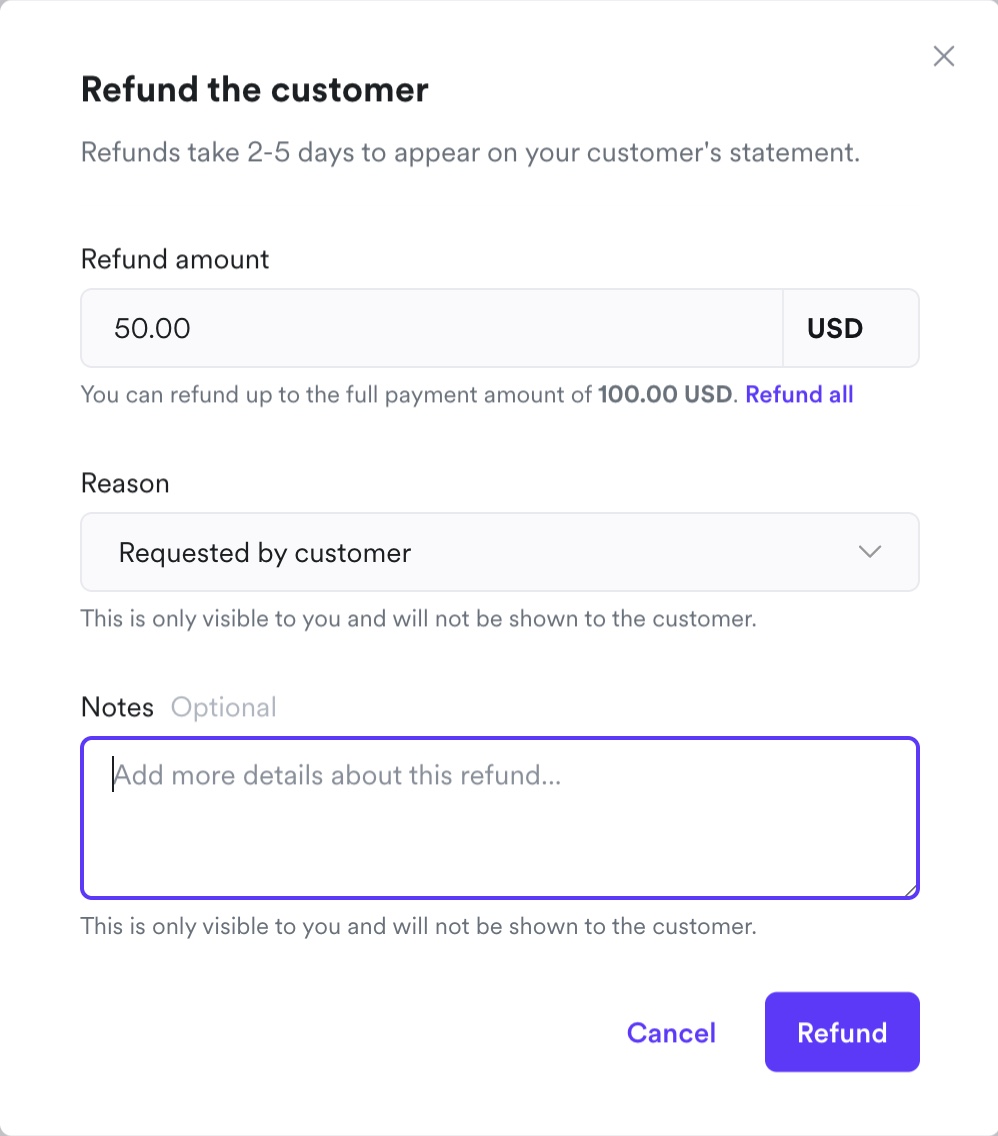
You can initiate refunds via the Airwallex web app or the Payments API. You can issue multiple partial refunds until the original captured amount has been fully refunded. Attempts to refund more than the remaining refundable amount will fail.
- Go to Payments > Payment Activity > All payments.
- Click the three dots (…) next to the payment record, and choose Refund.
- Choose a full or partial refund amount in the original payment currency.
- Click Submit to confirm the refund.
You can track the payment and refund timelines in the web app dashboard.
Call the RefundAPI endpoint to make a refund. You can provide either the payment_intent_id or payment_attempt_id of the payment against which the refund is being created. Specify the amount for partial refunds and the reason for the refund.
Example request
1 curl -X POST https://api.sandbox.airwallex.com/api/v1/pa/refunds/create \2 -H 'Content-Type: application/json' \3 -H 'Authorization: Bearer {{ACCESS_TOKEN}}' \4 -d '{5 "payment_attempt_id": "{{PAYMENT_ATTEMPT_ID}}",6 "reason": "customer requested",7 "request_id": "{{GUID}}"8 }'
Example response
1 {2 "id": "rfd_daLxZ7dkzlayAqhQqzsgNoEfPhs",3 "request_id": "fbb30283-eec7-45ca-8d98-cd18e1c70a03",4 "payment_intent_id": "int_762cmJuYzpBmfpF89zsgNoEfPhs",5 "payment_attempt_id": "att_k8Q6nMOXznIQyfUlizsgNoEfPhs",6 "amount": 49.12,7 "currency": "HKD",8 "reason": "Return good",9 "status": "RECEIVED",10 "created_at": "2020-06-28T10:14:14+0000",11 "updated_at": "2020-06-28T10:14:14+0000"12 }
Subscribe to refund webhook events to receive notification of the refund status.
If you use Automatic Currency Conversion, always base the refund on the shopper’s transaction currency and amount, for example, by retrieving the Payment Intent before creating the refund.
Refund statuses
Refunds move through four main statuses:
| Status | Webhook event | Description |
|---|---|---|
RECEIVED | refund.received | The refund has been created. This means the requested refund amount is valid, and the payment is not in dispute. |
ACCEPTED | refund.accepted | The refund has been accepted by the payment method provider. In most cases this means the refund has effectively succeeded from Airwallex’s side. |
SETTLED | refund.settled | The refund has been included in the provider’s reconciliation file and will appear in your Airwallex settlement reports and Wallet balances (often as part of a net batch amount). |
FAILED | refund.failed | The refund has been rejected, for example due to insufficient refundable funds in the relevant currency, the refund time limit being exceeded, the payment being under dispute, or provider-specific reasons. |
In some cases a refund can remain in pending settlement for longer than usual even after receiving the refund.accepted webhook. Until it reaches refund.settled, it will not appear in the settlement report or as a debit against your Wallet.
Shopper experience
After Airwallex sends the refund to the shopper’s bank or payment provider:
- Airwallex cannot see when it is posted inside the shopper’s account.
- The timing depends on the issuing bank or provider’s processing time.
For card refunds:
- The payment / refund details show an Acquirer Reference Number (ARN).
- You can share the ARN with the shopper so their bank can trace the refund.
- The ARN plus the original payment record are the standard proof; Airwallex does not issue a separate "refund receipt" PDF.
If the original card is expired or replaced, the issuer will usually route the refund to the same underlying account (for example, to a new card on that account). If the shopper still cannot see the funds, ask them to contact their bank with the ARN. If a refund is ultimately rejected and returned through the card network, the amount will be credited back to your Airwallex Wallet via a later settlement entry.
FAQ
Why can’t I see the Refund button against the payment in the Airwallex web app?
Common reasons include:
- The payment is in Created, Pending, or Failed states.
- The payment is already in a dispute / chargeback flow.
- The payment method’s refund time limit has passed.
- The payment has already been fully refunded.
Why hasn’t my shopper received the refund yet?
Check that the refund status is ACCEPTED or SETTLED. If it is, share the ARN (for cards) or relevant reference with the shopper and ask them to contact their bank or provider. If the bank cannot locate the refund with the ARN, contact Airwallex Support with the Payment ID, Refund ID and ARN so we can review further.
Can Airwallex refund my shoppers directly?
No. Refunds are created by you as the merchant (via your platform, the Airwallex web app, or the API). End customers who contact Airwallex directly are redirected to your support channels or to their card issuer.
I’m a shopper and I want a refund – what should I do?
Please contact the business you paid (the merchant) directly. Airwallex only provides payment processing and cannot issue refunds on the merchant’s behalf.