

IP whitelisting
IP whitelisting allows you to restrict which IP addresses can use your API keys to access Airwallex's API endpoints. When you configure an IP whitelist for an API key, only requests originating from the declared IP addresses are permitted. All other requests are blocked by default.
Enable IP whitelisting on production API keys whenever you have stable egress IPs. Pair it with scoped keys and other controls in API key best practices.
When an IP whitelist is configured for an API key:
- All API requests made using that key are validated against the whitelist.
- If the request originates from a whitelisted IP address, it proceeds normally.
- If the request originates from an IP address not on the whitelist, Airwallex returns a 403 error response.
Airwallex strongly recommends that platform customers implement IP whitelisting for all API keys. This is one of the most effective controls for reducing the risk of unauthorized API access and mass wallet extraction.
IP address formats
Airwallex supports IPv4 addresses in two formats:
Single IP address
Specify individual IP addresses that is allowed to use an API key.
Example: 203.0.113.50
CIDR notation
Use CIDR (Classless Inter-Domain Routing) notation to specify a range of IP addresses. CIDR notation combines an IP address with a suffix indicating the number of bits in the network prefix.
Example: 203.0.113.0/24 allows all 256 addresses from 203.0.113.0 to 203.0.113.255.
CIDR notation requires strict formatting. The IP address must be the network address for the specified prefix length. For example, 203.0.113.0/24 is valid, but 203.0.113.50/24 is invalid.
We support all CIDR prefix lengths from a minimum of /24 up to a maximum of /32. Smaller prefix values like /16 or /8 are not supported.
| CIDR suffix | Addresses allowed | Example | Range |
|---|---|---|---|
| /32 | 1 (single IP) | 203.0.113.50/32 | 203.0.113.50 only |
| /31 | 2 | 203.0.113.48/31 | 203.0.113.48 - 203.0.113.49 |
| /30 | 4 | 203.0.113.48/30 | 203.0.113.48 - 203.0.113.51 |
| /29 | 8 | 203.0.113.48/29 | 203.0.113.48 - 203.0.113.55 |
| /28 | 16 | 203.0.113.48/28 | 203.0.113.48 - 203.0.113.63 |
| /27 | 32 | 203.0.113.32/27 | 203.0.113.32 - 203.0.113.63 |
| /26 | 64 | 203.0.113.64/26 | 203.0.113.64 - 203.0.113.127 |
| /25 | 128 | 203.0.113.128/25 | 203.0.113.128 - 203.0.113.255 |
| /24 | 256 | 203.0.113.0/24 | 203.0.113.0 - 203.0.113.255 |
Invalid IP addresses
The following IP address types are not permitted in an IP whitelist:
- IPv6 addresses: Only IPv4 addresses are supported.
- Private IP addresses: Addresses in the following ranges are not allowed:
10.0.0.0/8172.16.0.0/12192.168.0.0/16
- Loopback addresses:
127.0.0.0/8 - Link-local addresses:
169.254.0.0/16 - Invalid formats: Any address not in valid IPv4 format (
x.x.x.xwhere eachxis 0-255)
Configure IP whitelist
You can configure IP whitelists for your API keys using the Developer app in the Airwallex web app.
Developer app access requires Owner, Admin, or Developer user roles.
Add IP whitelist to an existing API key
Follow these steps to add IP addresses to an existing API key's whitelist:
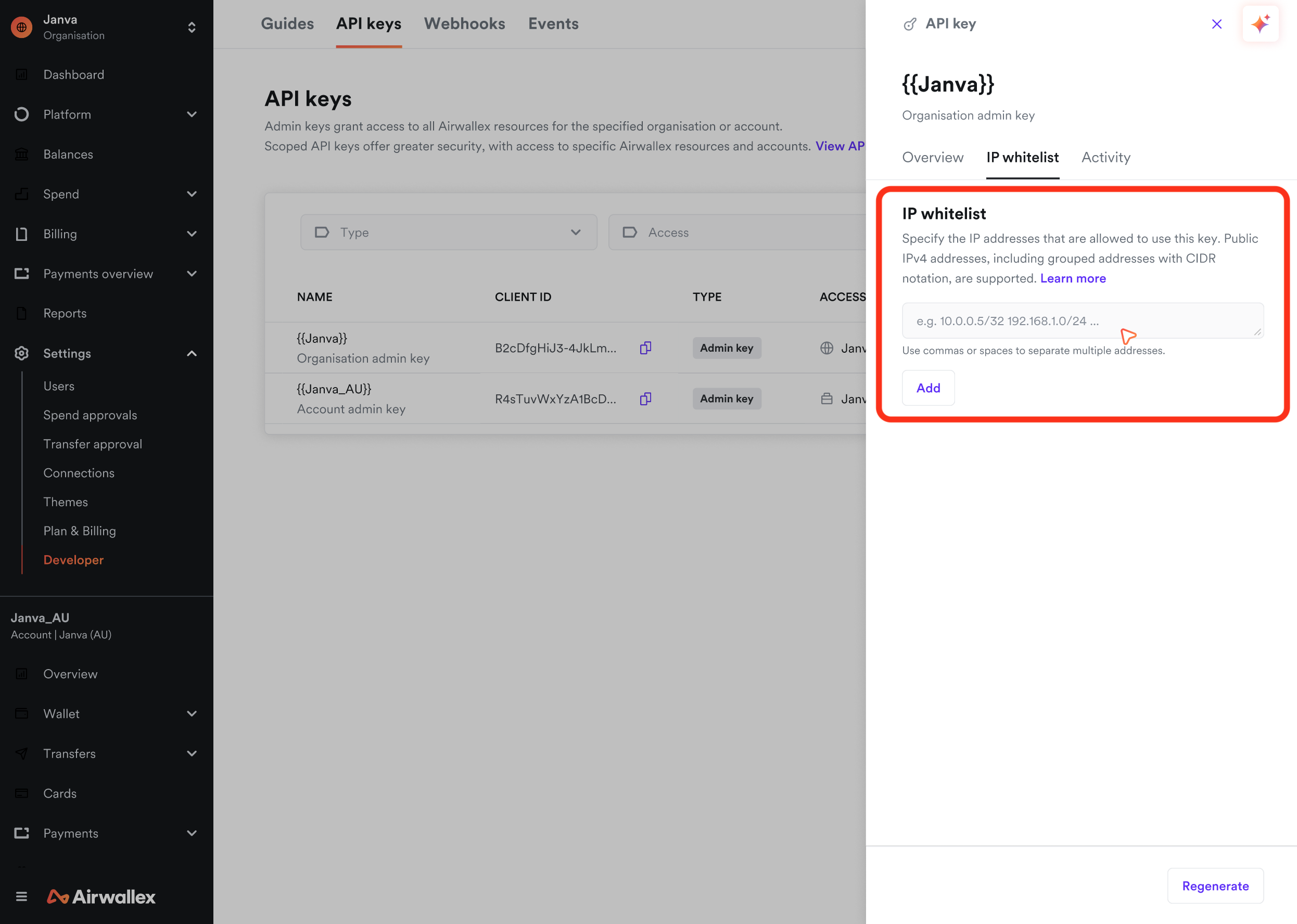
- Log in to the Airwallex web app and select Settings > Developer > API keys.
- Click on the row of the API key you want to configure to open the drawer.
- Select the IP whitelist tab.
- Enter the IP address or CIDR range you want to whitelist.
- Click Add to add the IP address or CIDR range to the whitelist.
- Repeat steps 4-5 to add additional IP addresses.
Bulk add IP addresses
You can add multiple IP addresses at once using one of the following methods:
Paste a list
- Log in to the Airwallex web app and select Settings > Developer > API keys.
- Click on the row of the API key you want to configure to open the drawer.
- Select the IP whitelist tab.
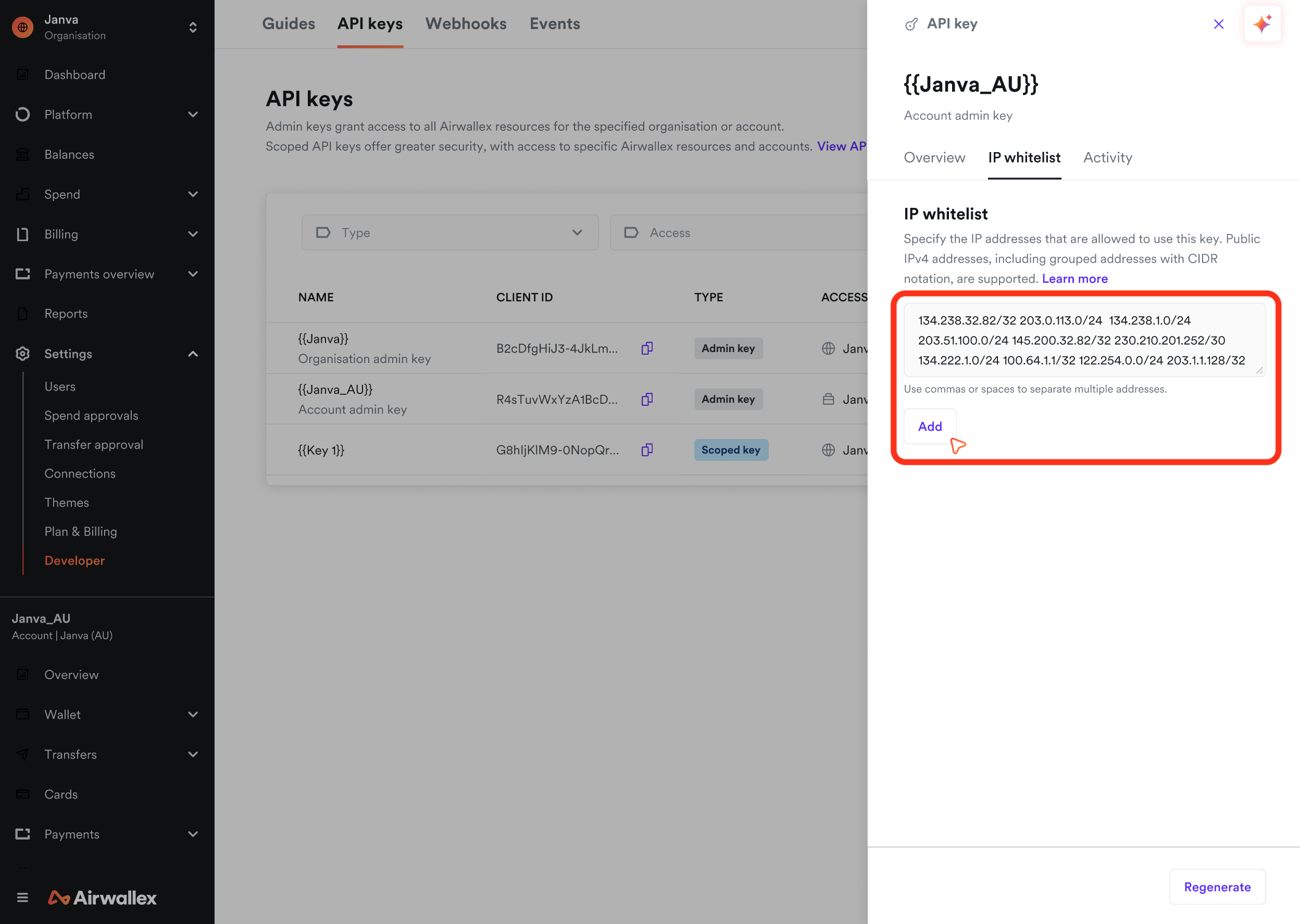
- Paste a list of IP addresses or CIDR ranges into the IP address input field. Each IP address or CIDR range must be comma-delimited or space-delimited.
- The system will parse and validate each IP address individually.
- Click Add to add all the IP addresses to the whitelist.
Copy from another API key
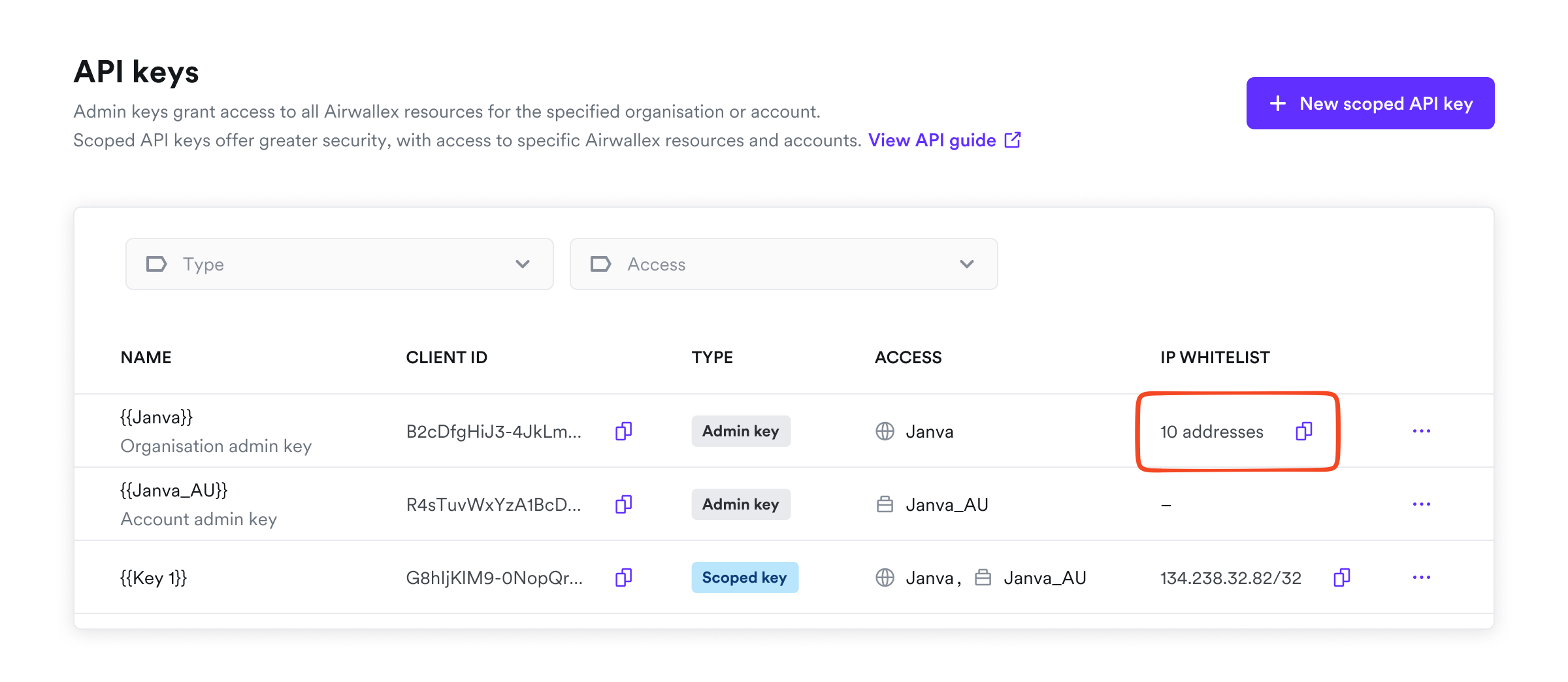
You can copy IP addresses from one API key's whitelist and paste them into another API key's configuration, making it easy to replicate IP restrictions across multiple keys.
- Log in to the Airwallex web app and select Settings > Developer > API keys.
- Copy the relevant set of IP whitelist by clicking on the copy icon.
- Navigate back to API keys and click on the row of the API key you want to configure.
- Select the IP whitelist tab.
- Paste the list into the IP address input field.
- Click Add to add all the IP addresses to the whitelist.
Remove IP addresses from whitelist
To remove an IP address from the whitelist:
- Log in to the Airwallex web app and select Settings > Developer > API keys.
- Click on the row of the API key to open the drawer.
- Select the IP whitelist tab.
- Click the delete icon next to the IP address you want to remove.
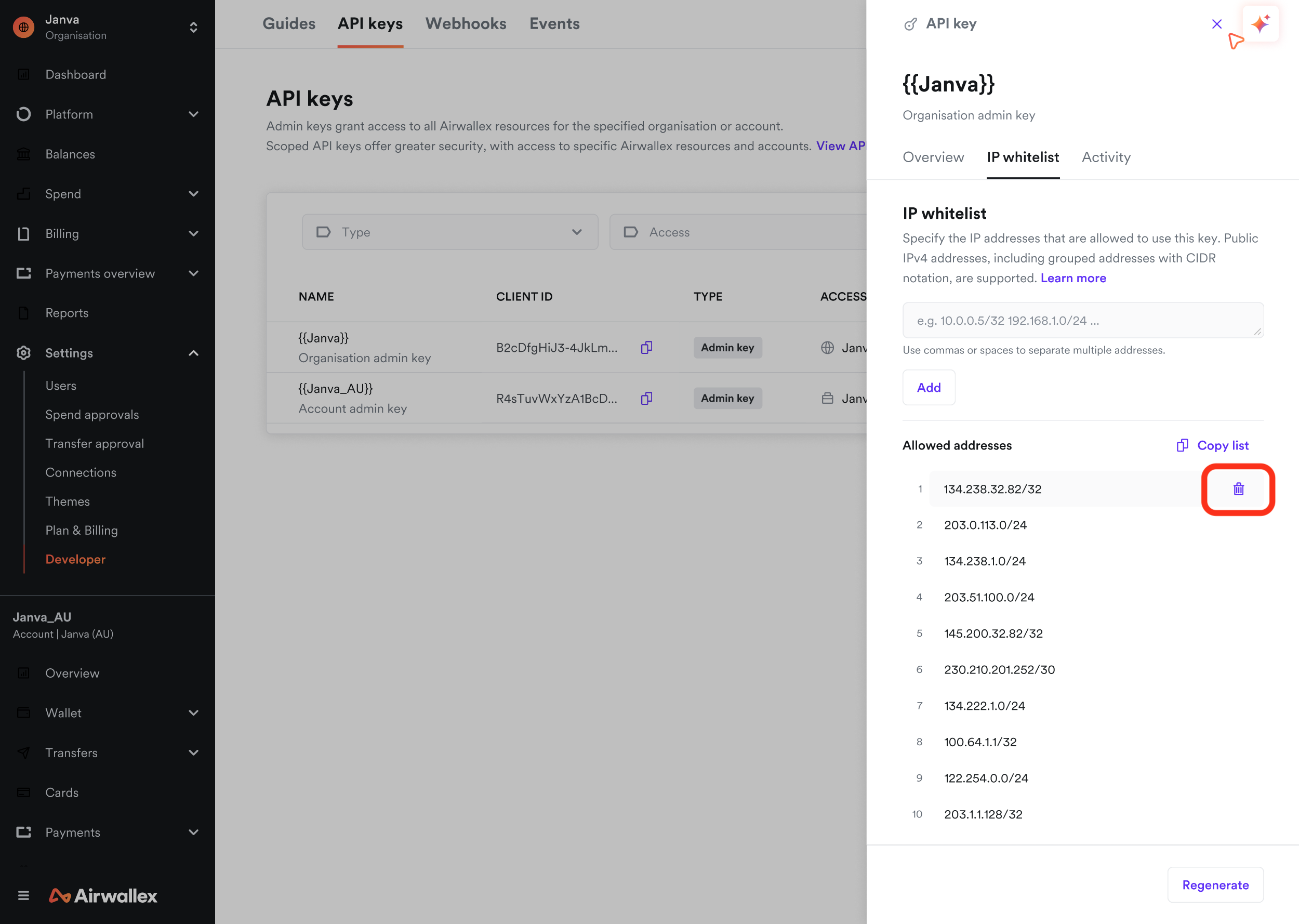
Removing all IP addresses from the whitelist disables IP whitelisting for that API key, allowing requests from any IP address.
Error response
When a request is made from an IP address that is not on the whitelist, Airwallex returns an error response with an HTTP 403 (Forbidden) status code.
1{2 "code": "forbidden",3 "message": "Access denied: IP address not whitelisted."4}
Best practices
Follow these recommendations when implementing IP whitelisting:
- Platform customers: Airwallex strongly recommends enabling IP whitelisting for all API keys. Ensure your platform routes outbound API traffic through static IP addresses, such as a NAT Gateway with a static IP on your cloud provider.
- Use specific IP addresses: When possible, use individual IP addresses rather than broad CIDR ranges to minimize exposure.
- Document your whitelist: Maintain a record of which IP addresses are whitelisted and the services or systems they represent.
- Review regularly: Periodically review your IP whitelists to remove addresses that are no longer needed.
- Plan for IP changes: If your infrastructure uses dynamic IP addresses, ensure you have a process to update whitelists when IPs change.
- Test before enforcing: Before enabling IP whitelisting in production, verify that all required IP addresses are included in the whitelist to avoid service disruptions.