

Save and reuse payment details
Both Airwallex iOS SDK and Airwallex Android SDK support recurring payments with certain payment methods.
Recurring payments involves three types of payment flows:
- Save payment details
- Subsequent customer-initiated transaction (CIT)
- Subsequent merchant-initiated transaction (MIT)
See integration steps for each scenario, and use tabs for platform-specific steps.
Save payment details
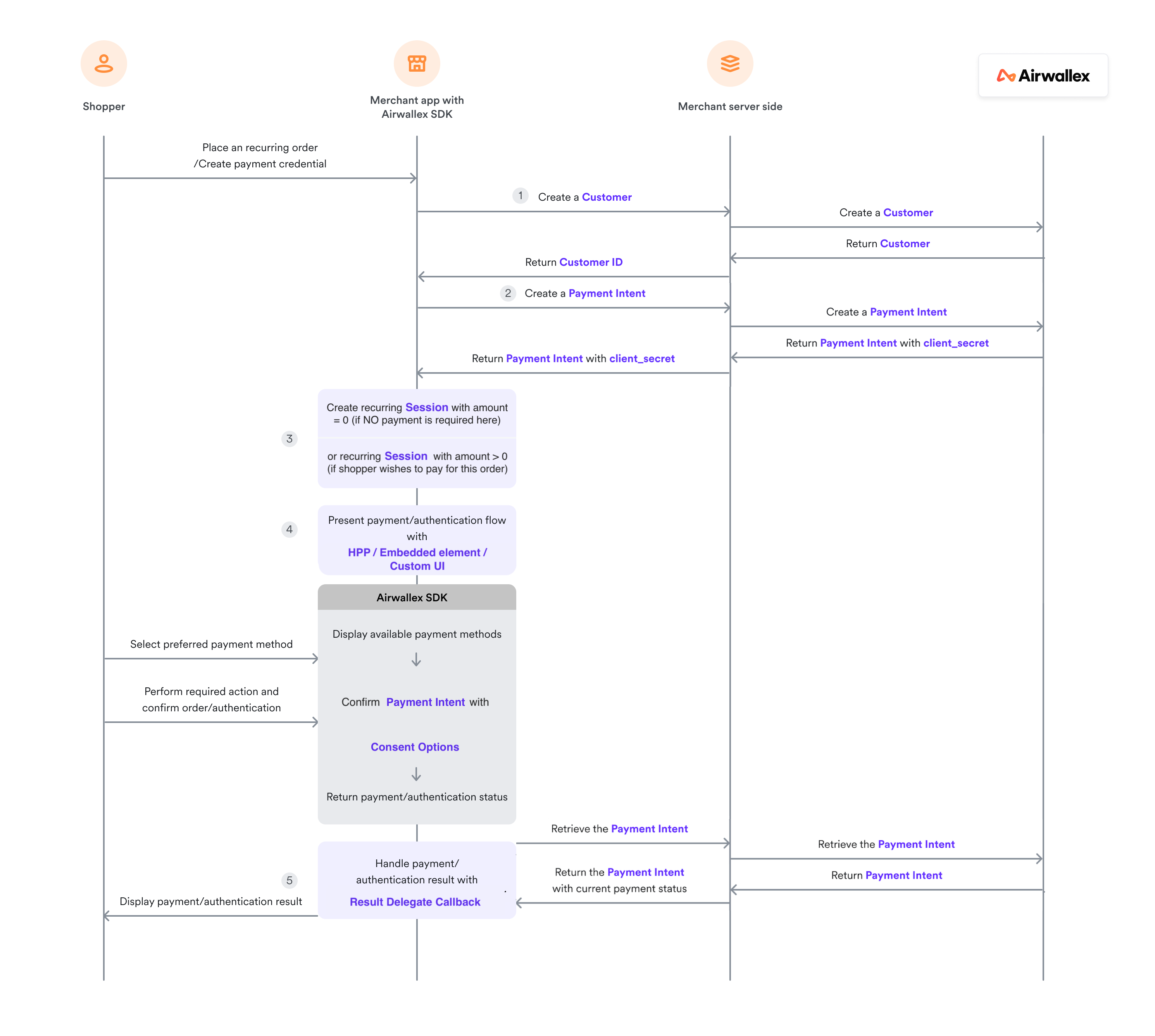
Prepare payment session
Follow Prepare payment session to create a customer, payment intent, and payment session.
You must set PaymentConsentOptions when creating the payment session to save payment method for future payment.
1let paymentConsentOptions = PaymentConsentOptions(2 nextTriggeredBy: .customer, // or .merchant3 merchantTriggerReason: .unscheduled // or .scheduled4)56let session = Session(7 paymentIntent: paymentIntent,8 countryCode: "Your country code",9 paymentConsentOptions: paymentConsentOptions, // Required for recurring10 returnURL: "myapp://payment/return"11)
Present payment flow
Present the payment flow using AWXUIContext:
1let configuration = AWXUIContext.Configuration()2configuration.layout = .tab // or .accordion3configuration.launchStyle = .push // or .present45AWXUIContext.launchPayment(6 from: "hosting view controller which also handles AWXPaymentResultDelegate",7 session: session,8 configuration: configuration9)
Handle authentication result
In AWXPaymentResultDelegate, handle authentication result to present it to the shopper:
1func paymentViewController(_ controller: UIViewController?, didCompleteWith status: AirwallexPaymentStatus, error: Error?) {2 // call back for status success / in progress / failure / cancel3}
If the payment consent is created during payment process, you can implement this optional function to get the ID of this payment consent for future use:
1func paymentViewController(_ controller: UIViewController?, didCompleteWithPaymentConsentId paymentConsentId: String) {2 // Store consent ID for future payments3}
Retrieve the Payment Intent API from your server to query payment result and pass it to client app.
-
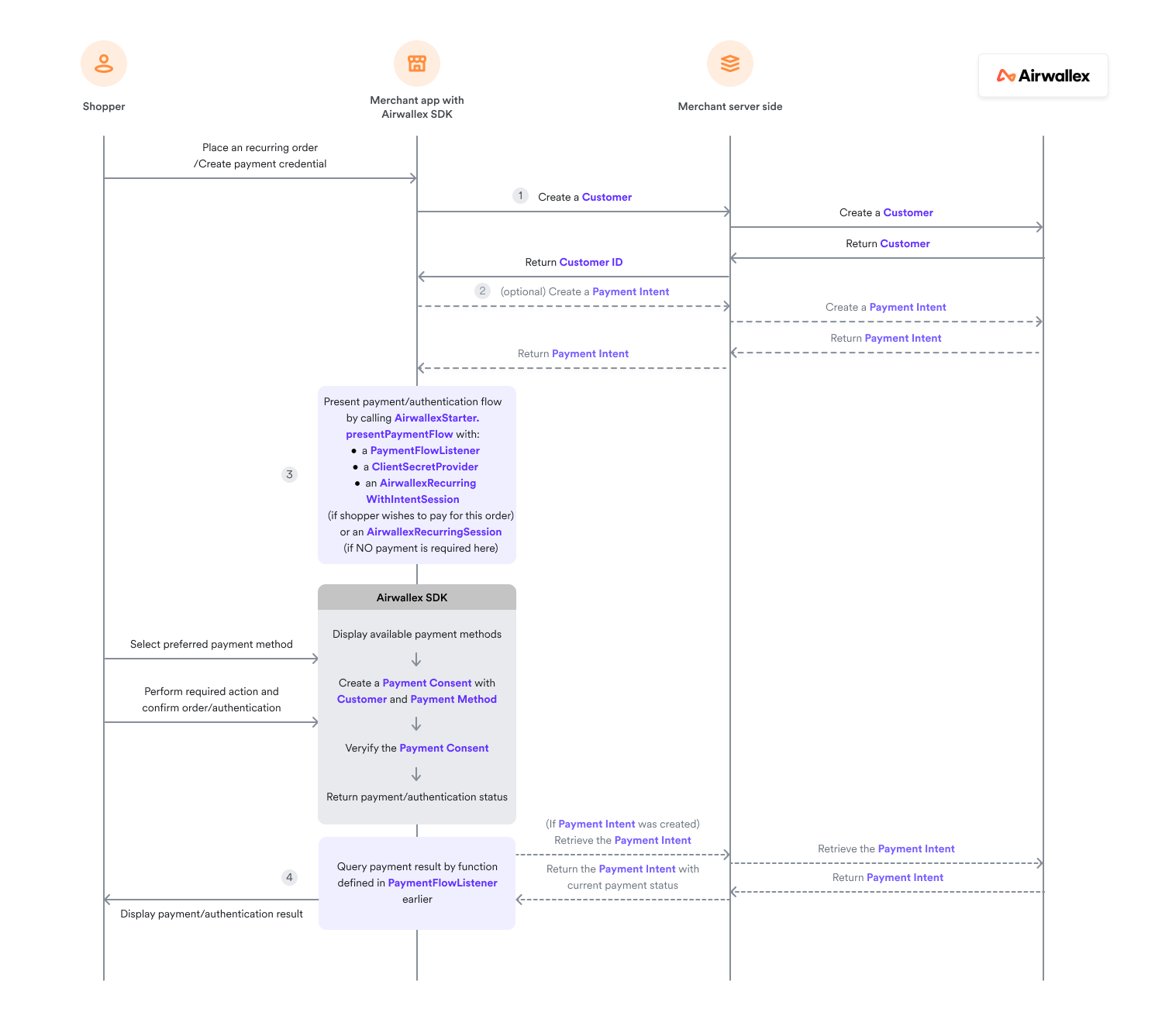
Create a customer object and pass it to your server if it is a new customer. Recurring payment requires a customer ID to be initiated.
From your server, Create a Customer API with customer data received from client app and save the
Customer IDreturned. -
(Optional) If the shopper wishes to pay for the first order
Your client app will need a
PaymentIntentto form a payment session for Airwallex SDK to present payment flow.From your server, access Airwallex API to Create a Payment Intent API and pass the
PaymentIntentreturned to client app. -
Call
AirwallexStarter.presentPaymentFlowto present the payment flow or the authentication flow to the shopper.a. PaymentIntent was created
Call
AirwallexStarter.presentPaymentFlowwith anAirwallexRecurringWithIntentSessionand aPaymentResultListenerto present payment flow to the shopper. See sample code below for parameters required to create anAirwallexRecurringWithIntentSession.Java1val session = AirwallexRecurringWithIntentSession.Builder(2 paymentIntent = requireNotNull(3 paymentIntent,4 { "PaymentIntent is required" }5 ),6 customerId = requireNotNull(7 paymentIntent.customerId,8 { "CustomerId is required" }9 ),10 nextTriggerBy = nextTriggerBy,11 countryCode = Settings.countryCode12 )13 .setRequireCvc(requiresCVC)14 .setMerchantTriggerReason(if (nextTriggerBy == PaymentConsent.NextTriggeredBy.MERCHANT) PaymentConsent.MerchantTriggerReason.SCHEDULED else PaymentConsent.MerchantTriggerReason.UNSCHEDULED)15 .setReturnUrl(Settings.returnUrl)16 .setAutoCapture(Settings.autoCapture)17 .build()18AirwallexStarter.presentPaymentFlow(this, session,19 object : Airwallex.PaymentResultListener {2021 override fun onCompleted(status: AirwallexPaymentStatus) {2223 }24 }25 )b. NO payment is required here
Call
AirwallexStarter.presentPaymentFlowwith anAirwallexRecurringSessionand aPaymentResultListenerto present the authentication flow to the shopper. See sample code below for parameters required to create anAirwallexRecurringWithIntentSession.Java1val session = AirwallexRecurringSession.Builder(2 customerId = customerId,3 currency = currency,4 amount = orderAmount,5 nextTriggerBy = nextTriggerBy,6 countryCode = countryCode // Alpha-2 country code of shopper region7)8 .setShipping(shipping)9 .setRequireCvc(requiresCVC)10 .setMerchantTriggerReason(if (nextTriggerBy == PaymentConsent.NextTriggeredBy.MERCHANT) PaymentConsent.MerchantTriggerReason.SCHEDULED else PaymentConsent.MerchantTriggerReason.UNSCHEDULED)11 .setReturnUrl(Settings.returnUrl)12 .build()1314AirwallexStarter.presentPaymentFlow(this, session,15 object : Airwallex.PaymentResultListener {1617 override fun onCompleted(status: AirwallexPaymentStatus) {1819 }20 }21) -
In your
PaymentFLowListener, handle the authentication result returned from SDK and present it to the shopper.If
PaymentIntentwas created earlier, inonSuccessfunction above, ask your server to retrieve the payment result. From your server, retrieve the Payment Intent API after SDK has confirmed it with Airwallex API, and pass the payment result to your client app.
Subsequent customer-initiated transaction (CIT)
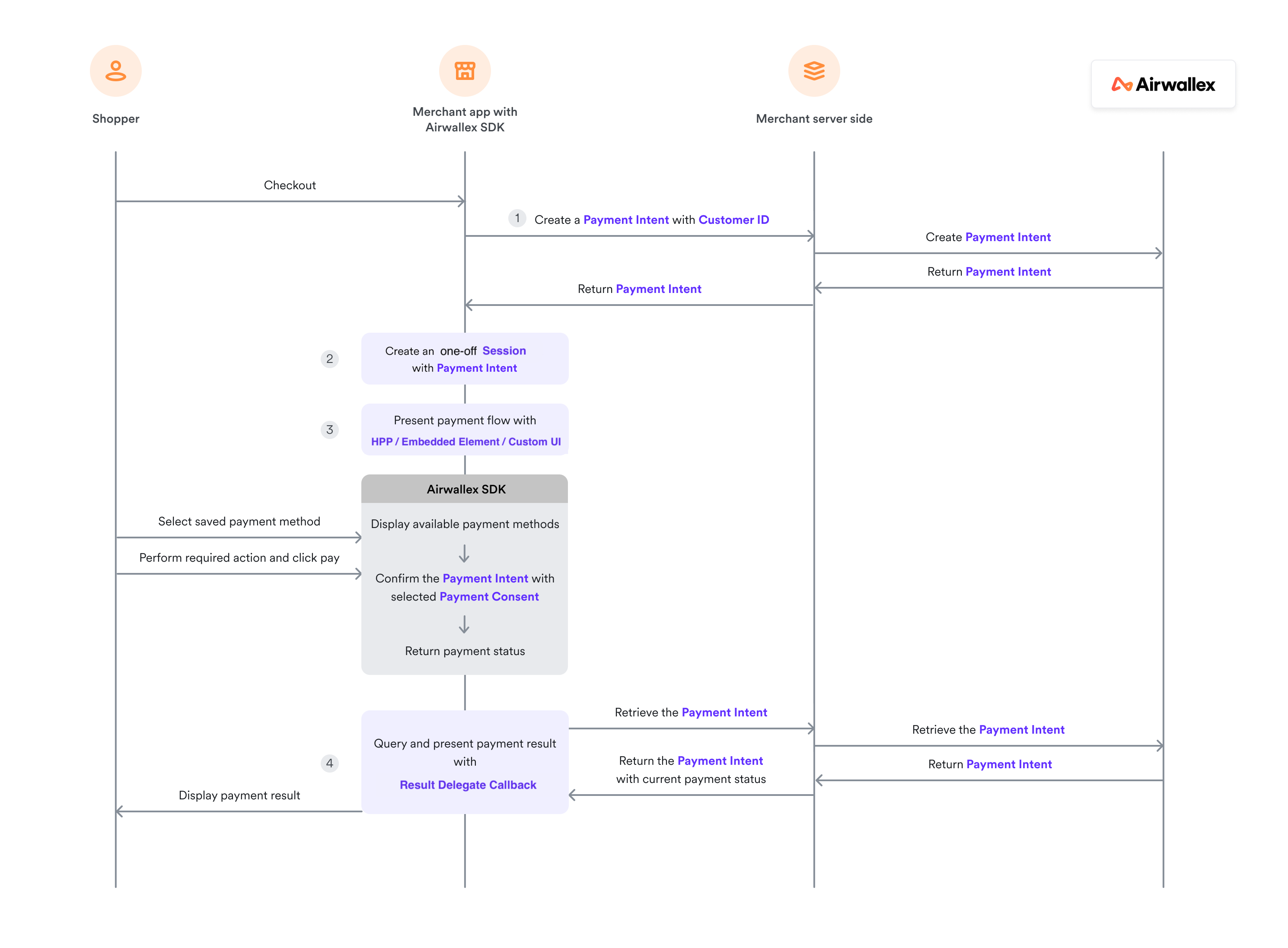
For subsequent payments where the customer initiates the transaction using a saved payment method.
Prepare payment session
Follow Prepare payment session to create a payment intent and payment session.
For subsequent one-off transactions, leave paymentConsentOptions as nil when creating the payment session.
1let session = Session(2 paymentIntent: paymentIntent,3 countryCode: "Your country code",4 // paymentConsentOptions is nil for one-off transactions5 returnURL: "myapp://payment/return"6)
Present payment flow
Present the payment flow using AWXUIContext. The SDK will automatically display saved cards for the customer:
1let configuration = AWXUIContext.Configuration()2configuration.layout = .tab // or .accordion3configuration.launchStyle = .push // or .present45AWXUIContext.launchPayment(6 from: "hosting view controller which also handles AWXPaymentResultDelegate",7 session: session,8 configuration: configuration9)
Handle payment result
After the PaymentIntent is confirmed by SDK, this delegate will be called by the SDK automatically:
1func paymentViewController(_ controller: UIViewController?, didCompleteWith status: AirwallexPaymentStatus, error: Error?) {2 // call back for status success / in progress / failure / cancel3}
A completed flow does NOT imply a successful transaction. You need to query the payment result afterwards through your server to know whether the order is paid or not. Inside AWXPaymentResultDelegate, ask your server to retrieve the PaymentIntent.
On your server, retrieve the Payment Intent API, get the payment result within it and pass it to client app.
-
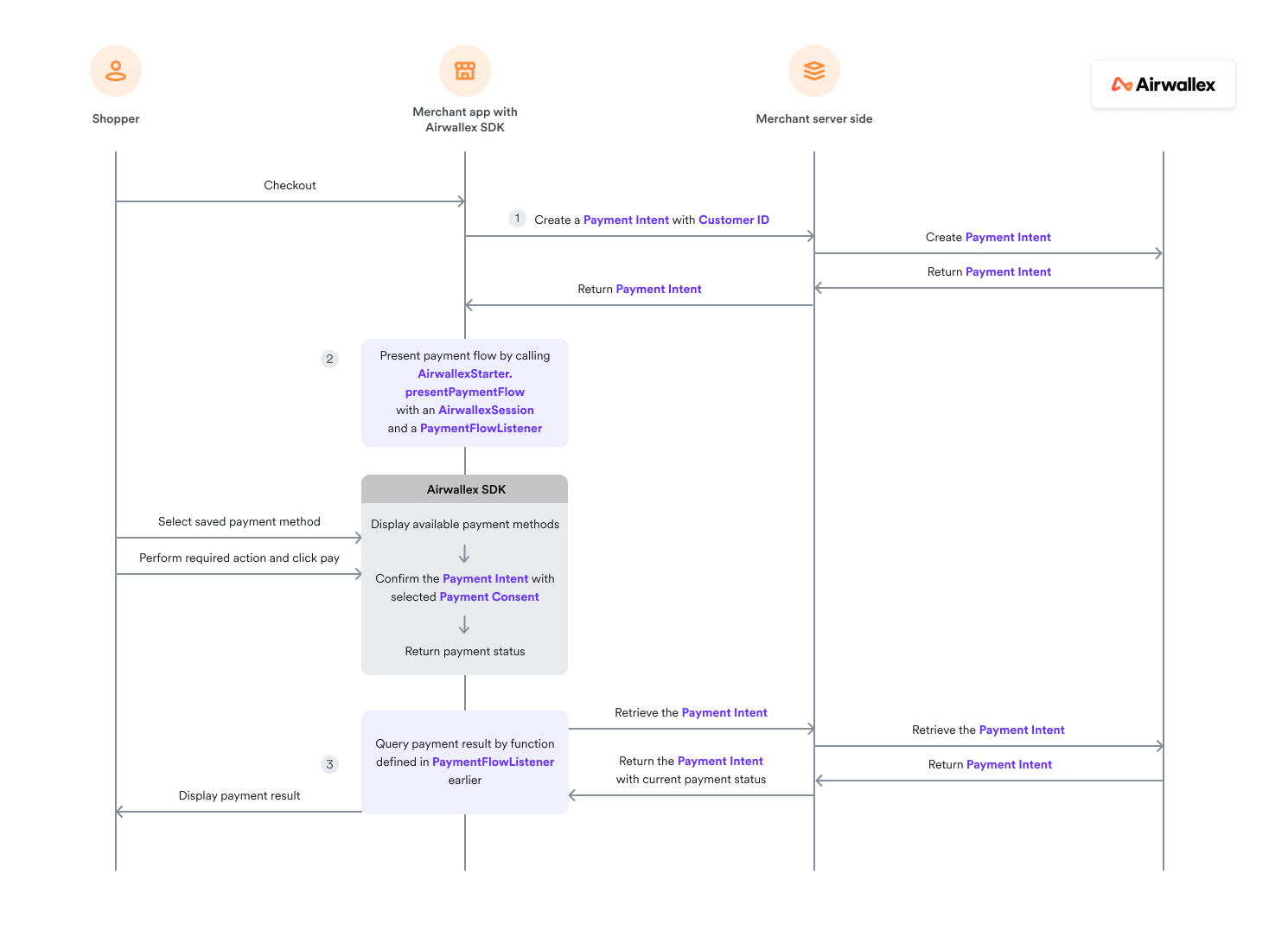
Create a Payment Intent with Customer ID to request payment for this order. You will get Payment Intent ID and
client_secretreturned. -
Call
AirwallexStarter.presentPaymentFlowwith anAirwallexSessionand aPaymentResultListenerto present payment flow to the shopper.Java12val session = AirwallexPaymentSession.Builder(3 paymentIntent = paymentIntent,4 countryCode = Settings.countryCode5 )6 .setReturnUrl(Settings.returnUrl)7 .setAutoCapture(Settings.autoCapture)8 .build()9 AirwallexStarter.presentPaymentFlow(this, session,10 object : Airwallex.PaymentResultListener {1112 override fun onCompleted(status: AirwallexPaymentStatus) {1314 }15 }16 )17 -
Retrieve the Payment Intent API in
onSuccessfunction above to get the payment result from thePaymentIntentafter the SDK has confirmed it with Airwallex API.
Subsequent merchant-initiated transaction (MIT)

For merchant-initiated transactions (subscriptions, auto-debit), the payment is processed entirely on the server side.
-
From your server, Create a Payment Intent API to request for a subsequent payment.
-
Confirm the Payment Intent API with reference to Payment Consent ID of the stored Payment Consent.
-
From your server, Create a Payment Intent API to request for a subsequent payment.
-
Confirm the Payment Intent API with reference to Payment Consent ID of the stored Payment Consent