

Coupons
A Coupon is a reusable discount template that can be used to define a promotional rule, such as "$10 off for 3 months."
Applying a coupon
Coupons can be applied to one-time invoices and subscriptions at two different levels. You may apply coupons to both levels simultaneously:
- Line item level: Applies a discount to a specific product of the invoice or subscription.
- Subtotal level: Applies a discount to the subtotal of the invoice or subscription.
Note:
- You can apply a maximum of one coupon to each line item and one coupon to the subtotal.
- A coupon can be applied more than once on the same purchase, e.g. a 10% off coupon is applied to a line item and the invoice subtotal.
Coupon redemption
You can apply coupons during the invoice and subscription creation flow to preview the discounted amount, but the discount is not finalised until the coupon is redeemed. The timing of coupon redemption depends on the object it's applied to:
- One-time invoice: When invoice status is
FINALIZED. - Subscriptions: When the subscription is created.
Coupon types
Two types of discount models are available:
- Percentage: A percentage reduction (e.g., 10% off).
- Fixed amount: A fixed amount reduction (e.g., $5.00 off).
- Note: Fixed-amount coupons are currency-specific and must match the currency of the item they are applied to.
Duration
For subscriptions, the duration determines how long a discount remains active, measured from the start of the first billing cycle.
Once: The discount applies to the first invoice only.Indefinitely: The discount applies to every invoice for the lifetime of the subscription.Custom: The discount applies to all invoices generated within the specified time frame (e.g. 3 months).- To ensure your customers receive the exact number of discounts intended, Airwallex adjusts the duration logic based on your billing model:
- In-arrears billing: Duration end date is inclusive
- In-advance billing: Duration end date is exclusive
- Result: A monthly subscription with a "3-month" coupon will consistently generate three discounted invoices, regardless of whether the subscription is billed in-advance or in-arrears.
- To ensure your customers receive the exact number of discounts intended, Airwallex adjusts the duration logic based on your billing model:
Note: For one-time invoices, the duration is always treated as Once, regardless of the coupon's configuration.
Redemption Deadline
The redemption deadline is an optional field that sets the final date a coupon can be redeemed.
After the redemption deadline:
- New redemption attempts: The coupon will not appear for selection in the dropdown list in the Web app.
- Existing redemptions: Redemptions made before the deadline are unaffected. For subscriptions, the discount will continue to apply for its duration, even if it extends beyond the deadline.
Discount calculations
Order of operations
Calculations are performed in the following sequence:
- Line-item discounts: Applied to the amount due for each individual product.
- Subtotal discounts: Applied to the remaining balance of the invoice after all line-item discounts are deducted.
- Taxes: Calculated on the post-discount amount.
Pro-rata distribution
When a discount is applied to the entire invoice or subscription (applied_to=INVOICE/SUBSCRIPTION), the system distributes the discount amount across all line items based on their relative value to the subtotal. This ensures that any line-item calculations (e.g. line-item tax) reconcile with the final invoice total.
This distributed value is reflected in the discount_amount field of each invoice line-item.
Create a coupon
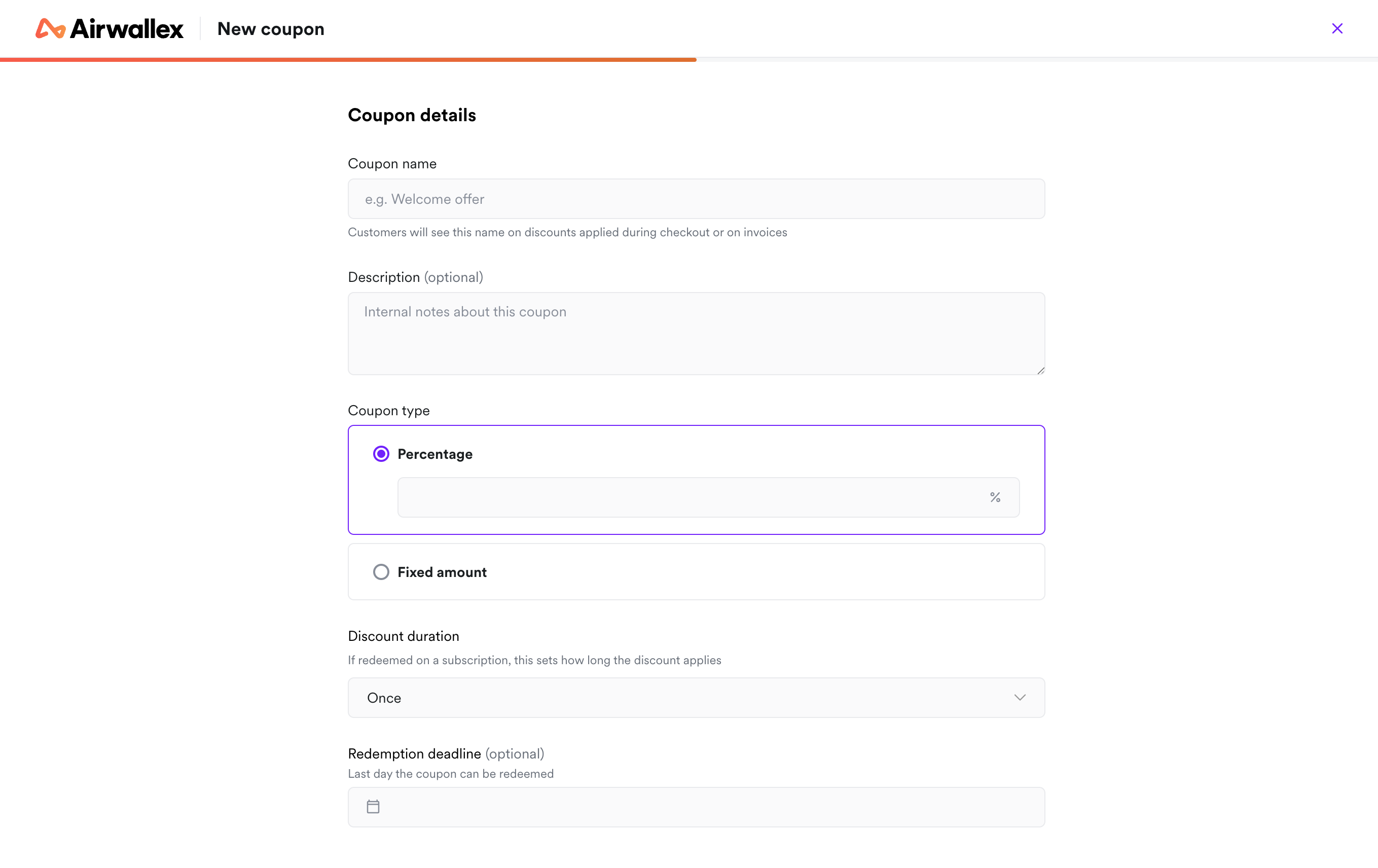
- Go to the product catalogue app and click on the Coupon tab
- Click + New coupon
- Fill in the coupon information
- Click Create coupon
Once created, the coupon appears in the coupon table and is immediately available for use on new one-time invoices and subscriptions.
Edit coupon
- Before first redemption: All coupon fields can be edited.
- After redemption: Only
nameanddescriptioncan be edited.
Steps:
- Open the coupon details page from the coupon table.
- Select Edit from the Manage dropdown.
- Update your coupon information and click Save changes.
Archive a coupon
Archiving a coupon deprecates it. This is the recommended method for stopping a promotion without affecting customers who are already using it.
- New invoice or subscription: Archived coupons are unavailable for selection
- Existing subscriptions: Any subscriptions currently using the archived coupon are unaffected. The discount will continue to apply until the end of its defined duration.
Steps:
- Open the coupon details page from the coupon table.
- Select Archive from the Manage dropdown.
Restore a coupon
Restoring a coupon reverses the archival, making the coupon active again. Once restored, the coupon can be applied to new one-time invoices or subscriptions.