

Online payment acceptance
Partners such as payment orchestrators can facilitate online payment acceptance for their connected accounts through Airwallex. To build such an integration, you will need the following OAuth scopes:
payment_acceptance:writepayment_acceptance:read
Key considerations
- Account setup: Before facilitating payments for any Airwallex merchant, ensure that their account is connected, they’ve completed all onboarding verification and KYB requirements, and their account is active with the relevant payment methods enabled. A merchant’s enabled payment methods can be verified either through the web app or through native API callsAPI.
- Integration type: You will need to choose which integration type you would like to use. For payment orchestrators, we generally recommend either Native API or Embedded Elements, depending upon whether you are PCI-DSS compliant or not. Regardless of the integration type you choose, please ensure you pass the following information to Airwallex during payment intent creation and confirmation to maximize success rates:
- Customer (email + customer name)
- Product information
- Shipping information
- Billing information
For more information, see Enhance fraud protection with comprehensive risk data. Details on how to integrate with Native API and Embedded Elements are provided below.
Native API integration
Ensure the following prerequisites are met before integrating with Airwallex Native API.
-
PCI-DSS certification: A Native API integration is permitted only for partners with PCI-DSS certification; a Report on Compliance (ROC) must be provided to enable this. You can email [email protected] with your Report on Compliance to get enabled for Native API access.
-
Partner identification: It’s essential that Airwallex is able to identify which partner is making native API calls on behalf of any merchant. Otherwise, the API calls may be blocked. To identify yourself to Airwallex, you will need to populate
referrer_data.typefield within your API request with an Airwallex-provided value. Additionally, you will need to do the following:- If you are using static IP addresses, get Airwallex to whitelist these IP addresses for native API access. Please note that these IP addresses must be specific to your company, and not shared across multiple companies, i.e., certain IP addresses provided by public cloud services.
- Alternatively, if you are using a unpredictable IP addresses, you will need to include an additional Airwallex-provided secure token in your API request.
- To perform IP whitelisting, obtain the secure token, or obtain the
referrer_data.typevalue, email [email protected].
The following example shows how to include
referrer_dataat the parent level in the request body when calling the Create a PaymentIntentAPI API:Shell1curl -X POST https://api.sandbox.airwallex.com/api/v1/pa/payment_intents/create \2 -H 'Content-Type: application/json' \3 -H 'Authorization: Bearer {{ACCESS_TOKEN}}' \4 -d '{5 "request_id": "95527c7f-88d9-44c2-ba01-15886323c102",6 "referrer_data": {7 "type": "Airwallex_provided_ID",8 "version": "1.0.0"9 },10 "amount": 100,11 "currency": "USD",12 "merchant_order_id": "d45fe031-ac74-4347-b2db-00cb3528adca"13 }'Ensure you include
referrer_datain the request body for all PaymentIntent API calls, including Create a PaymentIntentAPI and Confirm a PaymentIntentAPI. ReplaceAirwallex_provided_IDwith the value provided to you by Airwallex. -
3DS integration: You will also need to integrate with 3DS. Airwallex recommends integrating with Airwallex 3DS in order to provide the best possible experience. However, for partners who must use external 3DS, external 3DS integrations are also supported. Please note that each merchant who would like to use external 3DS with Airwallex must be individually approved to do so. Merchants may reach out to Airwallex directly to seek such approval.
-
Device fingerprinting: In addition to 3DS, we require that the device fingerprinting library be integrated into the checkout page. Please note that the absence of device fingerprinting will cause all payments to be rejected. In cases where the checkout page is owned by the merchant, the merchant must directly integrate the device fingerprinting library, and the orchestrator must collect and pass along the session ID and device ID from the merchant to Airwallex, per step 3 in the device fingerprinting guide.
-
API version control: As an orchestrator assisting multiple merchants, you may be working with merchants who have different API versions configured in their Airwallex web app. To ensure consistency across all merchants and avoid version-related discrepancies, use the
x-api-versionheader in your API calls to explicitly set the API version. This header overrides the individual merchant's web app settings, allowing you to standardize on a specific API version across your integration. For more information, see VersioningAPI.
Please include the following in your merchant-facing documentation: If the checkout page is owned by the merchant, they will need to integrate the device fingerprinting library directly into their checkout page and provide you with the session ID and device ID. If a merchant wishes to use external 3DS with Airwallex, each merchant must be individually approved by Airwallex; merchants should contact Airwallex directly to seek such approval.
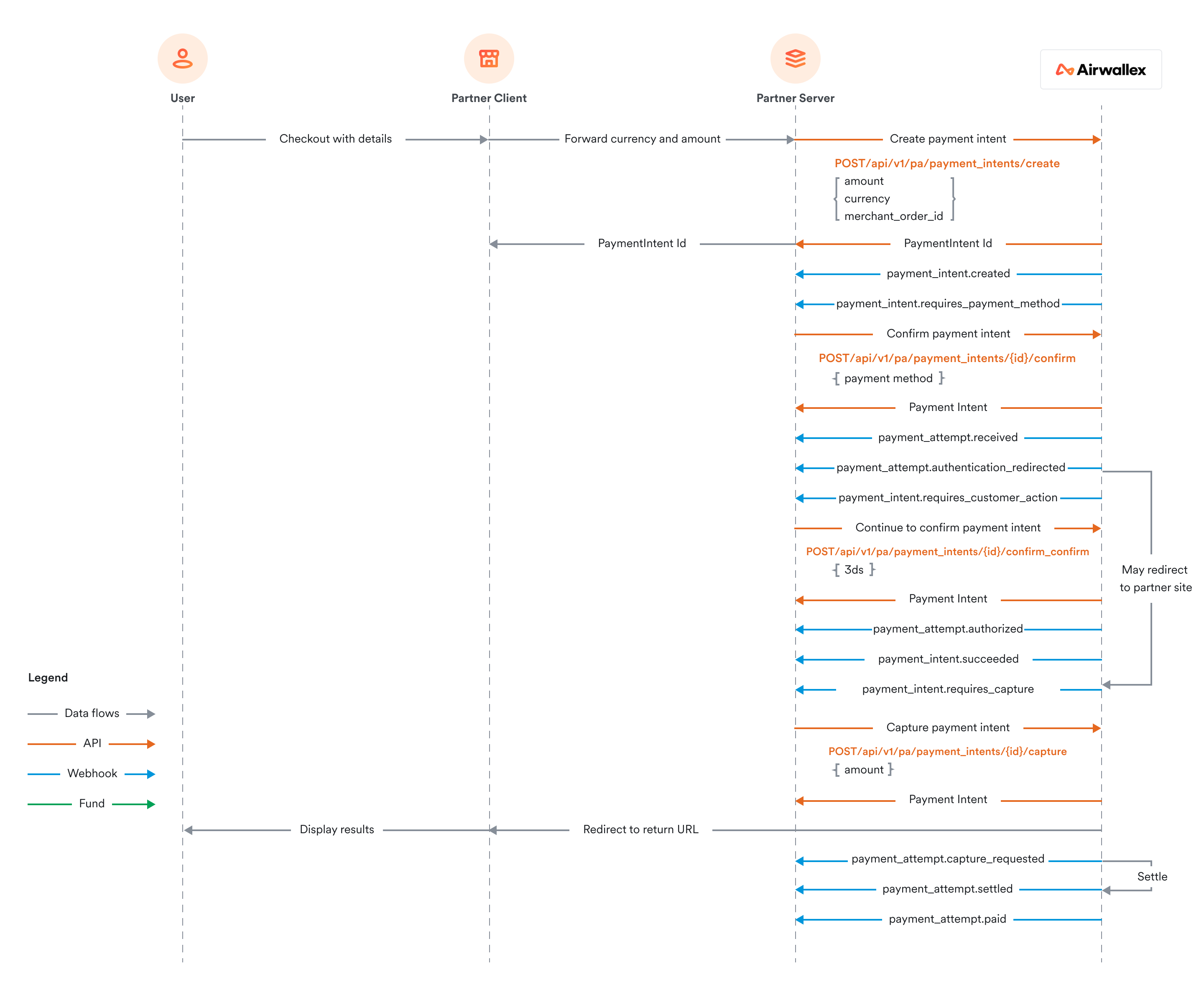
To complete your Native API payment acceptance integration, please refer to these docs and sequence diagram.
Embedded Elements integration
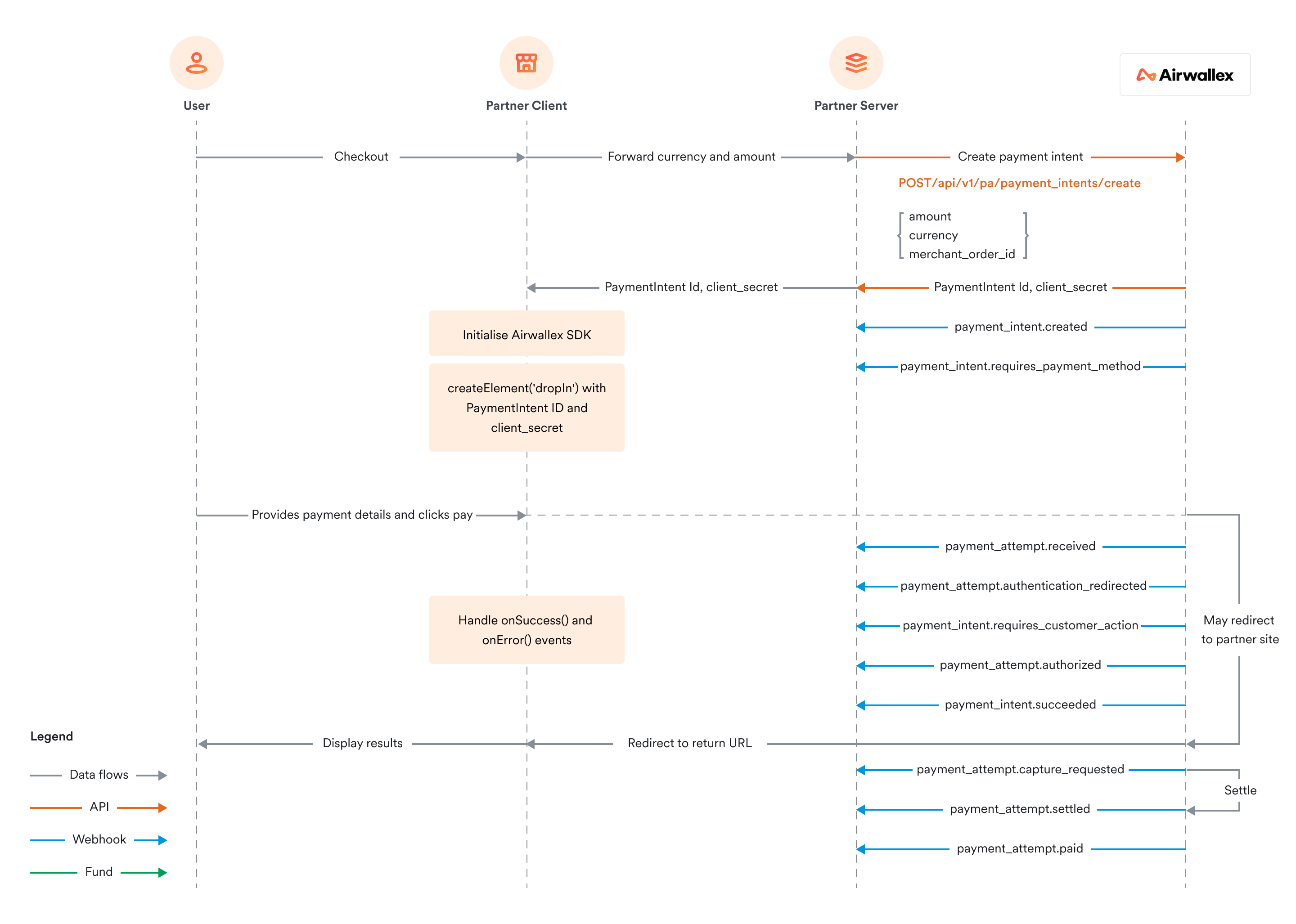
For partners not integrating with Native API, Airwallex provides pre-built "Elements” that can be embedded into your experience with less effort. The Drop-in Element provides a full-featured checkout module, which lets you accept multiple payment methods easily. For a more customized experience, you could choose instead to use more granular Embedded Elements, such as the Card Element, Split Card Element, Apple Pay Button Element, and Google Pay Button Element, rather than an all-in-one solution. For further details on how to integrate, please refer to these docs and sequence diagrams:
Drop-in Element integration
Card and Split Card Element integration
