

Octopus
Reach Hong Kong shoppers with Octopus
Octopus is a widely used payment method in Hong Kong with the Octopus card across NFC terminals and the Octopus app which enables shoppers to make online payments. By accepting Octopus, you gain access to shoppers in Hong Kong with more than 98% of the population in Hong Kong using Octopus. Octopus will be available for both online and offline payments.
Payment method properties
| Features | Octopus |
|---|---|
| Payment type | E-Wallet |
| Available for businesses registered in | HK, SG |
| Activation time for onboarding | 5-10 business days |
| Shopper regions (typically used by payers from) | HK |
| Processing currencies | HKD |
| Settlement currencies | HKD Or in your default settlement currency if your account does not support the above settlement currencies. |
| Settlement schedule | T+1 business day |
| Minimum transaction amount | 0.5 HKD |
| Maximum transaction amount | 30,000 HKD, subject to internet banking limit |
| Session timeout | 10 minutes |
| Recurring Payment | |
| Full & Partial Refunds | within 180 days , customers will be notified of their refund on the Octopus App the next day (more details about the refund process below) |
| Disputes (chargebacks) | |
| Placing a hold (delayed/manual capture) | |
| Descriptor (what the payer will see in their transaction history) | Your registered business name |
| Payments for Platforms support |
Choose the integration method that best suits your needs
Airwallex has built a range of client-side integration methods that allow you to manage your UI, minimize your implementation effort, and allow you to get to market quickly.
| Online payments via your own website/app | Online payments via ecommerce plugins | Payment links & Invoice Integrations |
|---|---|---|
| Hosted Payment Page Drop-in Element Mobile SDK Native API Subscription APIs | Shopify WooCommerce SHOPLINE Shoplazza Magento | Payment Links Xero Invoice |
Shopper experience
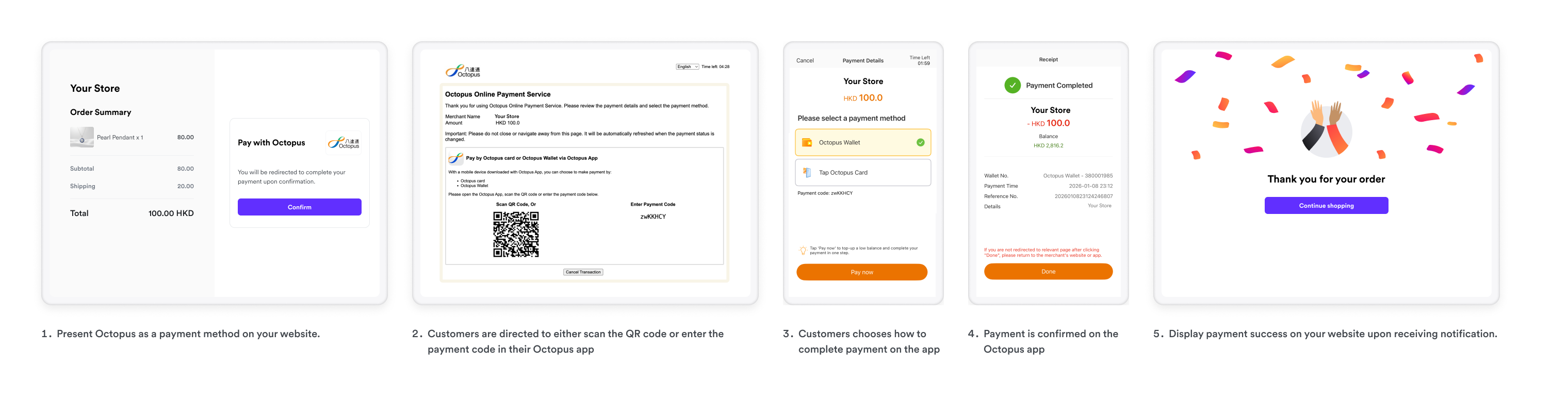
- On desktop, shoppers selecting Octopus will need to scan the QR code or input the payment code in their Octopus App
- On mobile, shoppers will be redirected to the Octopus App on their phone
- In the Octopus App, shoppers can choose to complete payment via
- Octopus Wallet or
- Physical Octopus card by tapping it on their phone
- Payment is confirmed instantly once completed.
Refund process
Octopus processes transactions to 1 decimal place. When you initiate a refund with 2 decimal places, the amount rounds up to the nearest 1 decimal place. For example, a refund of 5.13 HKD rounds up to 5.20 HKD. If you attempt a partial refund and the rounded amount equals or exceeds the original transaction amount, a full refund is issued instead.
After a successful refund, shoppers will receive a notification in the Octopus app that their refund will be ready for collection the following day.
To collect the refund in the Octopus app:
- Open the Octopus app
- Navigate to All Actions > Collect Octopus Dollar
- Collect the refund