

US tax reporting for platforms
Overview
As a platform, you can make Airwallex Transfers across the globe easily on behalf of your connected accounts to their suppliers, employees, contractors and/or bank accounts. This service may come with certain tax filing and reporting responsibilities.
Airwallex supports platforms in filing 1099-K or 1099-NEC tax forms on behalf of their connected accounts to the Internal Revenue Service when transfers are:
- made to recipients who are United States Persons or Entities; and
- with no withholding.
This guide outlines the steps required to use Airwallex's all-in-one solution that streamlines the process of generating, filing, and distributing 1099-K or 1099-NEC tax forms on behalf of your connected accounts. This saves you time and effort during tax season.
Note: It is recommended to consult a tax advisor to determine your tax filing and reporting requirements. If you require this capability, please contact your Account Manager to discuss your use case and eligibility.
What are the obligations for companies or business owners that need to file a 1099-K or 1099-NEC form?
Companies or business owners who have made transfers to eligible recipients above a specified cumulative threshold within a tax year are required to:
- report to the IRS by filing a 1099-K or 1099-NEC form;
- provide a copy of the 1099-K or 1099-NEC form to the recipient.
The reporting requirements and thresholds change from time to time. You are strongly advised to consult a tax advisor independently on the latest reporting requirements and your tax reporting obligations.
Note: We only support the filing of either 1099-K or 1099-NEC forms. Mixed filing is not currently supported. Please contact your Account Manager to discuss your use case and ensure your account is configured correctly with the correct form type.
When may I need to file a 1099-K form?
The requirement to file a 1099-K form may be triggered when payments are made for goods or services through a payment settlement entity like Airwallex. The reporting thresholds change from time to time. You are strongly advised to consult a tax advisor independently on the latest reporting requirements.
For the 2025 tax year, third party settlement organisations are not required to file a 1099-K form unless the gross amount of reportable payment transactions to a recipient exceeds US$20,000 and the number of transactions exceeds 200. These are federal thresholds and state requirements may differ.
When may I need to file a 1099-NEC form?
The requirement to file a 1099-NEC form may be triggered when payments are made for services performed by someone who is not an employee of the payer.
For the 2026 tax year, it is not required to file a 1099-NEC form unless payments of at least US$2,000 to a nonemployee recipient are made. This is a federal threshold and state requirements may differ.
Deadlines
The deadline to file 1099-K or 1099-NEC forms is usually 31 January in the following year. Please refer to the IRS website for official dates to avoid late penalties from the IRS.
State filing considerations
Airwallex supports 1099-K or 1099-NEC filing under the Combined Federal/State Filing Program (CF/SF); however, some states may not participate in this program and require direct reporting. It is recommended to consult a tax advisor to determine state filing requirements.
Before you begin
- Obtain your access token by authenticating to Airwallex using your unique Client ID and API key. You will need the access token to make API calls.
- Integrate with TransfersAPI and/or BeneficiariesAPI API endpoints including the
external_identifierfield.
Step 1: Collect recipient tax information
Before creating transfers to recipients, it is recommended to collect tax information to ensure all reportable transactions are recorded accurately for 1099-K or 1099-NEC filing.

Our Embedded Tax Form component is a pre-built UI element for you to integrate into your own flow for recipient tax information collection. You will also be able to customise the colour themes and font to your requirements to ensure a consistent experience with your product. To view and interact with the component, go to the demo site.
The identity field serves as the linkage between tax information and both beneficiaries and transfers, and therefore should be the same as the external_identifier field when calling our Beneficiaries and Transfers API. Generally it can be a unique identifier for each recipient as recorded on your system (for example, customer ID, username, account ID etc.).
Note that you will need transfer recipients to complete the tax information submission process before being able to generate a 1099-K or 1099-NEC form for filing. You will be able to view the W-9/W-8 form completion status on the Airwallex web app. Tax records with incomplete W-9/W-8 forms will have a 'Record incomplete' status.
Step 2: Create or update beneficiaries
While transfers can be created without beneficiaries, it is strongly recommended to create a beneficiary with the external_identifier included beforehand, which will establish the linkage to the tax information collected via the Embedded Tax Form component. All subsequent transfers using this beneficiary will be automatically associated with the recipient.
Call Create a new beneficiaryAPI to save and manage beneficiaries that you can use for creating payouts using beneficiary_id, as well as linking to the tax information collected.
Example request
1curl -X POST https://api.sandbox.airwallex.com/api/v1/beneficiaries/create \2 -H 'Content-Type: application/json' \3 -H 'Authorization: Bearer {{ACCESS_TOKEN}}' \4 -d '{5 "beneficiary": {6 "additional_info": {7 "external_identifier": "089cc0ec-0a6f-4150-90351232"8 },9 "address": {10 "city": "Seattle",11 "country_code": "US",12 "postcode": "98104",13 "state": "Washington",14 "street_address": "412 5th Avenue"15 },16 "bank_details": {17 "account_currency": "USD",18 "account_name": "John Walker",19 "account_number": "50001121",20 "account_routing_type1": "aba",21 "account_routing_value1": "021000021",22 "bank_country_code": "US",23 "local_clearing_system": "ACH"24 },25 "company_name": "Complete Concrete Pty Ltd",26 "entity_type": "COMPANY"27 },28 "nickname": "Complete Concrete Pty Ltd",29 "transfer_methods": [30 "LOCAL"31 ]32 }'
For existing beneficiaries, you can call Update existing beneficiaryAPI to add/edit the external_identifier field. The same schema validation and response body as in Create a new beneficiary will apply.
Example request
1curl -X POST https://api.sandbox.airwallex.com/api/v1/beneficiaries/8365ea88-2946-4877-abe1-e02a1015288d/update \2 -H 'Content-Type: application/json' \3 -H 'Authorization: Bearer {{ACCESS_TOKEN}}' \4 -d '{5 "beneficiary": {6 "additional_info": {7 "external_identifier": "089cc0ec-0a6f-4150-90351232"8 },9 "address": {10 "city": "Seattle",11 "country_code": "US",12 "postcode": "98104",13 "state": "Washington",14 "street_address": "412 5th Avenue"15 },16 "bank_details": {17 "account_currency": "USD",18 "account_name": "John Walker",19 "account_number": "50001121",20 "account_routing_type1": "aba",21 "account_routing_value1": "021000021",22 "bank_country_code": "US",23 "local_clearing_system": "ACH"24 },25 "company_name": "Complete Concrete Pty Ltd",26 "entity_type": "COMPANY"27 },28 "nickname": "Complete Concrete Pty Ltd",29 "transfer_methods": [30 "LOCAL"31 ]32 }'
Note that only future transfers will be automatically associated with the corresponding recipient when external_identifier is added/updated for an existing beneficiary. In other words, historical transfers will remain to be either unlinked or linked to the previous recipient. Additionally, in the event that you delete the beneficiary, historical transfers will remain to be linked to the recipient.
As part of initial setup, Airwallex will be able to support one-off backfilling/update of historical transfers to support your first year of tax filing. Please contact your Account Manager for more details.
Step 3: Create transfers
Call Create a new transferAPI with the required beneficiary and transaction information (currency, amount, date, reference) to create a transfer.
Beneficiary information can be specified within the request in two ways:
-
Beneficiary ID
As mentioned above, it is strongly recommended to create a beneficiary (including
external_identifier) to simplify the transfer creation and tax filing process. You can call Create a new beneficiary, and a uniquebeneficiary_idwill be returned. This can be used in place of the beneficiary object to create the transfer subsequently. -
Directly within the request
If you prefer to manage all beneficiary information outside of Airwallex, you can provide beneficiary information (including
external_identifier) directly under the beneficiary object each time when calling Create a new transferAPI. Transfers created will be automatically associated with the corresponding recipient. Note that once a transfer is created, you can no longer add/edit theexternal_identifiervalue.
Example request
1curl -X POST https://api.sandbox.airwallex.com/api/v1/transfers/create \2 -H 'Content-Type: application/json' \3 -H 'Authorization: Bearer {{ACCESS_TOKEN}}' \4 -d '{5 "beneficiary": {6 "additional_info": {7 "external_identifier": "089cc0ec-0a6f-4150-90351232"8 },9 "address": {10 "city": "Seattle",11 "country_code": "US",12 "postcode": "98104",13 "state": "Washington",14 "street_address": "412 5th Avenue"15 },16 "bank_details": {17 "account_currency": "USD",18 "account_name": "John Walker",19 "account_number": "50001121",20 "account_routing_type1": "aba",21 "account_routing_value1": "021000021",22 "bank_country_code": "US",23 "local_clearing_system": "ACH"24 },25 "entity_type": "COMPANY"26 },27 "transfer_amount": "50",28 "transfer_currency": "USD",29 "transfer_method": "LOCAL",30 "quote_id": "string",31 "reason": "travel",32 "reference": "PMT1936398",33 "remarks": "",34 "request_id": "c02d2e3c-dedd-410b-a1cc-9b7e58444fa2",35 "source_currency": "CNY"36 }'
Step 4: Manage tax records to be ready for tax filing
Airwallex provides a Tax Filing module on the Connected Account Console to help you manage and file tax records on behalf of your connected accounts. To access it, log in to your Airwallex account and navigate to the Connected Account Console, followed by Tax Filing.
In the Tax Filing interface, you can:
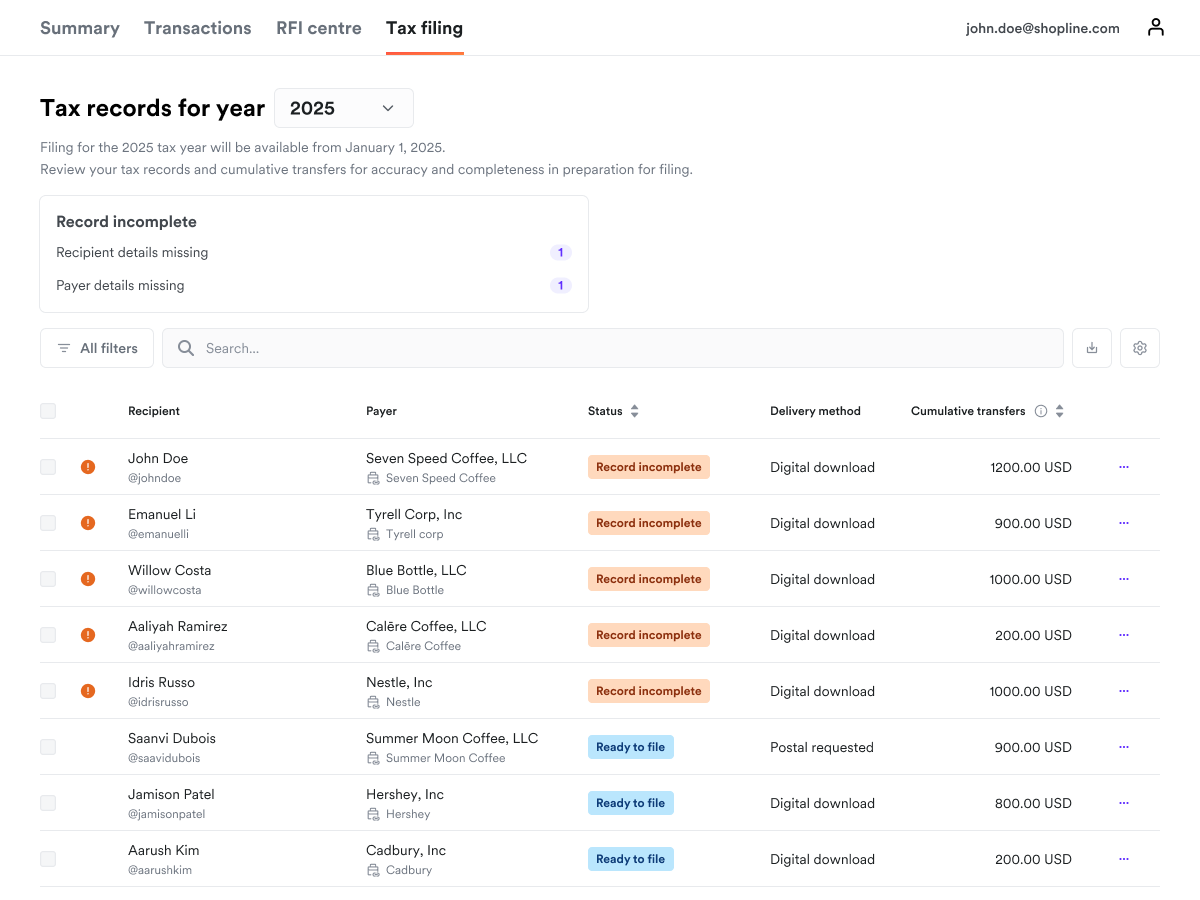
- view a summary of tax records including recipient and payer information, record and filing status, cumulative transfers in the tax year, and the recipients' chosen delivery method.
- download a list of tax records, W-9/W-8 forms, transfers list, and 1099 forms.
- file 1099 forms electronically to the IRS on behalf of your connected accounts.
View summary of tax records
The summary table will display details of tax records when either tax information is submitted on the Embedded Tax Form component; or beneficiaries/transfers with external_identifier are created:
- Recipient: Details about the tax form recipient, including their name, and
external_identifier. - Payer: Details about the payer, typically the connected account.
- Status: Tax record and filing statuses. See tax record statuses for details.
- Delivery method: Details the recipients' chosen delivery method: digital download or postal delivery.
- Cumulative transfers: Total year-to-date transfers made to this recipient (in USD). Multiple beneficiaries can be associated to the same
external_identifier, and this field will be the summation of all transfers to all beneficiaries.
Export and download tax record information
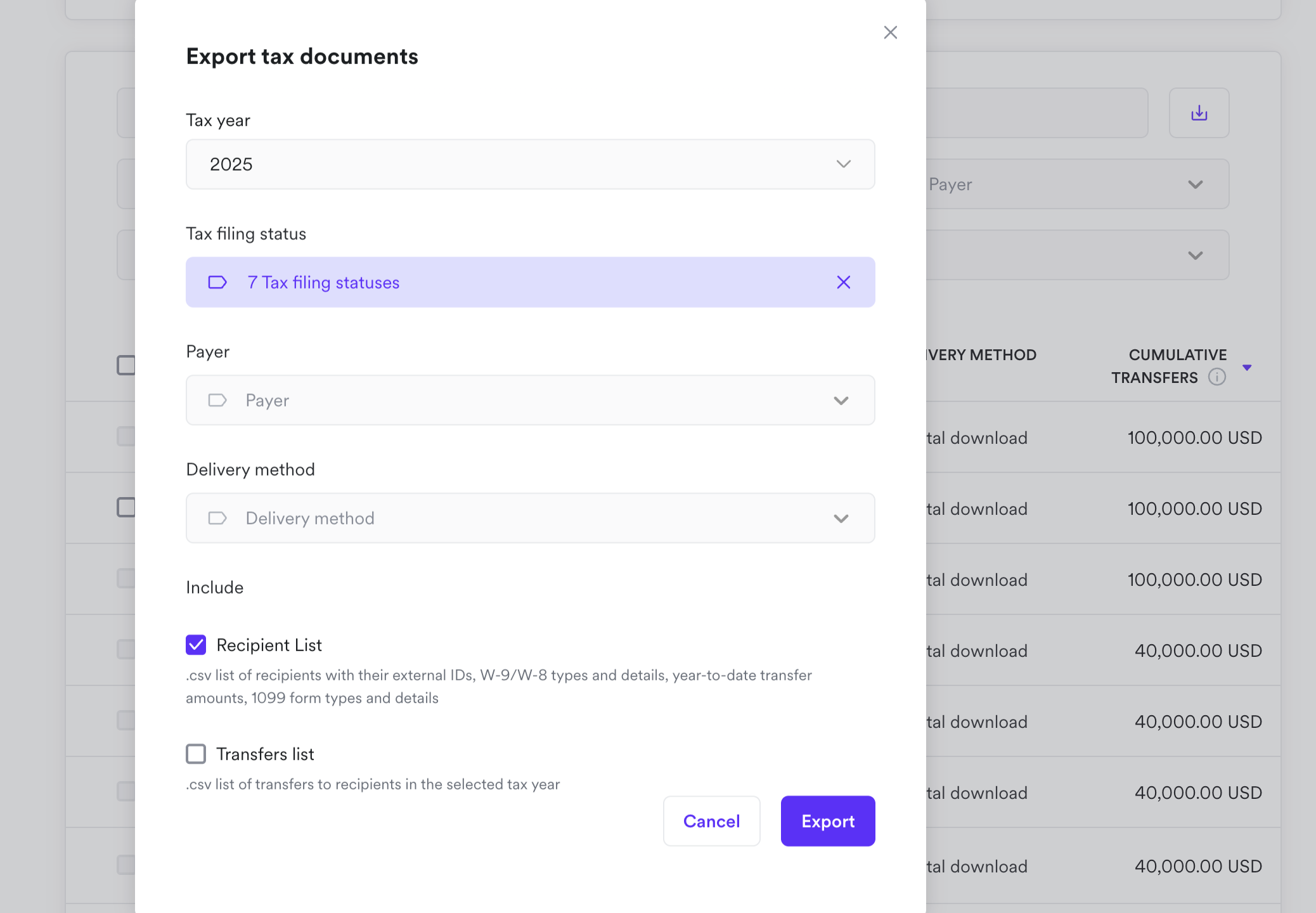
To retrieve tax record information, you can filter based on various parameters and download detailed information:
- Recipient list: recipients with their external IDs, W-9/W-8 types and details, year-to-date transfer amounts, 1099 form types and details in .csv format
- Transfers list: transfers made to recipients in the selected tax year in .csv format
Step 5: Complete tax filing
You will be able to start filing tax records after the end of the tax year, typically from 1 January of the following year.
Towards the end of the current tax year, you are recommended to prepare for filing by reviewing the end-recipients' W-9/W-8 forms and transfers on behalf of your connected accounts.
1099-K filing requirements
1099-K filing is required when:
- the recipient has filed a verified W-9 form and is therefore a United States person/entity i.e. the SSN/EIN and name provided has been matched against records in the IRS database.
- Since TIN matching is not an IRS requirement, you may request to turn this verification service off by contacting your Account Manager.
- the recipient is cumulatively paid in excess of US$20,000 and the number of payment transactions to the recipient exceeds 200 in the tax year.
Note: These are federal thresholds and state requirements may differ.
1099-NEC filing requirements
1099-NEC filing is required when:
- the recipient has filed a verified W-9 form and is therefore a United States person/entity i.e. the SSN/EIN and name provided has been matched against records in the IRS database.
- Since TIN matching is not an IRS requirement, you may request to turn this verification service off by contacting your Account Manager.
- the recipient is cumulatively paid at least US$2,000 in the tax year.
Note: These are federal thresholds and state requirements may differ.
Tax record statuses
| STATUS | DESCRIPTION | NEXT STEP |
|---|---|---|
| Record incomplete | Recipient has not submitted a W-9/W-8 form, a W-8 form has expired, or a W-9 form failed verification | Ask the recipient to submit/resubmit tax information. |
| Filing not applicable | The recipient is not a United States Person (i.e., they submitted a W-8 form) and therefore are not subject to tax reporting requirements. | No action needed. |
| Ready to file | This tax record is complete and ready to file when the tax filing window opens. | Wait until filing is open, usually starting from January 1 of the following year. |
| Filing required | This tax record can be filed, and filing is required as it has met the federal filing thresholds. | File required 1099 forms before the IRS deadline. |
| Filing optional | This tax record can be filed, and filing is optional as it has not met the federal filing thresholds. | You may choose to file optional 1099 forms before the IRS deadline. This may be because it meets state thresholds even if it does not meet the federal threshold. Check with your tax advisor on state filing requirements. |
| Filed | 1099 form submitted to the IRS electronically. | Wait for the IRS result on whether filing is accepted or rejected. |
| Accepted | 1099 form accepted by the IRS. | Inform the recipient that their 1099 form has been submitted, and furnish them with a copy. If they have requested for postal delivery, you will have to mail them a copy. For electronic delivery, Airwallex facilitates electronic delivery via the Embedded Tax Form component. |
| Rejected | 1099 form rejected by the IRS. | Contact your Account Manager for next steps. |
| Not filed | 1099 form no longer available for filing. | No action needed. |
Delivery method
Check which delivery method a recipient has opted for. Recipients typically opt via electronic delivery by selecting the option when completing their W-9 form.
Airwallex facilitates electronic delivery of filed 1099 forms via the Embedded Tax Form component.
For recipients that have opted for Postal delivery, you will be responsible for mailing the 1099 forms to these recipients.
1099 filing with the IRS
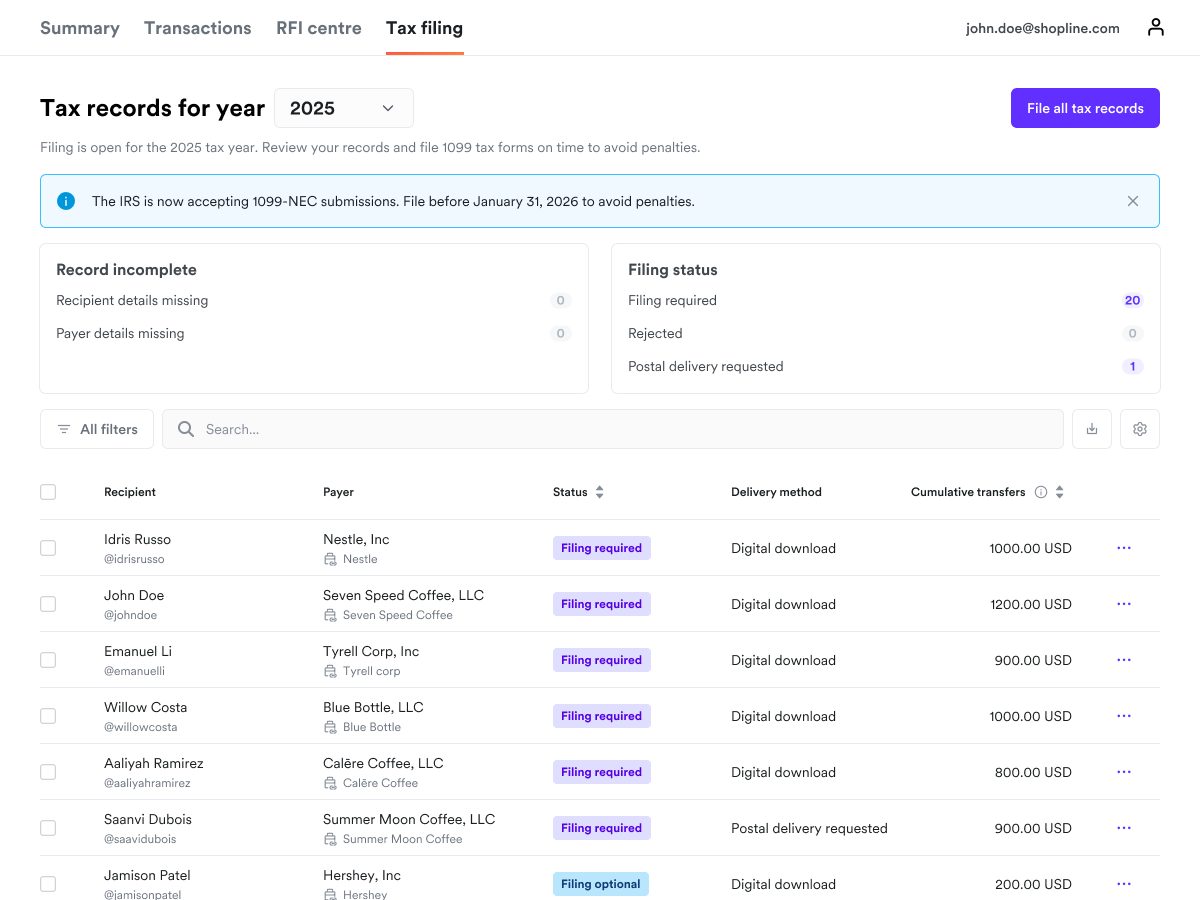
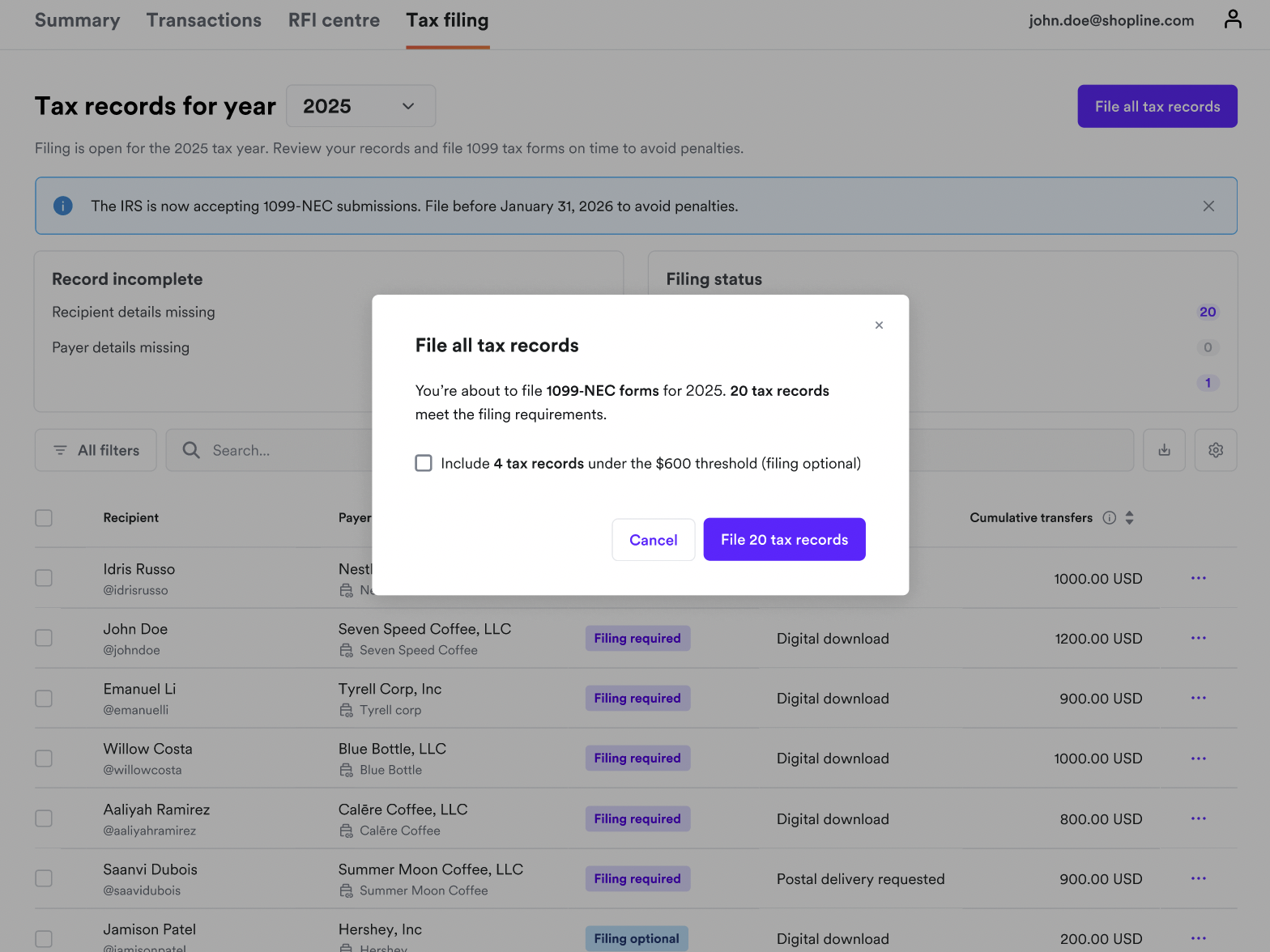
Once 1099 forms are open for filing, you will be able to file electronically to the IRS via the Airwallex Web app for all eligible recipients:
- file each tax record separately
- file in bulk by selecting multiple tax records
- file all eligible tax records at once
After filing
Once filed, you will be able to download 1099 forms for recipients in .pdf format for retention or postal delivery purposes.

Late filing considerations
While it is strongly recommended to file 1099 forms before the IRS deadline (usually 31 January in the following year), Airwallex has some limited support for late filing:
- for tax records where the recipient has completed their W-9 tax form: you will be able to file for the past 3 tax years
- for tax records where the recipient has a missing W-9 tax form: they must provide a complete W-9 form by Apr 15 of the following year to be eligible for filing