

Ledger Account model
This model is ideal for marketplaces outside Europe seeking a lightweight solution for rapid launch or requiring extensive seller payout coverage. Refer to the guide below for a sample integration.
Step 1: Create a ledger connected account for sellers
Use Create a Connected AccountAPI to create a seller ledger. The data requirements will vary depending on the seller type as described in the sections below.
| Field | Registered sellers | Non-registered sellers |
|---|---|---|
identifier | Provide Seller ID on the platform | Provide Seller ID on the platform |
account_details.business_details.industry_category_code | Industry category code for your business | Industry category code for your business |
account_details.business_details.url | URL(s) for your store | URL(s) for your store |
primary_contact.email | Primary contact details for your business | Primary contact details for your business |
customer_agreements.terms_and_conditions.service_agreement_type | Set this to RECIPIENT | Set this to RECIPIENT |
account_details.business_details.business_structure | Set this to COMPANY or SOLE_PROPRIETOR | Set this to NON_REGISTERED_SOLE_PROPRIETOR |
account_details.business_details.business_name | Legal entity name | Optional |
account_details.business_details.business_name_trading | Optional | Optional |
account_details.business_details.registration_address.country_code | Country where the business is registered | Optional |
account_details.business_details.business_identifiers.* | Local business registration number | Optional |
account_details.business_address.country_code | Optional | Country where seller's business operates |
account_details.business_person_details.first_name | Optional | Seller's first name |
account_details.business_person_details.last_name | Optional | Seller's last name |
account_details.business_person_details.date_of_birth | Optional | Seller's date of birth |
account_details.business_person_details.roles | Optional | Business person role |
account_details.business_person_details.identifications.primary.* | Optional | Details of the business person for identity verification, such as a passport, driver's license, or other government-issued ID card |
Collecting customer agreements to terms and conditions
The platform needs to collect the acceptance of Global Recipient agreement from sellers for the use of ledger.
A RECIPIENT service agreement clarifies that there is no service relationship between Airwallex and the recipient, and that the recipient's relationship is with the platform.
- If terms & conditions are agreed during account creation, use Create a Connected AccountAPI.
- If terms & conditions are agreed upon after account creation, use Agree to Terms and ConditionsAPI.
Refer to this resource for display T&C links: Collect T&C acceptance guide.
Example request
1curl -X POST https://api.sandbox.airwallex.com/api/v1/accounts/create \2 -H 'Content-Type: application/json' \3 -H 'Authorization: Bearer {{ACCESS_TOKEN}}' \4 -d '{5 "identifier": "TEST_LA_1",6 "account_details": {7 "business_person_details": [8 {9 "date_of_birth": "2020-01-01",10 "first_name": "John",11 "last_name": "Smith",12 "roles": [13 "CONTROLLING_PERSON"14 ],15 "identifications": {16 "primary": {17 "issuing_country_code": "SG",18 "identification_type": "PASSPORT",19 "passport": {20 "number": "123"21 }22 }23 }24 }25 ],26 "business_details": {27 "industry_category_code": "ICCV3_0002XX",28 "business_address": {29 "country_code": "DE"30 },31 "business_structure": "NON_REGISTERED_SOLE_PROPRIETOR",32 "url": "https://www.ebay.com/str/doverjewelry?_trksid=p4429486.m3561.l161211"33 }34 },35 "customer_agreements": {36 "terms_and_conditions": {37 "agreed_at": "2024-08-17T16:08:02+1100",38 "service_agreement_type": "RECIPIENT",39 "device_data": {40 "ip_address": "127.0.0.1",41 "user_agent": "Chrome/51.0.2704.103 Safari/537.36"42 }43 },44 "agreed_to_terms_and_conditions": true,45 "agreed_to_data_usage": true,46 "opt_in_for_marketing": true47 },48 "primary_contact": {49 "email": "[email protected]"50 }51 }'
Step 2: Payout to sellers
As a marketplace platform, you can choose from the two options below to pay sellers.
Option A: Payout to seller's external bank account directly
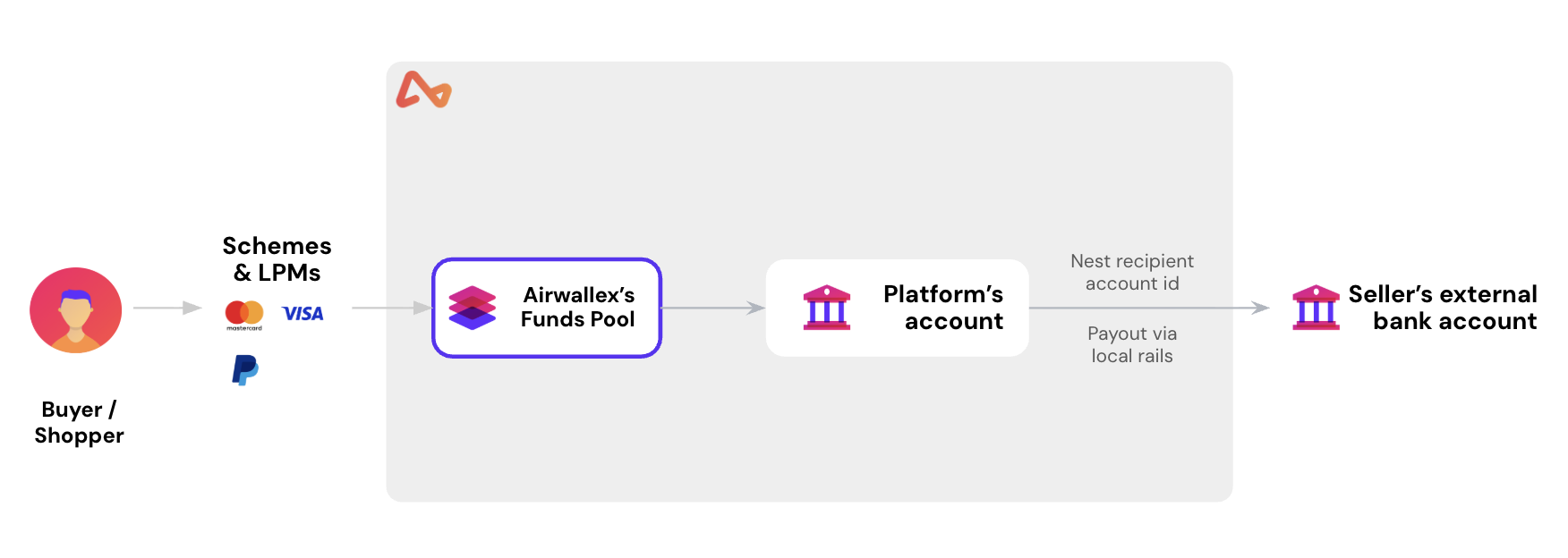
In this integration flow, the platform will calculate the amount to be paid to sellers on their own and payout to the seller's external bank account directly using Airwallex Transfer APIs. Platform doesn't need to initiate fund splits and no funds will be held in the seller's ledger.
Apart from the standard information required to Create a new transferAPI, you need to specify the seller account id as the additional parameter in your request:
beneficiary.additional_info.recipient_account_id: Specify the account id of seller ledger (recipient) in Beneficiary object.
When a refund happens, funds will go back to the platform's account.
Only same-name payout ("beneficiary name" matches "recipient account name") will be accepted.
Example request
1curl -X POST https://api.sandbox.airwallex.com/api/v1/transfers/create \2 -H 'Content-Type: application/json' \3 -H 'Authorization: Bearer {{ACCESS_TOKEN}}' \4 -d '{5 "beneficiary": {6 "additional_info": {7 "external_identifier": "",8 "personal_email": "[email protected]",9 "recipient_account_id": "acct_O9JasXyBPNagXgd5L8rhDA"10 },11 "address": {12 "city": "Seattle",13 "country_code": "US",14 "postcode": "98104",15 "state": "Washington",16 "street_address": "412 5th Avenue"17 },18 "bank_details": {19 "account_currency": "USD",20 "account_name": "John Walker",21 "account_number": "50001121",22 "account_routing_type1": "aba",23 "iban": "123123123",24 "account_routing_value1": "021000021",25 "bank_country_code": "US",26 "bank_name": "JP Morgan Chase Bank",27 "local_clearing_system": "ACH"28 },29 "company_name": "Complete Concrete Pty Ltd",30 "entity_type": "COMPANY",31 "type": "BANK_ACCOUNT"32 },33 "metadata": {34 "order_id": "0123456789"35 },36 "reason": "travel",37 "reference": "INV-123456",38 "remarks": "",39 "request_id": "ce6e34d6-1fbc-4d6a-8b0c-0f1a4a552404",40 "source_currency": "CNY",41 "transfer_amount": "1000.00",42 "transfer_currency": "USD",43 "transfer_date": "2026-01-07",44 "transfer_method": "LOCAL"45 }'
Option B: Use ledger account to hold funds and payout from ledger
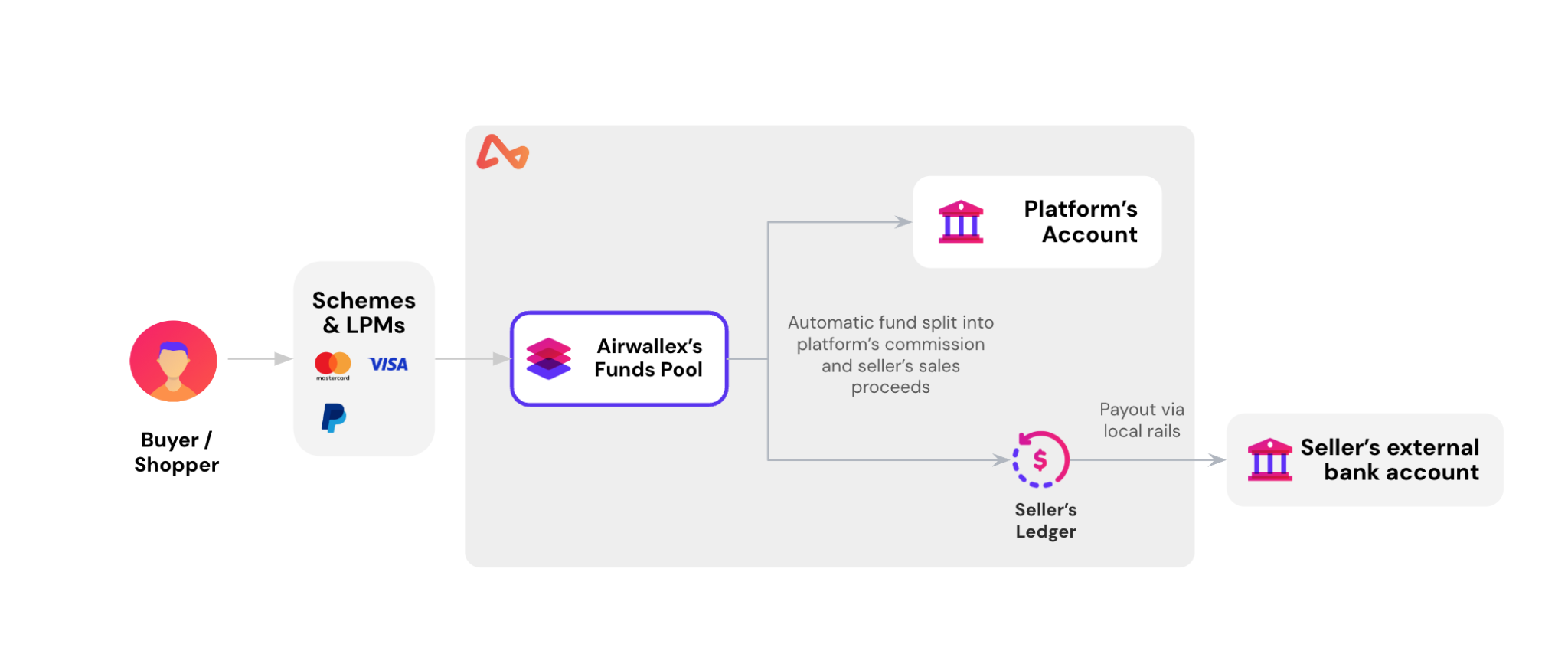
In this integration flow, the platform will first split and deposit funds to the seller's wallet, then trigger payouts to the seller's external bank account. This allows the funds to be stored in the seller's wallet.
Deposit funds to seller's ledger
Depending on your choice of acquiring entity, follow the corresponding steps to split and deposit funds to the seller's wallet.
- Use Airwallex as the payment service provider (PSP) to acquire funds: See details in Process payments and manage funds.
- Use other payment service providers (PSPs) as the acquirer: See details in Get started with PSP-agnostic solutions.
Payout from seller's ledger to seller's external bank account
Trigger payouts to seller's external bank accounts using Airwallex's Transfer APIs. Airwallex's network of local clearing systems supports payouts to bank accounts in multiple countries and currencies, with country-specific delivery time taken into consideration to ensure the payouts arrive in time.
When a refund happens, funds will go back to the seller's ledger account. Use Scale ChargesAPI if you need to debit the ledger account's wallet and credit the platform account's wallet.
Only same-name payout ("beneficiary name" matches "recipient account name") will be accepted.
Example request
1curl -X POST https://api.sandbox.airwallex.com/api/v1/transfers/create \2 -H 'Content-Type: application/json' \3 -H 'Authorization: Bearer {{ACCESS_TOKEN}}' \4 -H 'x-on-behalf-of: {{LEDGER_ACCOUNT_ID}}' \5 -d '{6 "beneficiary": {7 "additional_info": {8 "personal_email": "[email protected]"9 },10 "address": {11 "city": "Brandonbury",12 "country_code": "DE",13 "postcode": "10115",14 "state": "",15 "street_address": "8860 Graciela Heights"16 },17 "bank_details": {18 "account_currency": "EUR",19 "account_name": "Deondre Kuvalis",20 "account_routing_type1": "bsb",21 "account_routing_value1": "[email protected]",22 "bank_country_code": "DE",23 "iban": "DE04370502990081288281"24 },25 "company_name": "Complete Concrete Pty Ltd",26 "entity_type": "COMPANY"27 },28 "metadata": {29 "order_id": "0123456789"30 },31 "transfer_amount": "1.00",32 "transfer_currency": "EUR",33 "transfer_method": "SWIFT",34 "reason": "travel",35 "reference": "test-ccs-in-tm",36 "remarks": "",37 "request_id": "a9fa3ea9-73de-47c5-bd04-74a13131d6922",38 "source_currency": "EUR",39 "payer": {40 "additional_info": {41 "business_registration_number": "SG-647-37-3333"42 },43 "address": {44 "city": "Melbourne",45 "country_code": "AU",46 "postcode": "3000",47 "state": "VIC",48 "street_address": "15 William Street"49 },50 "company_name": "happiness store",51 "entity_type": "COMPANY"52 }53 }'